



When running molecular simulations, a common challenge is the need to experiment interactively with the molecular system — adding or deleting atoms without resetting everything. Whether you’re exploring a reaction mechanism or preparing a structure for refinement, being able to modify the molecular model on the fly without breaking the flow of simulation is a major convenience.
This is especially true for users working with the Universal Force Field (UFF) in SAMSON, where modifications to a structure might require re-typization, bond recomputation, and parameter updates. Fortunately, SAMSON’s UFF implementation supports precisely this kind of interactive modeling.
Why Interactivity Matters
Many molecular modeling tools require you to stop the simulation, rebuild the system from scratch, and then rerun the simulation after editing atoms. This breaks the rhythm of experimentation, especially in educational or early-stage research use cases. With SAMSON, such interruptions are avoided by providing real-time interactivity directly within UFF simulations.
Deleting Atoms During Simulation
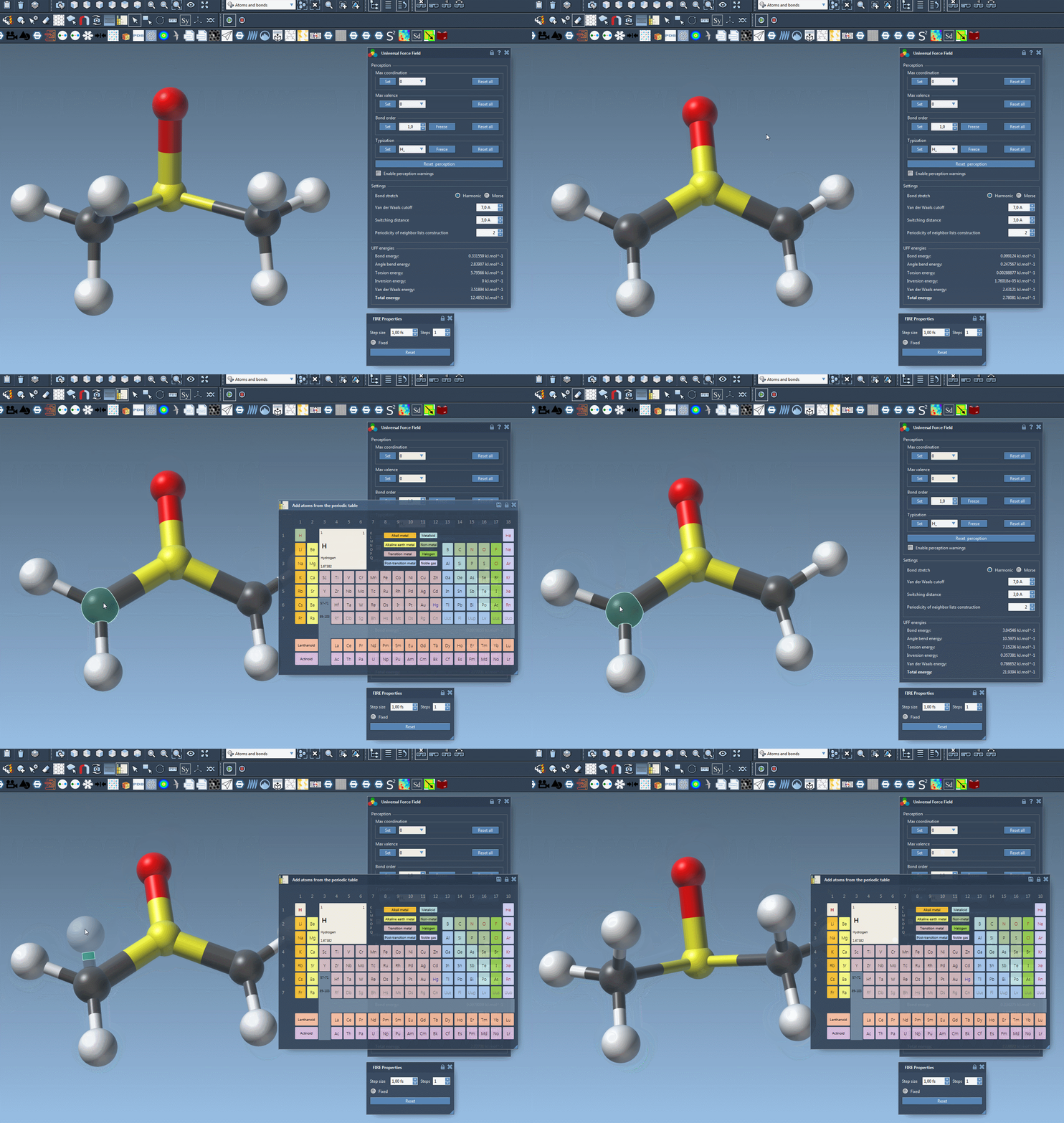
To remove atoms during a running simulation with UFF:
- Select the eraser tool (look for the rubber icon in the editor toolbar).
- Click on the atom(s) you wish to delete.
- The UFF typization is automatically updated to account for the removed atoms.
This makes it natural to clean up parts of the molecule or experiment with fragment removal while observing live changes in the energy landscape.
Adding Atoms
You can also append new atoms to the structure on the go:
- Open the periodic table from the editor and choose the element you want to add.
- Click on an existing atom in the model to serve as the bonding point.
- Move your mouse to adjust the position of the new atom. It will appear in transparency, bonded to the selected atom.
- Release the mouse to add the new atom to the system.
Once added, the UFF model automatically recalculates bonds, atom types, and bond orders where necessary. This is particularly useful for modeling substitution reactions, ligand addition, or simply exploring how molecular geometry adapts as the structure evolves.
Real-Time Updates and Visualization
As atoms are added or removed, you can continue to view UFF energy terms and total energy in the simulation window. Visual feedback and real-time structural response help you intuitively understand the effect of your edits.
Who Should Use This?
While the feature is applicable to any molecular modeler, it’s particularly valuable for:
- Students learning force fields and interactive molecular editing
- Chemists doing conceptual reaction modeling
- Computational scientists prototyping molecular systems
Interactive editing can help catch structural problems early, guide structure refinement, or even just serve as an educational tool to understand molecular mechanics behavior in UFF.
To explore additional features and dive deeper into the UFF simulation capabilities in SAMSON, check the full Universal Force Field documentation.
SAMSON and all SAMSON Extensions are free for non-commercial use. Get it at https://www.samson-connect.net.