



For molecular modelers who need to analyze structural transitions between protein conformations, creating realistic and continuous transition paths can be a challenging and time-consuming task. Whether you’re working on conformational analysis, setting up umbrella sampling, or refining reaction coordinates for free energy simulations, a smooth path between protein structures can greatly simplify your workflow.
The As-Rigid-As-Possible (ARAP) Interpolation method, available in the SAMSON platform, is designed to address this need. By using the ARAP Interpolator extension, you can compute a realistic transition path between two protein structures in just a few seconds. Let us guide you through the process.
Why ARAP Interpolation?
ARAP Interpolation offers several benefits for molecular modelers:
- It computes smooth, continuous transition paths in seconds, reducing the time spent on manual path generation.
- You can visualize and export intermediate conformations to enhance your analyses.
- It uses a biologically meaningful geometric model to align and place conformers, ensuring the generated paths reflect realistic biomolecular movements.
- The generated paths can be directly used for applications such as free energy simulations, steered molecular dynamics, or nudged elastic band (NEB) methods.
Getting Started with ARAP Interpolation
Here is a quick overview of the steps you can follow within SAMSON to get started:
1. Prepare Your Protein Structures
Start by fetching example structures, e.g., 1DDT (a conformation of Diphtheria Toxin) and 1MDT, directly from SAMSON. Once the structures are loaded, isolate the relevant chain (e.g., chain A) and clean the structures to remove water, ions, ligands, or alternate locations. These steps ensure you are working with single, clean components, ready for interpolation.
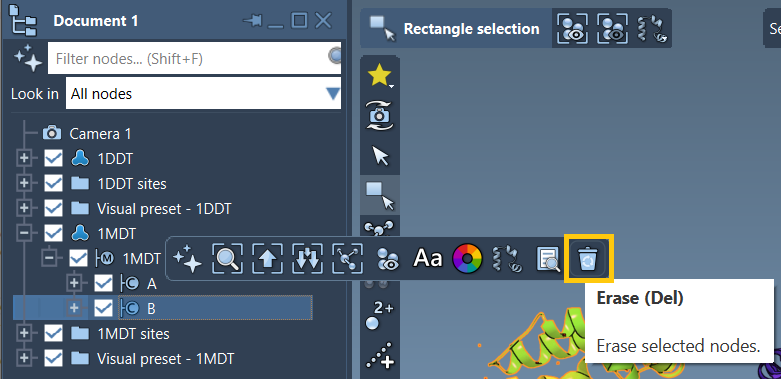
2. Define Conformations
With your cleaned structures, define the starting and target conformations. For instance, you can name the conformation of 1DDT as 1DDT A and that of 1MDT as 1MDT A. These will act as the endpoints of the interpolation path.
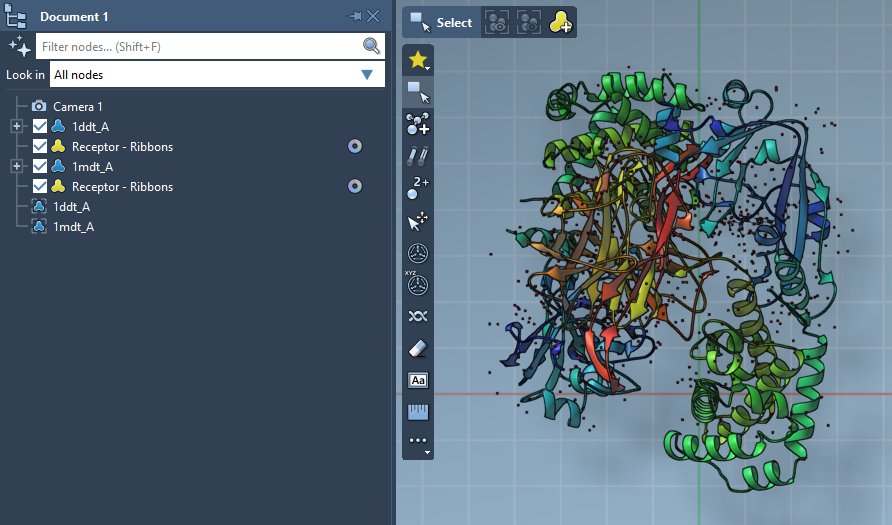
3. Run ARAP Interpolation
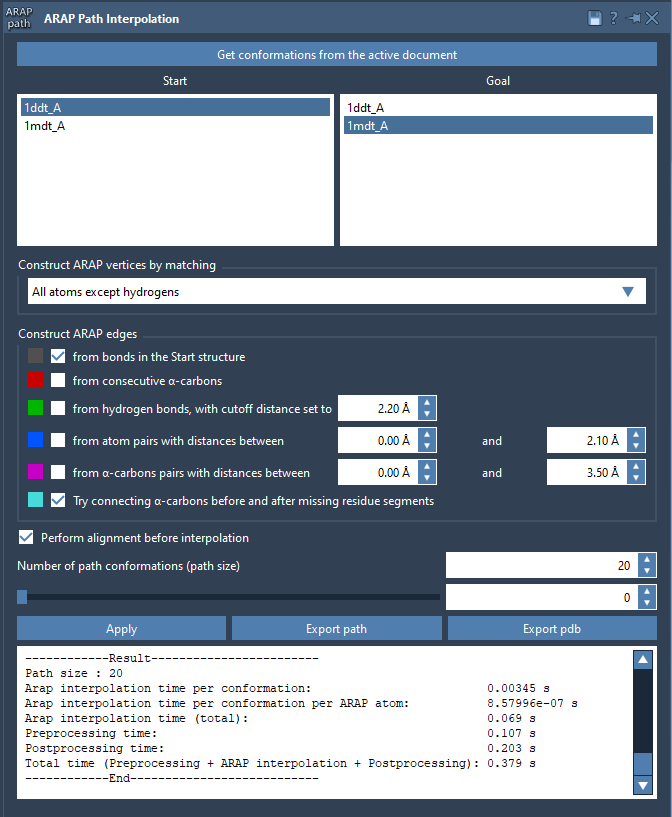
Launch the ARAP Interpolation app in SAMSON and load your defined conformations as the start and goal structures. Select options for matching and connecting protein atoms, such as:
- All except hydrogens for atom matching.
- Try connecting α-carbons before and after missing residue segments to address missing segments in your structures.
Before running the algorithm, enable Perform alignment before interpolation to align start and goal conformations. You can also specify the number of interpolated structures you need to generate a dense or sparse path, depending on your requirements. For instance, generating 20 conformations provides a flexible yet manageable path.
Visualizing and Exporting Your Results
The interpolated conformations can be visualized interactively within SAMSON using the slider in the ARAP Interpolation app. This allows you to clearly see how the structure evolves along the path. Edge construction visualization is also supported, making it easy to understand how geometric connectivity contributes to the transition.
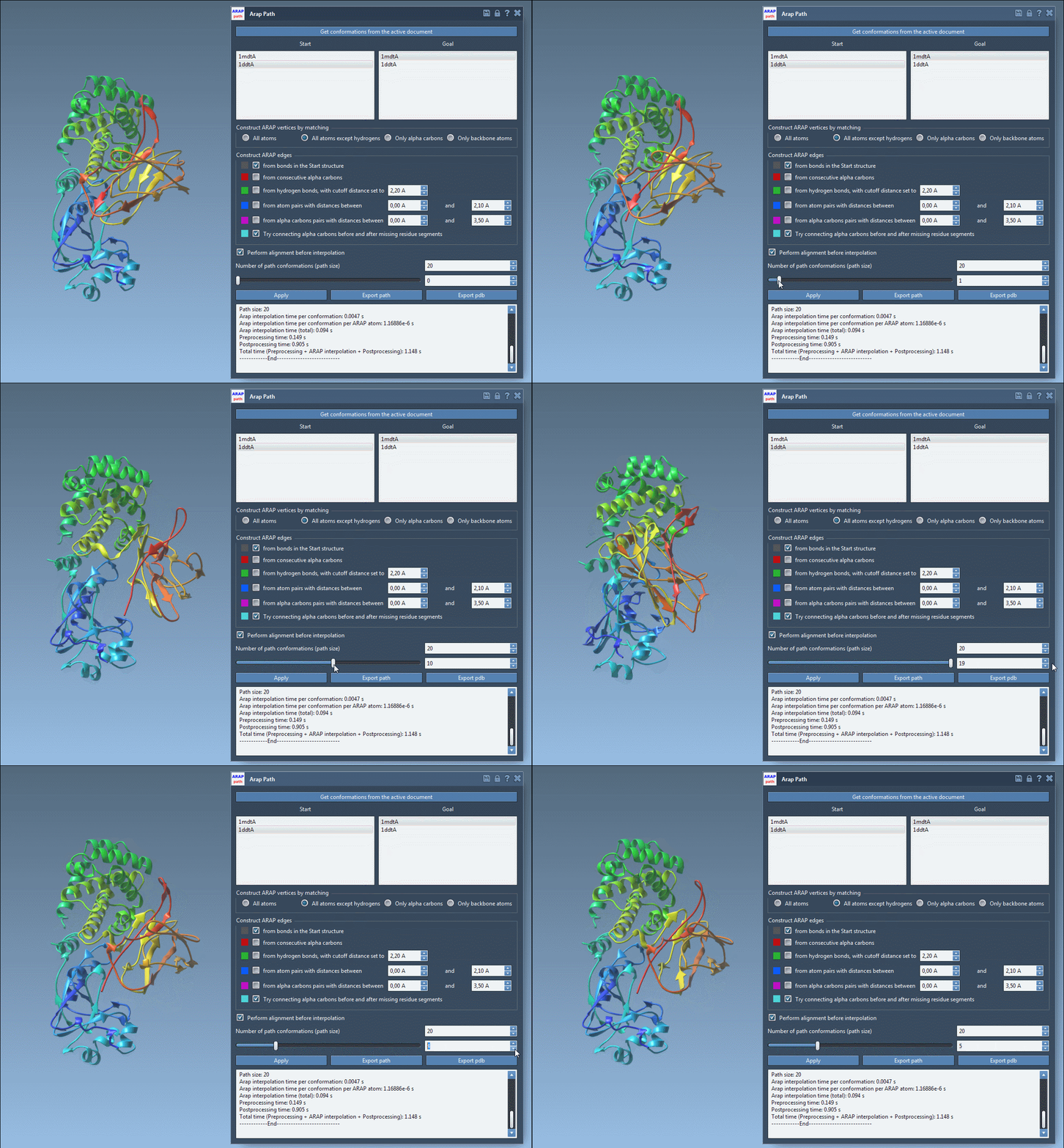
Export options are also available, enabling you to save the entire path into a PDB file or as a trajectory object for downstream processing and visualization.
Conclusion
ARAP Interpolation provides a powerful way to compute biologically meaningful transition paths between protein conformations. By following this workflow, you can significantly streamline complex workflows such as conformational analysis, pathway refinement, or simulation setup.
To learn more, visit the full tutorial page at SAMSON Documentation – ARAP Interpolation.
SAMSON and all SAMSON Extensions are free for non-commercial use. Click here to get SAMSON and start your molecular modeling journey today.