



Editing molecular systems interactively can be both fascinating and challenging. Often, modelers need to oversee complex topological changes such as bond creation or breaking, which typically require intricate operations and manual configurations. Enter the Interactive Modeling Universal Force Field (IM-UFF) in SAMSON, which brings in a more fluid way of handling these changes.
IM-UFF, an extension of the Universal Force Field (UFF), integrates a flexible system to seamlessly handle bond alterations. This is especially helpful during interactive modeling as users can now create or break covalent bonds, dynamically adjust bond orders, and update atom types—all while seeing the topology update in real time.
Why is Bond Modulation Important?
For molecular modelers, being able to explore new molecular structures and simulate potential interactions is key. Traditional tools often demand significant manual intervention, which slows down the creative and experimental process. IM-UFF resolves this challenge by permitting real-time adjustments directly within the modeling process, guided by physically-based inter-atomic forces. This makes molecule building and editing easier, faster, and more intuitive.
How to Enable IM-UFF for Interactive Bond Formation?
To begin using IM-UFF in SAMSON, follow these steps for a smooth experience:
- Open the molecular system document you wish to simulate.
- Add a simulator by selecting Edit > Simulate > Add simulator or by using the shortcut
Ctrl + Shift + M(on Mac:Cmd + Shift + M). - From the interaction models list, choose Interactive Modeling Universal Force Field.
- Pick a state updater for the simulation. A popular option is the FIRE minimizer.
- Press OK to finalize the setup.
IM-UFF automatically adapts to the movements of the atoms, allowing bonds to break or form depending on how close or far the atoms are.
Simulation in Action
Once your simulation is running (via Edit > Simulate > Start), you can interact with the structure directly. For example, dragging an atom slightly will let the system adjust while preserving current connections. However, moving the atom farther away will break the associated bonds due to topology updates. Conversely, bringing it closer to other atoms results in new bond formation. Check out the example below to better visualize this dynamic process:
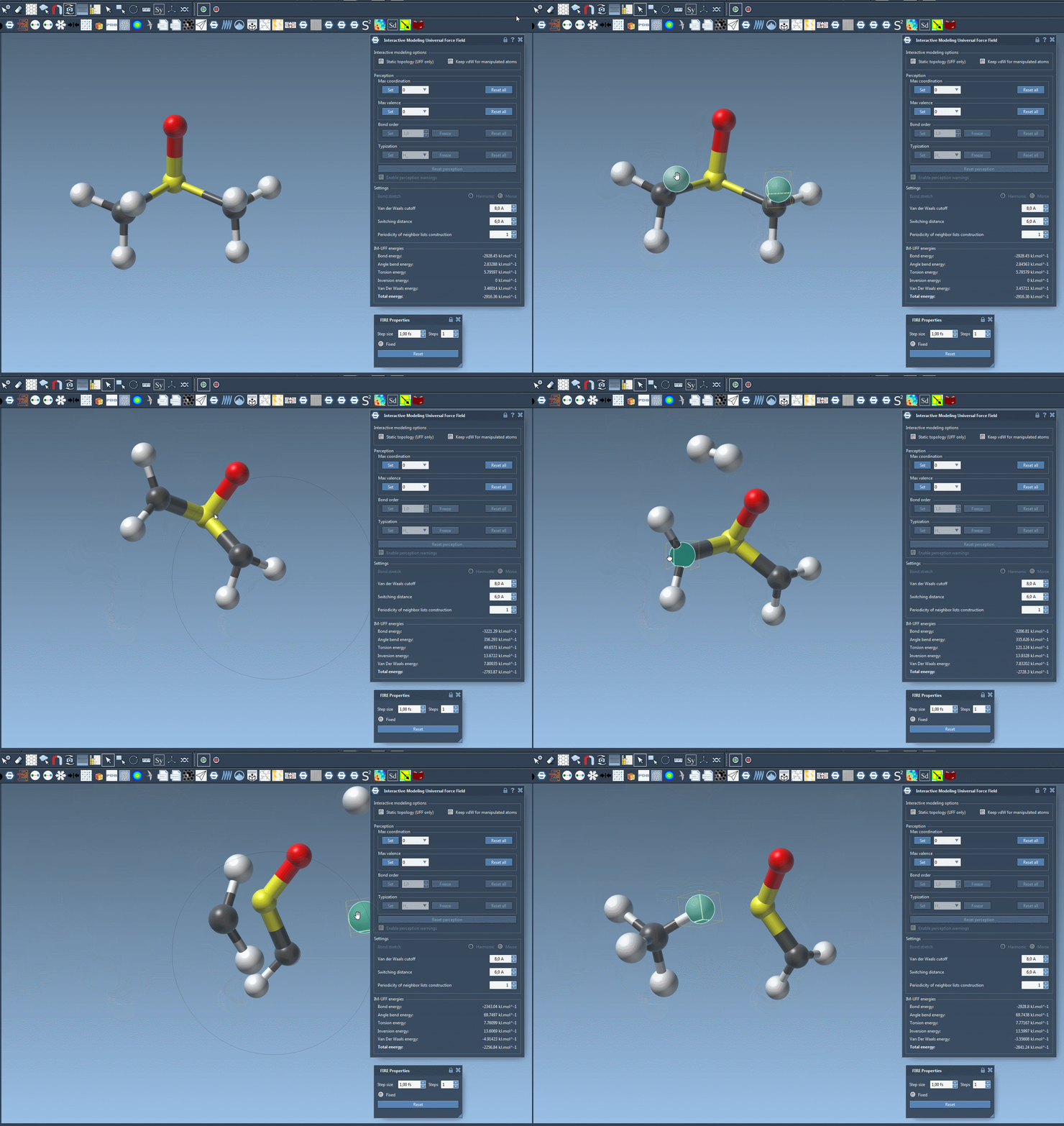
This real-time capability allows researchers to rapidly iterate through molecular configurations, ensuring the results align with desired physical and chemical properties.
Adding Flexibility to Your Workflow
Beyond bond manipulation, IM-UFF provides customizable settings such as enabling or disabling van der Waals (vdW) interactions for manipulated atoms. Adjusting these options can make atom manipulation easier by reducing unnecessary repulsive forces when forming connections. Just ensure the following are unchecked for the most interactive experience:
- Static topology (UFF only)
- Keep vdW for manipulated
Conclusion
IM-UFF offers a smooth and efficient approach to molecular modeling—one that reduces the typical pain points associated with topological changes. Whether you are forming, breaking, or modulating bonds, IM-UFF is designed for ease of use while maintaining scientific accuracy.
To explore IM-UFF further, visit the original documentation at this link.
SAMSON and all SAMSON Extensions are free for non-commercial use. To get SAMSON, visit https://www.samson-connect.net.