



For molecular modelers, one common challenge is comparing protein structures and sequences to understand similarities, variations, or functional insights. This process can often feel complex, especially when working with large datasets or intricate structures. SAMSON’s Protein Aligner could dramatically simplify your workflow, allowing you to align protein sequences and structures seamlessly. Let’s dive into how you can make the most of this tool to save time and boost your productivity.
Why Align Proteins?
Protein alignment serves as a cornerstone for multiple molecular modeling tasks. By aligning protein sequences and structures, you can:
- Identify conserved residues critical for function or ligand binding.
- Analyze conformational similarities or differences across species or mutants.
- Lay the groundwork for homology modeling or other downstream molecular design projects.
How to Load Example Proteins
Let’s consider an example to demonstrate the process: aligning two hemoglobins (1DLW and 1RTX). Follow these steps:
- Navigate to Home > Fetch in SAMSON.
- Enter
1DLW 1RTXin the appropriate field (e.g., PDB or PDB (mmCIF)). - Click Load to fetch the structures.

Before beginning the alignment workflow, ensure structures are clean by removing extra solvents or ligands with SAMSON’s Protein Preparation & Validation extension. This ensures a more accurate comparison.
Launching the Protein Aligner
With your structures loaded, starting the alignment is simple. Click Home > Align, which opens the Protein Aligner extension. The interface is designed for simplicity, helping you focus on your modeling without unnecessary hurdles.

Sequence Alignment Modes
SAMSON provides two modes to align protein sequences, depending on your focus:
- Align sequences (by structure): Useful for comparing entire models.
- Align sequences (by chain): Ideal for analyzing individual chains in oligomers or complex systems.
By clicking the appropriate Align sequences button, the system generates an alignment and highlights conserved regions. You can further explore each residue’s properties visually using the Highlight residues option.

The highlights make it easy to inspect conserved residues and variations that may correlate with crucial protein functions. Overlapping properties, such as polarity and similarity, are shown as blended colors, ensuring clarity in your analysis.
Tips for Structure Alignment
Aligning structures is just as intuitive. For instance, to superimpose two proteins:
- Ensure no residues are pre-selected to perform a whole-protein alignment.
- Click Align to this on the row of the reference model. The system calculates the RMSD (Root Mean Square Deviation) and displays the structural alignment instantly.
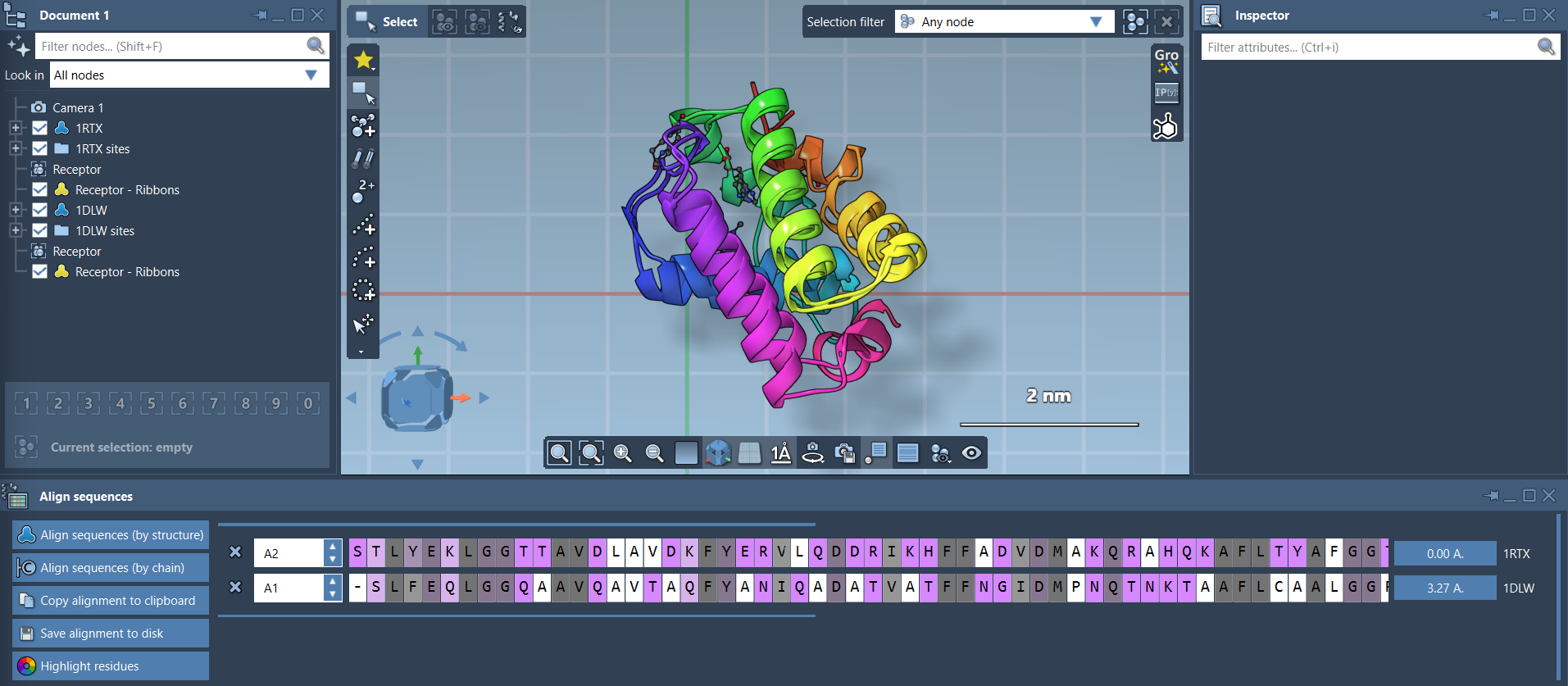
If you’re interested in specific regions, SAMSON also supports region-specific alignment. Simply select residues of interest in both sequences and use the alignment button next to the selection. This targeted alignment is particularly helpful when focusing on local structural features, such as functional domains or conserved helices.

Next Steps
Once you’ve completed your analysis, you can export the alignment for further tasks, such as homology modeling, identifying ligand-binding hot spots, or comparing additional chains and proteins. SAMSON’s Protein Aligner offers an efficient and reliable way to streamline these workflows.
To explore further features and get step-by-step instructions, visit the full SAMSON Protein Aligner documentation.
Note: SAMSON and all SAMSON Extensions are free for non-commercial use. Download SAMSON today at SAMSON Connect.