



Molecular modeling often requires clear visualizations of molecular interactions, especially when working with complex systems such as protein-ligand complexes. A lack of intuitive tools for creating and managing these diagrams can become a significant hurdle for researchers and molecular designers. This is where the Interaction Designer from the SAMSON platform steps in, offering a seamless solution for creating and editing 2D protein-ligand interaction diagrams while maintaining tight integration with a 3D molecular viewport.
Streamlining Interaction Diagram Creation
One of the standout features of the Interaction Designer is its ability to automate the creation of interaction diagrams with minimal effort. Using the Home > Diagram command, you can generate a detailed 2D interaction diagram from your current molecular selection—or even from the entire document if no selection is made. This eliminates the need to manually sketch interactions, saving significant time and effort.

The generated 2D diagrams are not static images—they’re dynamic and editable, providing users with a high degree of flexibility. You can select structural groups, atoms, or zoom into specific areas directly from the diagram.
Customize and Enhance Your Diagrams
Once you have created an interaction diagram, the Interaction Designer provides a range of customization options:
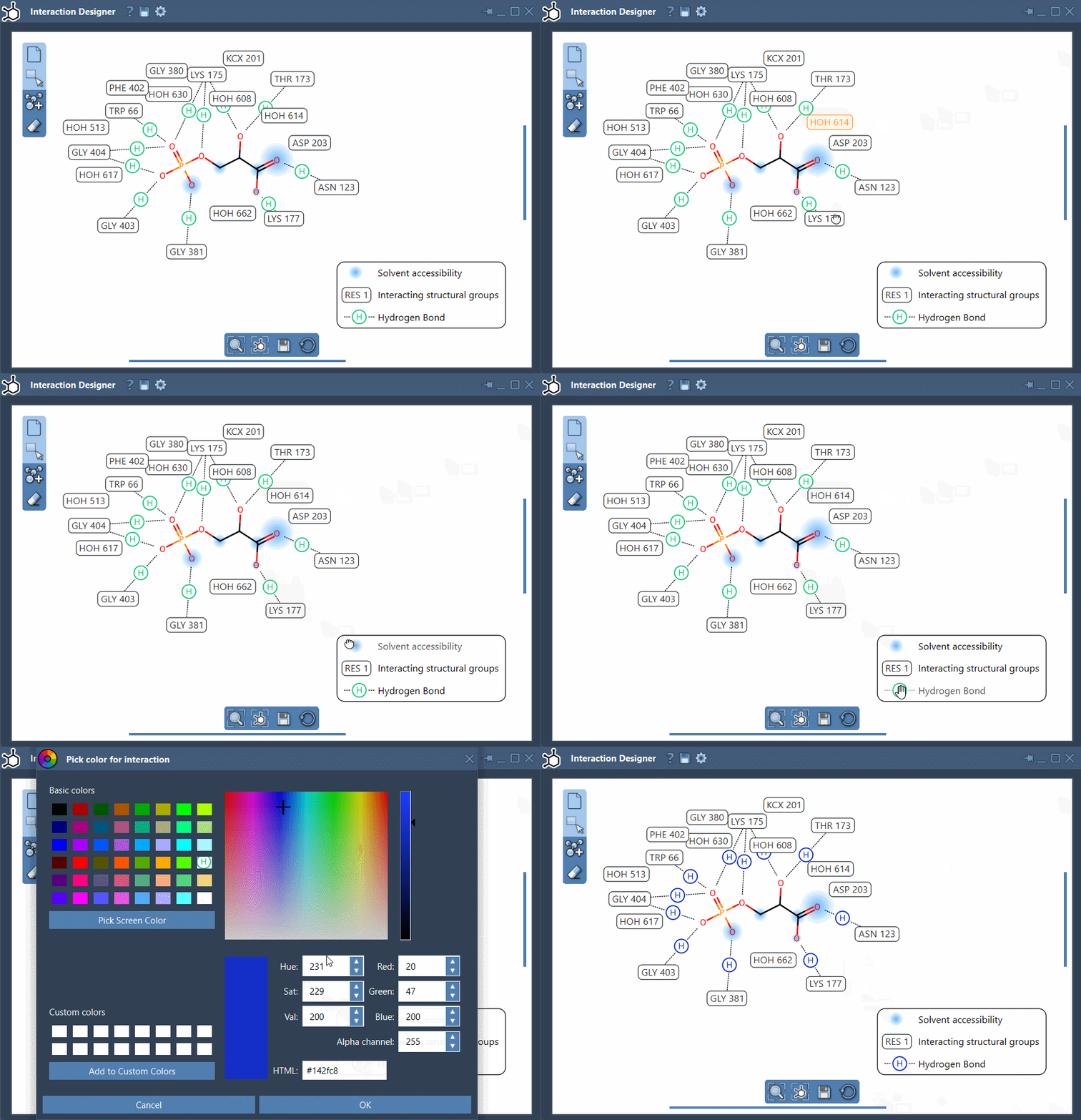
- Move labels and symbols: To optimize the layout, drag and drop interaction labels or symbols in your diagram. This ensures clarity when presenting your findings.
- Hide or show interactions: Clicking on an interaction’s name or icon in the caption/legend allows you to selectively display or hide specific interactions.
- Change interaction colors: Double-click on names or icons in the caption/legend to adjust the colors, giving you the ability to distinguish between various interaction types for better interpretation.
These editing options allow you to craft diagrams that are not only scientifically accurate but also visually compelling.
Features That Make a Difference
In addition to customizability, the Interaction Designer comes equipped with features that enhance insights into molecular interactions:
- Toggle the visibility of binding pockets for protein-ligand complexes.
- View the solvent accessibility of ligand atoms, helping you analyze exposure levels.
- Highlight interacting residues and structural groups with ease. You can also reference a list of supported interactions to better understand these groups.
Moreover, the bottom menu of the Interaction Designer allows you to align and update your 2D and 3D views automatically, ensuring consistency between views.
Video Tutorials and Advanced Applications
Learning a new tool is often easier with visual guidance. SAMSON provides a video tutorial that covers how to create and edit 2D and 3D protein-ligand interaction diagrams in tandem. You can revisit specific features at your own pace, making the learning process more approachable.
Start Visualizing with Ease
The Interaction Designer provides tools that are indispensable for molecular modelers aiming to visualize interaction networks clearly and efficiently. If protein-ligand complex analysis is part of your workflow, this tool will undoubtedly be a valuable addition, helping you create diagrams that are both detailed and adaptable.
For more detailed instructions and a deeper dive into its capabilities, visit the official documentation here: https://documentation.samson-connect.net/users/latest/interaction-designer/.
SAMSON and all SAMSON Extensions are free for non-commercial use. Download SAMSON at https://www.samson-connect.net.