



Molecular modeling often involves handling complex structures. These may include thousands of atoms, residues, and other molecular components. Hunting for specific structural elements can sometimes feel like finding a needle in a haystack—until now. The Node Specification Language (NSL) in SAMSON is a powerful tool that can simplify this process, making molecular selection more precise, efficient, and intuitive.
What Is NSL?
NSL, or Node Specification Language, is a feature in SAMSON that allows users to select molecular nodes (atoms, residues, ligands, etc.) using concise expressions based on properties, attributes, and logical operations. For instance, imagine needing to isolate all alanine residues in your structure or locate all atoms within a specific distance from a particular node. Instead of manually scanning for them, NSL empowers you to target them instantly with expressive queries like residue.type ALA or "CA" within 5A of S.
The Basics: Querying Step-by-Step
At its core, NSL gives you the ability to describe and filter elements by their attributes, such as type, ID, or distance from other nodes. Here is how a molecular modeler can harness this functionality for practical purposes:
Start with the Find Command
The easiest way to use NSL is through SAMSON’s Find command (Ctrl + F, or Cmd + F on Mac). Simply enter an NSL expression into the search bar and obtain instant results. Common yet powerful expressions include:
node.category ligand, receptor: Matches ligands and receptors.H linking O: Finds hydrogens connected to oxygen atoms."ALA" w 5A of S: Highlights nodes named “ALA” within 5 angstroms of sulfur atoms.
You can even use the Tab key for context-sensitive suggestions while composing your query.
Switch to the Document View
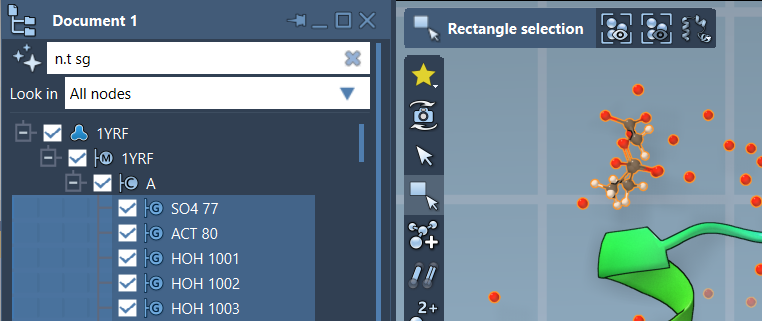
If you prefer an interactive approach, you can also filter elements directly in SAMSON’s Document View. For example, selecting n.t sg (short for node.type structuralGroup) filters structural groups. Use the Enter key to apply your selection, as demonstrated in the following image:
Practical Examples to Get You Started
Here are more examples to illustrate the versatility of NSL:
C or H: Matches carbon or hydrogen atoms, enabling you to detect certain molecular characteristics at a glance.r.id 20:40: Locates residues with IDs between 20 and 40, offering an easy way to focus on particular regions of your molecule.H in r.t ARG: Finds hydrogen atoms that belong to arginine residues.a.s C wb 3 of a.s S: Identifies all carbon atoms located within three bonds of sulfur atoms.
Combined with flexible operators and logical constructs, these queries give you precise control over large, intricate models. For more advanced cases, you can use regular expressions and proximity commands for unparalleled versatility.
Why You Should Use NSL
Whether you are designing a drug molecule or analyzing a protein structure, NSL acts as your assistant, saving time and improving accuracy. Instead of manually sifting through your molecular models, let NSL do the heavy lifting by pinpointing the exact entities you need. It’s efficient, repeatable, and saves you from tedious selection tasks, allowing you to focus on the science.
Try out NSL today and experience seamless molecular selection. To dive deeper, visit the full NSL documentation at this link.
Note: SAMSON and all SAMSON Extensions are free for non-commercial use. You can download SAMSON at https://www.samson-connect.net.