



For molecular modelers, understanding the interactions between molecular features, such as residues, ligands, or domains, is crucial for studying interfaces, domain interactions, and binding events. But how do you track such interactions across a simulation? SAMSON’s Contacts module in the Path Analyzer provides a solution by visualizing contacts with both a contact series and a contact map.
Why Contact Analysis Matters
Tracking how often molecular features interact can reveal essential dynamics: for example, when an interface forms or breaks, or how tightly a molecule binds to another. Without such insights, opportunities to uncover critical structural information might be missed.
With SAMSON’s Contacts module, you can:
- Visualize when features come into contact across the simulation using a contact series.
- Understand which specific features interact and their occupancies using a contact map.
How to Add the Plot
Setting up a contact analysis in SAMSON is straightforward:
- Open the Path Analyzer.
- Select Contacts in the “Observable” options.
- Choose your simulation path.
- Define two groups (e.g., Group A and Group B) containing the features you’d like to analyze.
- Set the interaction cutoff (in Ångström).
- Click Add Contact Series for a time-based plot or Add Contact Map for feature interactions.
Dive into the Visualizations
SAMSON provides two powerful ways to visualize molecular contacts:
- Contact Series: Tracks the total number of features in contact at every frame of a simulation. This is ideal for spotting significant events in molecular dynamics, such as when binding occurs.
- Contact Map: Shows the occupancy of interactions between features across the simulation. This heatmap visualization is valuable for identifying specific pairs of features responsible for observed dynamics.
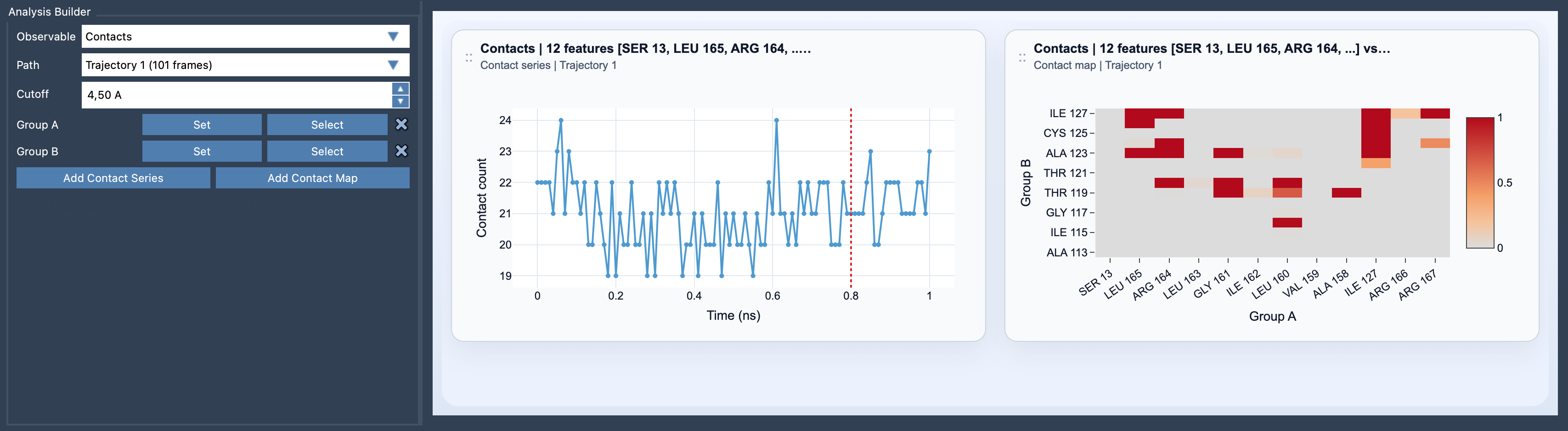
For example, imagine you’re studying a protein-ligand binding simulation. The contact series can help you quickly identify the moment the ligand binds, and the contact map can show you which residues are responsible for stabilizing the interaction.
Tips for Best Results
To make the most of the Contacts module, keep the following tips in mind:
- Use the contact series to discover when significant binding or unbinding events occur.
- Turn to the contact map to uncover the details: the exact feature pairs driving the interactions.
- If you require detailed data on the binary history of contacts, pair the module with the Contact Persistence analysis tool for further insights.
Learn More
Whether you are studying protein-protein interactions, molecular packing, or even structural disruptions, the Contacts module in SAMSON’s Path Analyzer offers a clear pathway to understanding molecular behavior. Learn more in the full documentation at this page.
Note: SAMSON and all SAMSON Extensions are free for non-commercial use. Download SAMSON from SAMSON Connect.