



For molecular modelers, there is often a need to focus on precise subsets of atoms within complex systems. Whether you’re conducting free energy calculations, examining binding site interactions, or visualizing ligand pathways, isolating and exporting specific atomic trajectories can save time and improve your analysis. Fortunately, SAMSON’s Export Along Paths extension makes this process seamless and highly customizable.
Why Export Atom Trajectories?
Molecular modeling often involves pathways, whether it’s examining ligand exit routes or reaction coordinates. However, exporting the trajectories of every atom in a system may produce unnecessary data. For example, when studying ligand behavior, you may only need the trajectories of the ligand and its key binding residues. By exporting a subset of atoms, you can reduce file sizes, simplify downstream analyses, and improve modeling efficiency.
How to Export a Subset of Atoms
The Export Along Paths app in SAMSON offers a straightforward way to isolate and export specific atoms. Here’s how:
- Open the App: Navigate to Home > Apps > All > Export Along Paths. Alternatively, use the search functionality by pressing Shift + E.
- Select Atoms to Export:
- In your Document view, select the subset of atoms you want to study. For instance, you can select a ligand, such as
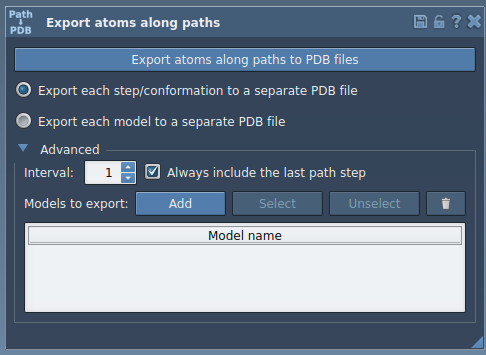
TDG(Thiodigalactosid), or any other region of interest. - Expand the Advanced panel in the app interface and click Add. This defines the selected atoms as a model to export.
- You can rename the model, add multiple models, and manage selections directly within the table interface.
- Configure Export Settings:
- Choose whether to export all frames in a single PDB file or create separate PDB files for each frame. Both options are available to suit varying analytical needs.
- If needed, adjust the frame export interval under the Advanced section to focus on key snapshots of the trajectory.
- Export the Trajectory Data:
- Select the relevant paths, confirm your selection, and click Export atoms along paths to PDB files.
- You’ll be prompted to select a destination folder and file prefix, ensuring your data is organized and ready for downstream use.
Here’s an example of how your app interface might look when preparing to export specific atoms:
Applications in Molecular Modeling
Customized export of atomic trajectories has multiple applications:
- Generate focused reaction coordinate files for free energy calculations.
- Export ligand exit or entry pathways for use in enhanced sampling methods.
- Isolate intermediate states for visualization and comparison across simulations.
- Track region-specific dynamics, such as ligand movement or structural changes in a binding pocket.
With the Export Along Paths app in SAMSON, you can streamline these processes and ensure your analyses remain targeted and manageable.
Learn More
For detailed instructions and further insights, visit the official documentation at this link.
SAMSON and all SAMSON Extensions are free for non-commercial use. To get SAMSON, visit SAMSON Connect.