



One common challenge in molecular docking is efficiently identifying docking sites without compromising on accuracy. The search domain, the region where docking calculations are performed, plays a major role here. Using unnecessarily large domains increases computation time, while overly restricted areas might overlook key interactions. In this post, we’ll explore how to define and refine the search domain in SAMSON’s AutoDock Vina Extended, helping users achieve a precise balance between computational efficiency and docking quality.
Why the Search Domain Matters
In AutoDock Vina Extended, the search domain determines the area in the receptor or substrate that the docking algorithm explores to place ligands. While default settings define the domain around the receptor’s entirety, adjusting this domain to focus on known or predicted binding sites can significantly enhance performance by reducing computation time and increasing docking accuracy.
Flexible Ways to Customize the Search Domain
SAMSON provides several ways to adjust the search domain to suit your analysis needs. Here’s a breakdown of the options:
- Adjust directly in the interface: Modify the domain’s center and size using the dedicated controls in the AutoDock Vina Extended interface. A user-friendly numeric input allows you to fine-tune dimensions.
- Visually refine in the Viewport: Use the search domain box in the Viewport to directly drag the yellow sphere controllers placed at the box’s corners, adjusting its size and position interactively. This offers a great visual perspective for alignment with the receptor structure.
- Set based on a selection: Select residues or nodes related to your binding site in the Document view and use the “Based on pocket/selection” option to generate a search domain that matches your selection.
- Define the domain based on a bound ligand or binding pocket: If your receptor already includes a bound ligand, select it and use Select > Biology > Binding sites. This tool will identify residues around the ligand to guide domain definition.
Step-by-step Guide to Refining the Domain
Let’s illustrate this with an example:
-
First, ensure the receptor is properly prepared, and a ligand or ligand library is set up. In this case, let’s focus on the 2AZ8-IA ligand that is part of the tutorial archive.
-
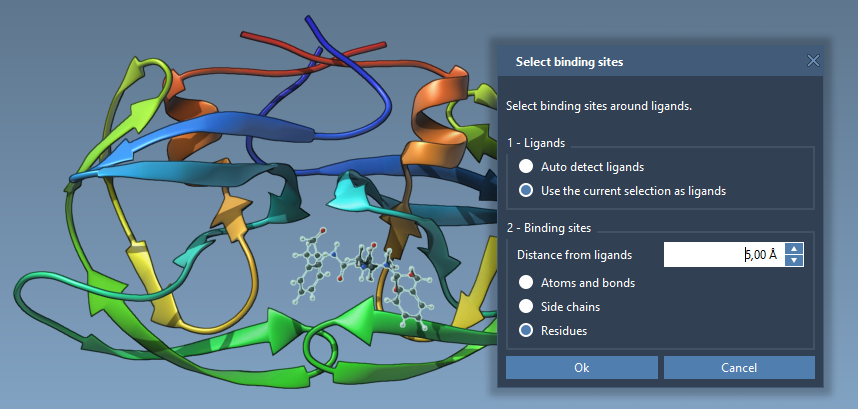
Identify and select the ligand in the Document view. Then, use the Select > Biology > Binding sites option to choose residues around the ligand. Choose parameters like distance as needed in the pop-up dialog, and click OK.
-
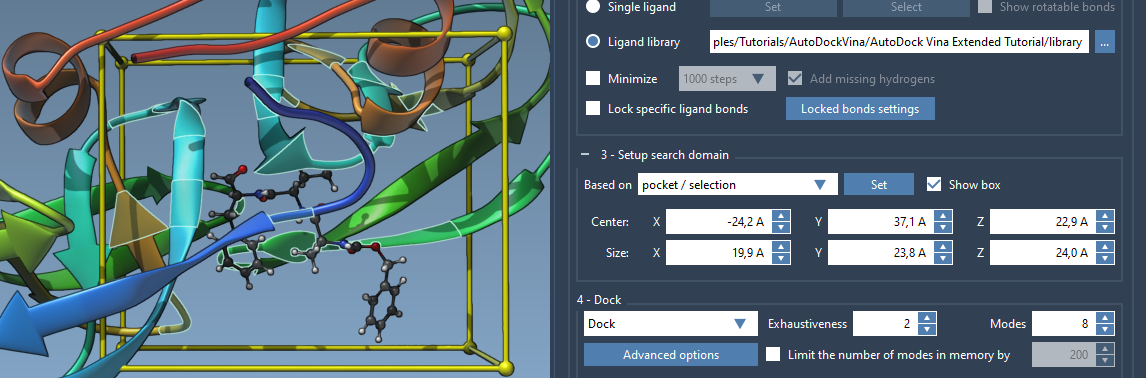
Once residues around the ligand are selected, return to the AutoDock Vina Extended interface and choose the “Based on pocket/selection” option for the search domain. Click on Set to apply the modification. The search domain box will now surround the targeted binding site based on your selection.
-
To further refine the domain size or orientation, use interactive sphere controllers in the Viewport. Additionally, you can adjust the receptor’s alignment using SAMSON’s Move editors.
Tips for Effective Domain Setup
If you want to temporarily hide the search domain box, toggle the “Show box” option. This feature is helpful for reducing clutter in the Viewport while working on other aspects of your docking setup. Additionally, proper alignment of the receptor and zooming into selected areas can simplify visual adjustments and make the process more intuitive.
Improve Your Docking Workflow
By skillfully defining the search domain, you not only save time but also improve the reliability of docking results. Leveraging SAMSON’s flexible options for search domain setup ensures that your docking calculations remain focused, precise, and effective.
To learn more about setting up the search domain and other functionalities in AutoDock Vina Extended, visit the tutorial documentation here.
SAMSON and all SAMSON Extensions are free for non-commercial use. Download SAMSON today at https://www.samson-connect.net.