



A ligand library can look ready to dock and still produce results that are difficult to interpret. Structures may need preparation, the search box may cover far more space than necessary, and a ranked list can invite more confidence than its scores justify. A dependable workflow is less about pressing Dock and more about making a few clear decisions before and after the run.
This guide focuses on a practical question: how can you dock a set of candidate ligands and make the resulting poses easier to inspect and compare? The examples use AutoDock Vina Extended in SAMSON.
1. Start with a prepared receptor
Before setting up docking, check the receptor structure. The tutorial recommends removing atoms with alternate locations and unnecessary small molecules, including ligands and cofactors. Water and monatomic ions can be removed as well; AutoDock Vina Extended does not consider them. Polar hydrogens are needed to detect hydrogen bonds, but do not change hydrogens if they already reflect a chosen protonation state.
For missing residues or heavy atoms, the PDBFixer extension can be used to repair a protein. The important practical point is to treat preparation as part of the workflow, not as a cosmetic step: know what was removed or added before interpreting poses.

2. Define what you are docking
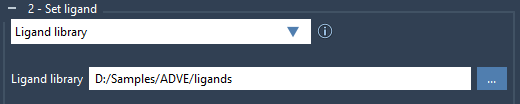
In AutoDock Vina Extended, choose a receptor and then select Ligand library in the ligand setup. The library can contain different supported file formats, such as MOL2 and SDF, and a file can contain multiple ligands. By default, library ligands are treated as fully flexible, so their rotatable bonds are active. If particular bond types should remain locked, verify the locked-bond settings and enable the option to lock specific ligand bonds.
Consider whether the input geometries are suitable for docking. If ligands are 2D or need relaxation, enable Minimize and choose a minimization preset. Missing hydrogens can be added for minimization and docking when appropriate. One detail that is easy to miss: locked bonds do not constrain the minimization step; they can rotate during minimization. Also, cis-trans isomers are not generated automatically, so include relevant isomers in the library yourself.
3. Make the search box match the question
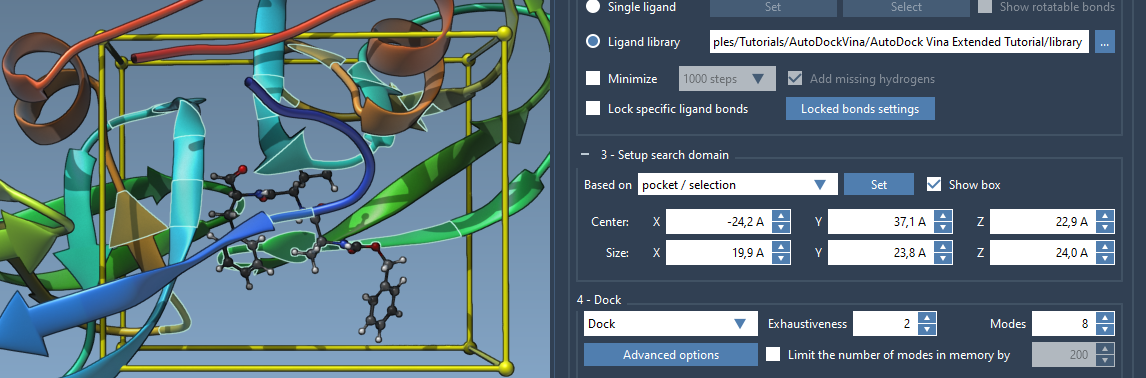
The default search domain is based on the whole receptor. That is a useful starting point when the binding site is unknown, but if you already know the pocket, a smaller, appropriately placed domain can reduce unnecessary computation. You can set the box from a selection or pocket, adjust its center and size in the interface, or drag its corner controllers in the Viewport.
For a receptor with a known bound ligand, select that ligand and use Select > Biology > Binding sites to select nearby residues. Then set the search domain to Based on pocket/selection. Remember that the domain is defined in global XYZ coordinates; if the box does not match the intended site, check the system’s orientation as well as the box dimensions.
4. Choose settings you can explain
Select Dock for a docking run. The tutorial’s example uses exhaustiveness 8 and a maximum of 20 generated binding modes. Exhaustiveness controls search effort: higher values mean a longer search. These example settings are a starting point, not a guarantee that every ligand has been sampled sufficiently. If you change advanced parameters, record them so that the results can be understood and reproduced.
Enable Save results and choose a destination folder if you want to revisit the run. The saved project includes docking inputs and outputs, including pose files. Keep its folder hierarchy intact and do not remove files if you plan to load the project back into the extension.
5. Turn results into a shortlist
After docking, the results table and plot help you browse compounds, scores, and poses. Filters can narrow what is displayed, and the table can be sorted or exported as CSV. A useful review sequence is to filter or sort candidates, inspect representative poses in the receptor, and then examine the interactions of promising candidates. A docking score is a ranking aid, not experimental confirmation of binding; treat it as one piece of evidence when deciding what to investigate next.
You do not have to load every pose at once. When reopening a saved project, choose to load only the results table, a specified number of top ligands, selected ligands, or all results. For a large library, loading selected results can keep the initial review manageable; other ligand results can be loaded later from the table.
For detailed interface instructions and further analysis examples, see the complete AutoDock Vina Extended tutorial.
Note: SAMSON and all SAMSON Extensions are free for non-commercial use. Get SAMSON.