



Docking a ligand library can turn a long list of compounds into a manageable set of poses to inspect. But the calculation is only as useful as its setup: inconsistent ligand structures, an oversized search region, or results that are difficult to reload can waste time and make comparisons harder. This workflow focuses on the practical choices that help keep a library-docking run organized in SAMSON with AutoDock Vina Extended.
Start with a clean, consistent system
Before docking, check the receptor and ligands rather than assuming every file is ready. For the receptor, remove alternate-location atoms and unnecessary bound small molecules. Water and monatomic ions can be removed as well; AutoDock Vina Extended does not consider them. Polar hydrogens are needed for hydrogen-bond detection. If hydrogens already reflect a chosen protonation state, avoid changing them casually. For missing residues or heavy atoms, the PDBFixer extension can help repair a protein before docking.
Ligand libraries can contain multiple molecules per file and use formats such as MOL2 or SDF. If a ligand is represented in 2D or needs geometry preparation, enable minimization and add missing hydrogens when needed. Minimization settings include a maximum number of steps and stopping criteria; use a consistent setup when comparing compounds. For a single ligand, inspect the rotatable-bond controllers. Library ligands are fully flexible by default, while the locked-bond settings can restrict selected bond types. Remember that locking bonds does not constrain them during minimization, and cis-trans isomers are not generated automatically.
Make the search region match the question
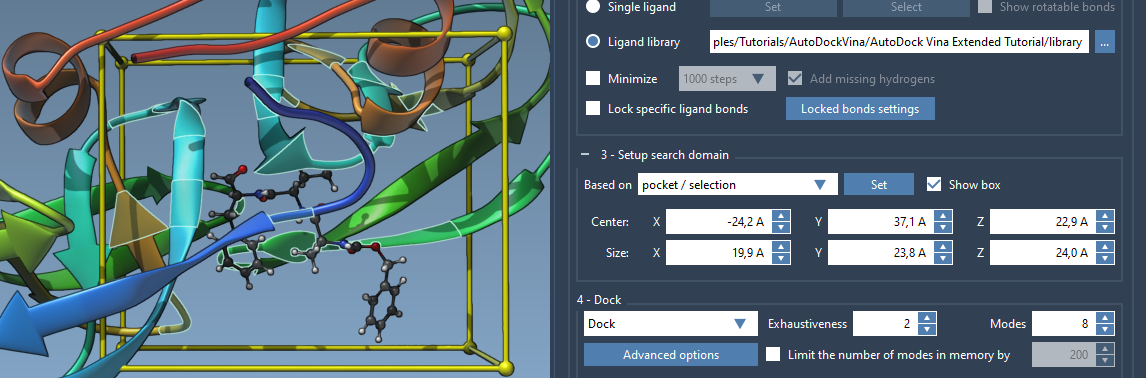
When the binding site is known, a focused search domain can reduce unnecessary computation compared with searching around the entire receptor. In SAMSON, select the bound ligand, use Select > Biology > Binding sites to select nearby residues, then set the domain using Based on pocket/selection. You can also adjust the yellow box in the Viewport or edit its center and size in the interface.
The box is defined in global XYZ coordinates. If the system has been rotated or aligned, check that the domain still surrounds the intended pocket. The tutorial’s example uses the bound ligand in the 2AZ8 system to define the binding-site region:
Choose settings deliberately—and save the project
For the tutorial run, the suggested starting values are an exhaustiveness of 8 and a maximum of 20 generated binding modes. Exhaustiveness controls search effort, so increasing it generally means a longer search. These values are a starting point, not a universal recipe: consider the size and flexibility of the ligands and the time available. Other settings include the scoring function and energy range; the documentation advises against changing scoring weights unless there is a specific reason.
Before starting, enable Save results and choose a destination folder. The saved project includes input and generated files, docked poses, and separate MOL2 files for ligand modes. Keep the project’s folder structure intact if you expect to load the results back into AutoDock Vina Extended. For a large library, you can pause or stop the run, but the change takes effect after the current ligand finishes.

Use scores to prioritize, then inspect poses
After docking, the results table and plot help you sort, filter, and compare compounds by available values such as affinity and RMSD. They are useful for narrowing the list, but a docking score is not experimental confirmation of binding or potency. Treat it as one piece of evidence, then inspect the poses in the receptor context. Restore conformations from the document or plot, and use interaction-analysis tools to examine contacts and hydrogen bonds. A visually plausible pose is still a model to evaluate, not a result to accept without further analysis.
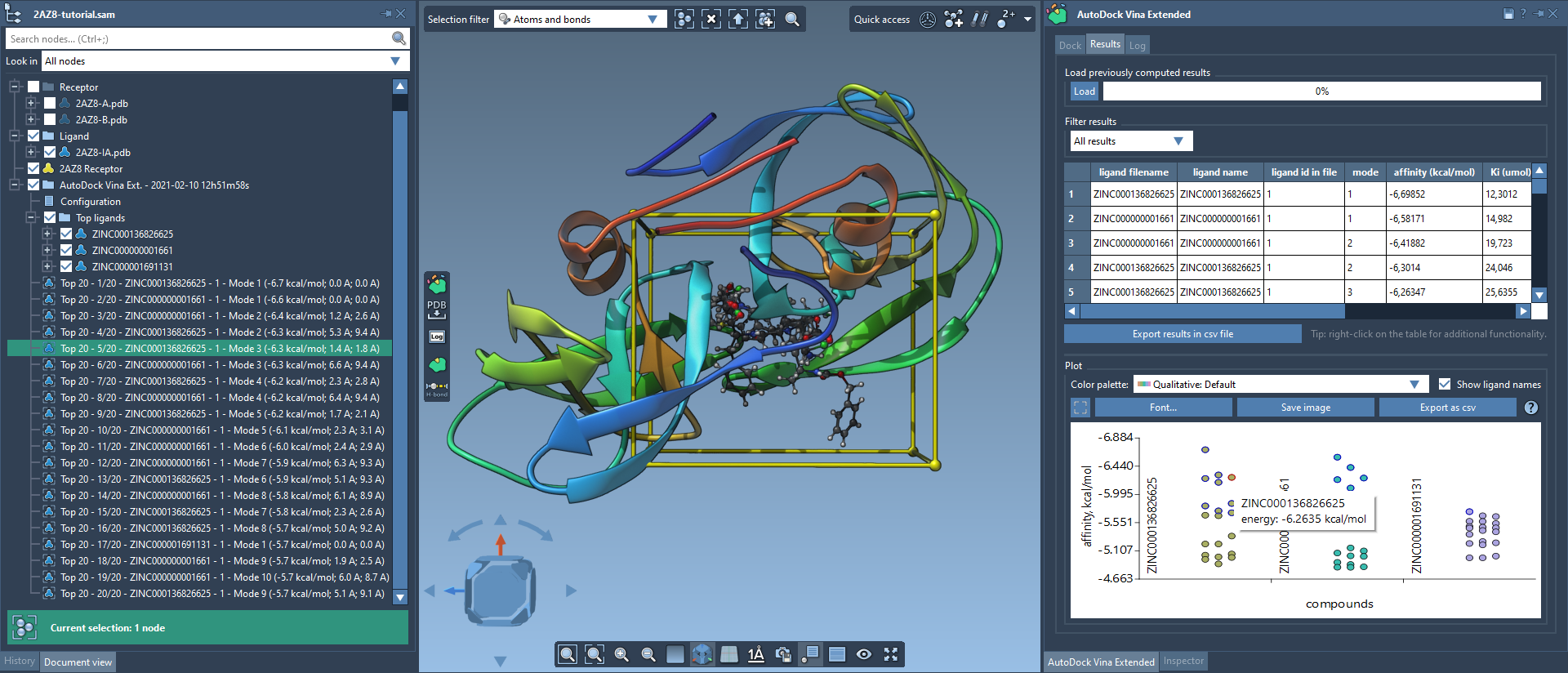
If the complete set of poses is not needed immediately, load only the results table, the top ligands, or selected results first. This can make review more manageable; additional ligand results can be loaded later from the table. Export the table or plot when you need a record of the comparison.
For the complete walkthrough, see the AutoDock Vina Extended docking tutorial.
Note: SAMSON and all SAMSON Extensions are free for non-commercial use. Get SAMSON at samson-connect.net.