



A molecular transition path can look plausible in a viewer and still contain awkward jumps, unevenly spaced states, or intermediate structures that are not well relaxed. That can make it harder to inspect a ligand’s motion or use the path in later analysis. The Parallel Nudged Elastic Band (P-NEB) app in SAMSON is designed for a specific stage of this workflow: refining a candidate path you already have.
The key distinction is that P-NEB optimizes a path; it does not invent the initial route between two structures. Start with a path or a sequence of conformations connecting the endpoint states. You might obtain that starting sequence by interpolation or with a path-generation tool such as Ligand Path Finder. If you already have conformations, SAMSON can combine them into a path. For a given system with the same number of steps, the documentation recommends using a path directly because optimizing a set of conformations takes longer.
What does the refinement do? Nudged Elastic Band (NEB) optimization adjusts the intermediate images while spring forces help keep neighboring states evenly distributed along the route. P-NEB also implements the climbing-image method, which can be used to seek the saddle point. This gives you a practical way to improve a candidate pathway without confusing path refinement with path generation.
A practical setup
Before starting, add the P-NEB extension and the FIRE state updater, then load a path or conformations. The tutorial uses a Zinc ligand unbinding example for a smaller test system, and a lactose permease–thiodigalactoside complex with unbinding paths for a protein–ligand example.
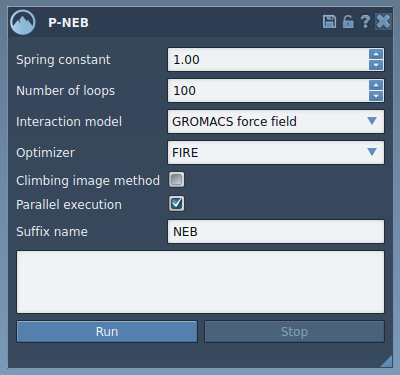
For the example workflow, set the spring constant to 1.00, the number of loops to 100, choose Universal Force Field as the interaction model, and select FIRE as the optimizer. Leave the climbing-image option unchecked for the first run; you can repeat the calculation later with it enabled if you want to try that strategy. Check parallel execution to run one thread per conformation, and enter NEB as the output suffix.
These values are the tutorial’s starting settings, not universal parameters for every molecular system. Treat them as a reproducible baseline, and examine the resulting structures rather than assuming that a completed calculation alone establishes that the pathway is suitable for your scientific question.
Run it on a path
In the Document view, select the path node, then click Run in the P-NEB app. When the Universal Force Field setup asks whether to use existing bonds, choose to use them and confirm. Initialization and computation then begin; the status bar shows progress.

When optimization finishes, SAMSON creates a new path. Select it and inspect its motion in the document. Double-clicking a path starts or stops its animation, which is a quick way to review how the atoms move between states. You can also inspect the new path with the Inspector, or use the path’s context-menu options.

If your input is a set of conformations
Select the conformations in the Document view and click Run. Confirm the existing-bonds option when prompted by the force-field setup. The optimized conformations appear as a new set in the document, where you can double-click them to restore the corresponding atom positions. If you plan to repeat this workflow, consider combining the conformations into a path first: select them and choose Conformation > Create path from conformations in the context menu.
A useful way to think about the workflow is: generate a candidate route, refine it with P-NEB, and then inspect the output. P-NEB is a path-optimization step, not a replacement for choosing meaningful endpoints or generating a reasonable initial sequence.
For the complete tutorial, examples, and related workflows, learn more in the P-NEB documentation.
Note: SAMSON and all SAMSON Extensions are free for non-commercial use. Get SAMSON.