



When studying transitions between molecular states, a common challenge in computational chemistry is building a reliable minimum energy path connecting two conformations. This is essential for exploring reaction mechanisms, ligand unbinding, or protein conformational changes. But what’s the most efficient way to apply the Nudged Elastic Band (NEB) method to this problem—should you work with individual conformations or a full-fledged path?
In SAMSON, researchers can use the Parallel Nudged Elastic Band (P-NEB) Extension to optimize transition paths with impressive flexibility. However, the method you choose—applying NEB directly to a path vs. to a set of conformations—can significantly impact both workflow speed and result quality.
Two Ways to Run NEB
1. NEB on a Path:
Paths in SAMSON are continuous transitions (trajectories) between molecular states. These can result from simulations or be built from interpolated conformations. Running P-NEB on a path means optimizing a set of intermediate structures already ordered along a trajectory.
This approach has several advantages:
- Faster execution, especially on complex systems.
- Smoother results due to pre-ordered path continuity.
- Direct animation and inspection possibilities within SAMSON.
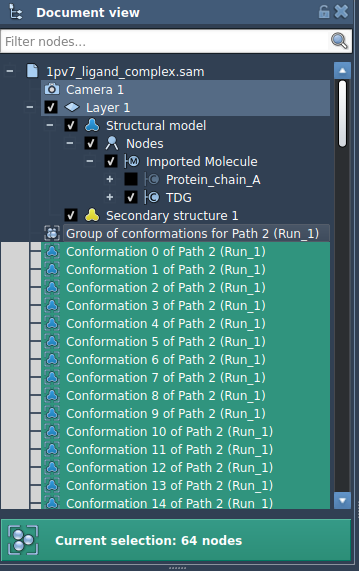
You simply select a path in the Document view and hit “Run” in the P-NEB app. The computation starts immediately, and once done, the resulting optimized path (with suffix _NEB) appears alongside the original.

2. NEB on a Set of Conformations:
Alternatively, you might start with a group of manually created conformations (e.g., snapshots of relaxed states, interpolated intermediates, etc.). While this method offers precise control over the structures included, it has important caveats:
- Longer computation time for the same number of frames.
- Harder to interpret without converting into a path.
Before running P-NEB on conformations, SAMSON offers a helpful shortcut—combine these conformations into a path using:
|
1 |
Conformation > Create path from conformations |
This conversion improves both performance and clarity.
Which Should You Choose?
As a general guideline:
- If you already have a continuous trajectory (e.g. from interpolation or simulation), prefer applying P-NEB directly to the path.
- If you only have a few discrete conformations, you can use them as-is, but consider converting to a path for better efficiency.
This small decision can save you minutes—or even hours—on large systems. It also improves the visualization: optimizations on paths are easier to animate and inspect in SAMSON’s user interface.
To learn more about setting up and running the Parallel NEB method in SAMSON, refer to the original documentation page:
Optimize Transition Paths with the Parallel Nudged Elastic Band Method
SAMSON and all SAMSON Extensions are free for non-commercial use. You can get SAMSON at https://www.samson-connect.net.