



For molecular modelers dealing with polymers, flexibility is key. Whether you’re exploring polymers for materials science or designing synthetic biopolymers, you often start from specific molecular fragments or building blocks. But turning those fragments into reusable, structured monomer units can be a tedious and error-prone process — especially when handling custom chemistry or unusual connectivities.
This is where SAMSON’s Polymer Builder simplifies things. With its intuitive monomer registration system, you can define custom monomers from any molecular fragment and reuse them to build complex, ordered polymer chains — all inside an interactive graphical environment. This blog post walks you through how to register your own monomers with full control over connection atoms and atom-level precision.
Why Register Custom Monomers?
In many molecular design projects — think conjugated systems, drug-polymer hybrids, or unusual side-chains — predefined monomer libraries fall short. You need your own fragments, often built from experimental data or quantum-optimized structures. By registering custom monomers, you can:
- Precisely define connection points.
- Reuse specialized units in polymer sequences.
- Visualize and compute molecular weight and geometry before generation.
- Avoid manual bond-drawing and reduce structural errors.
Step-by-Step: Registering Your Monomer
After installing the Polymer Builder, follow this quick process:
- Select your desired molecular fragment in SAMSON’s Document view or Viewport.
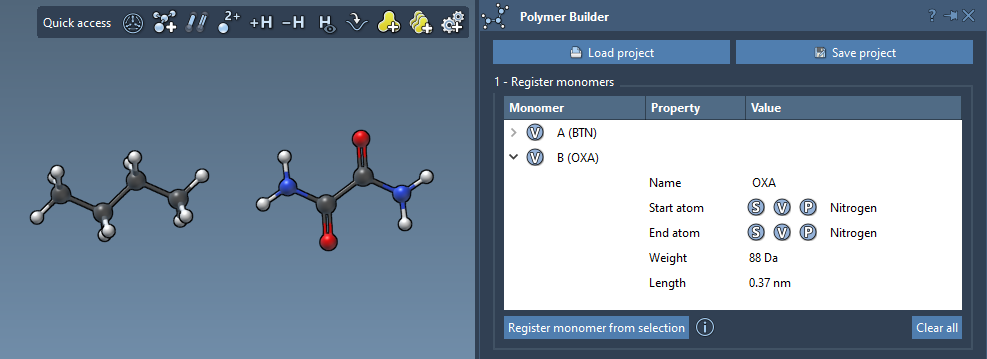
- Click Register monomer from selection. SAMSON will automatically detect likely
start and end atoms at opposite sides of the fragment.
You can further refine this selection using keyboard shortcuts:
- S – Assign a start or end atom from the currently selected atom.
- P – Pick atom from a list.
- V – Highlight atoms or molecule for visual inspection.
Each registered monomer gets an automatic ID (like A, B, etc.), and you’ll see calculated properties such as:
- Molecular weight (in Daltons)
- Distance between connection atoms
This visibility makes it easier to ensure consistency in your polymer architecture.
Tips and Notes
- You can name your monomers or let SAMSON use the detected residue/group name.
- If you remove or add atoms to a registered monomer, SAMSON will automatically deregister it to prevent inconsistencies.
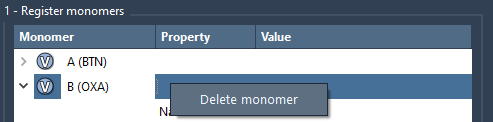
- To remove a monomer, right-click it in the table and choose Delete monomer. Or use Clear all to reset the list entirely.
This approach gives you full control over how monomers are defined and used. From there, you can arrange them into sequences or full polymers using Polymer Builder’s intuitive sequence editor and generation tools.
You can learn how to go from monomers to full polymer chains in the complete Polymer Builder documentation.
SAMSON and all SAMSON Extensions are free for non-commercial use. Learn more and download at https://www.samson-connect.net.