



Building a polymer model one connection at a time can become tedious fast. Repeating the same fragments makes manual assembly especially error-prone: a missed connection, an unintended bond, or an unclear chain boundary can mean rebuilding the structure. Polymer Builder offers a more systematic workflow: register molecular fragments once, reuse them as monomers or sequences, then describe the chain you want with a compact expression.
Start with connection points, not just fragments
A monomer is more than a piece of molecular structure. Polymer Builder needs to know where one unit connects to the next. Begin with a candidate fragment in the SAMSON document, select it, and choose Register monomer from selection. The app automatically proposes start and end atoms at opposite ends of the fragment. Check those choices against the way you intend the fragment to participate in the chain.
If the proposed atoms are not the right connection sites, you can set an atom from the current selection with S, choose one from a list with P, or highlight atoms and structures with V. Thinking about these endpoints early is useful: the direction between them contributes to the generated polymer’s shape. Each registered monomer receives a unique letter, making it easy to refer to later.
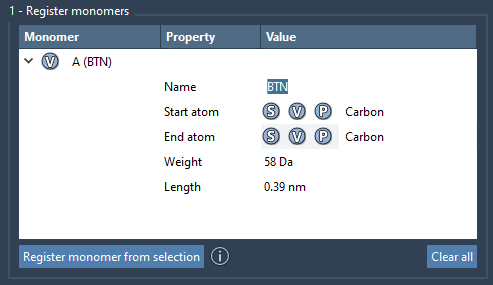
The monomer table also reports molecular weight and the distance between the start and end atoms. These values help you inspect the registered building blocks before composing a chain. If the original structure is changed—for example, by adding or removing an atom—the monomer is deregistered, so keep an eye on the table if you edit source fragments.
Turn repetition into a reusable sequence
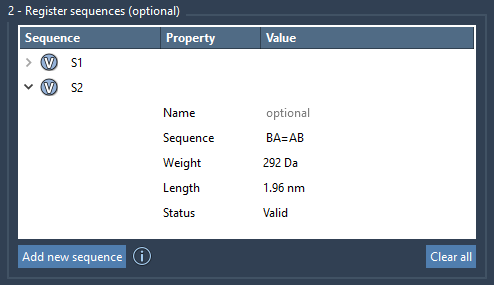
When a design contains a recurring pattern, register that pattern as a sequence rather than repeatedly typing individual monomer letters. Choose Add new sequence and enter the monomer IDs; for example, ABBA. Sequences receive identifiers such as S1 and S2, which can then stand for longer sections of a polymer. The status property reports whether a sequence is valid, and the V button can highlight the monomers it uses.
Bond notation is worth checking before generation. Connections default to single bonds; use = for a double bond and # for a triple bond. For example, A=B describes a double-bond connection between A and B. A quick review of the sequence and its status can catch a typo before you move on to a larger expression.
Describe the chain compactly
In the polymer expression, combine monomer and sequence identifiers, repeat counts, and bond notation. For example, 2*AB represents ABAB, while 2*S1 + 2*S2 repeats each registered sequence twice. Expressions such as AB=BA and AB#BA specify double- and triple-bond connections between the indicated sections.
This compact notation is especially useful when comparing alternative chain designs: you can change the order, repeat count, or bond type in the expression instead of reconstructing every fragment manually. Polymer Builder displays predicted molecular weight and length below the expression. Treat these as planning estimates, then inspect the generated structure rather than assuming a prediction confirms geometry or suitability for a particular application.
Generate, inspect, and refine
After clicking Generate polymer, the app builds the chain using the directions between monomer start and end atoms and removes excess hydrogens at connection sites. The advanced options let you adjust hydrogens at connection atoms based on valence and try to avoid clashes; clash adjustment may introduce slight curvature. These settings affect how the structure is assembled, so review the result visually and make the choices that fit your workflow.
If you want to refine the generated structure, SAMSON’s built-in minimizer is available through Edit > Minimize. The documentation notes that this minimizer uses the Universal Force Field. Minimization is a subsequent modeling step, not a substitute for checking the connectivity and geometry you intended. You can save the selected polymer with Home > File > Save selection as…, or save the full project to preserve the monomer and sequence tables for later work.
The practical payoff is a repeatable workflow: define connection points carefully, reuse patterns, express variations compactly, and inspect the resulting structure. For the full tutorial and interface details, see the Polymer Builder documentation.
Note: SAMSON and all SAMSON Extensions are free for non-commercial use. Get SAMSON.