



Building custom polymers can quickly become complex—especially when you’re not just connecting one identical monomer after another, but working with patterned sequences. Many computational chemists and molecular designers struggle with modeling repeat units that reflect experimental conditions or functional motifs.
If you’re trying to simulate realistic copolymers or explore the effect of block structures, manually assembling sequences atom-by-atom is error-prone and time-consuming. Fortunately, the Polymer Builder extension in SAMSON offers a practical way to register, preview, and assemble sequence-based polymers without leaving the molecular modeling environment.
Capture Monomer Sequences, Not Just Units
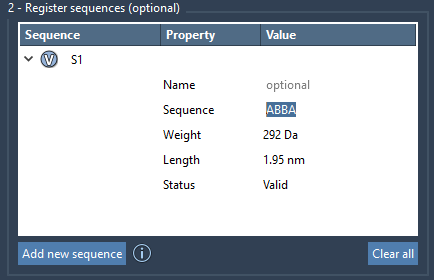
Once you’ve registered individual monomers (denoted with IDs like A, B, etc.), the real step-change in modeling comes with registering monomer sequences. For example, a block like ABBA can be defined a single time and reused across a polymer design. This helps not only with logical clarity but also maintains consistency across polymer variants.
The Interface at a Glance
In the Polymer Builder app, simply click Add new sequence to start:
- Enter any valid combination of registered monomer IDs (e.g.
ABBA). - The sequence will appear in a table with its predicted molecular weight and length.
- Click the V icon beside any sequence to visualize its monomers in the molecular viewport.
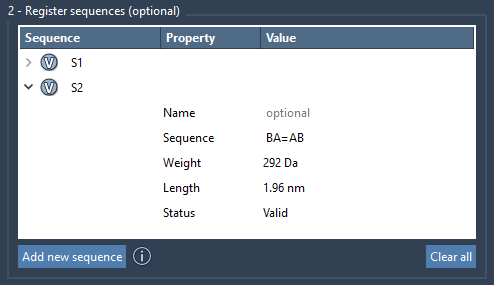
An important benefit is the ability to define bond types directly in the sequence. For example:
A=B: ConnectAandBusing a double bondA#B: ConnectAandBusing a triple bond
This is especially useful for modeling conjugated systems such as organic semiconductors, where bond types influence electronic behavior.
Name and Organize
Polymer Builder allows renaming sequences to group related designs or experimental setups. For instance, you might label certain sequences as backbone or responsive domain. Organizing complex polymers becomes much easier when you can reuse predefined sequence elements with informative names.
Real-Time Error Feedback
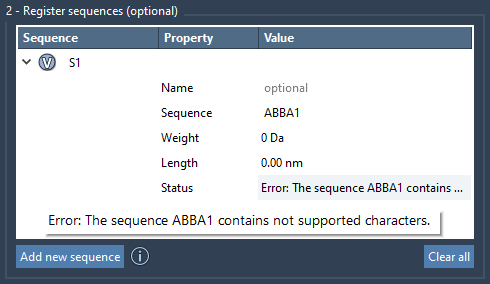
Inputs are validated on the fly. If the sequence contains invalid identifiers or syntax, Polymer Builder flags the issue immediately in the “Status” column. This cuts down debugging time and offers a smoother experience, even when dealing with long or nested sequences.
Reversible Editing & Cleanup
Every sequence you define appears in a table where it can be modified at any time. Right-clicking lets you delete a sequence, or you can clear everything to start fresh. The table interface is particularly convenient when you’re exploring different block arrangements for screening simulations.
Conclusion
By offering sequence registration on top of monomer design, Polymer Builder enables a thoughtful approach to custom polymer modeling. Whether you’re assembling peptide motifs, designing donor-acceptor polymers, or simulating polymer brushes, sequence definitions help bring clarity and reproducibility to your projects.
For a full overview of Polymer Builder, including how to generate polymers from sequences and minimize them, check out the complete documentation: Polymer Builder Documentation.
SAMSON and all SAMSON Extensions are free for non-commercial use. You can download SAMSON at https://www.samson-connect.net.