



One of the most common and time-consuming tasks in molecular modeling is generating accurate 3D molecular structures from SMILES (Simplified Molecular Input Line Entry System) strings. Whether you’re preparing datasets for simulations, virtual screening, or property prediction, the process often involves multiple steps and tools—sometimes even manual corrections.
The SMILES Manager extension in the SAMSON platform offers an integrated and streamlined way to turn flat SMILES text into usable 3D molecular models, with no need to leave your workspace.
Why this matters
Generating 3D structures from SMILES is necessary for a range of downstream tasks in molecular design and cheminformatics. Though RDKit provides SMILES-to-3D conversion capabilities, it often requires using script-based interfaces, which aren’t accessible to everyone and lack the interactive visualization you’d want in early-stage design or analysis.
SAMSON’s SMILES Manager bridges this gap by providing a point-and-click interface built around RDKit’s robust chemistry engine, enabling chemists, bioinformaticians, and students to quickly visualize and export 3D structures from textual representations.
A quick walkthrough
Here’s how you can generate 3D structures with SMILES Manager:
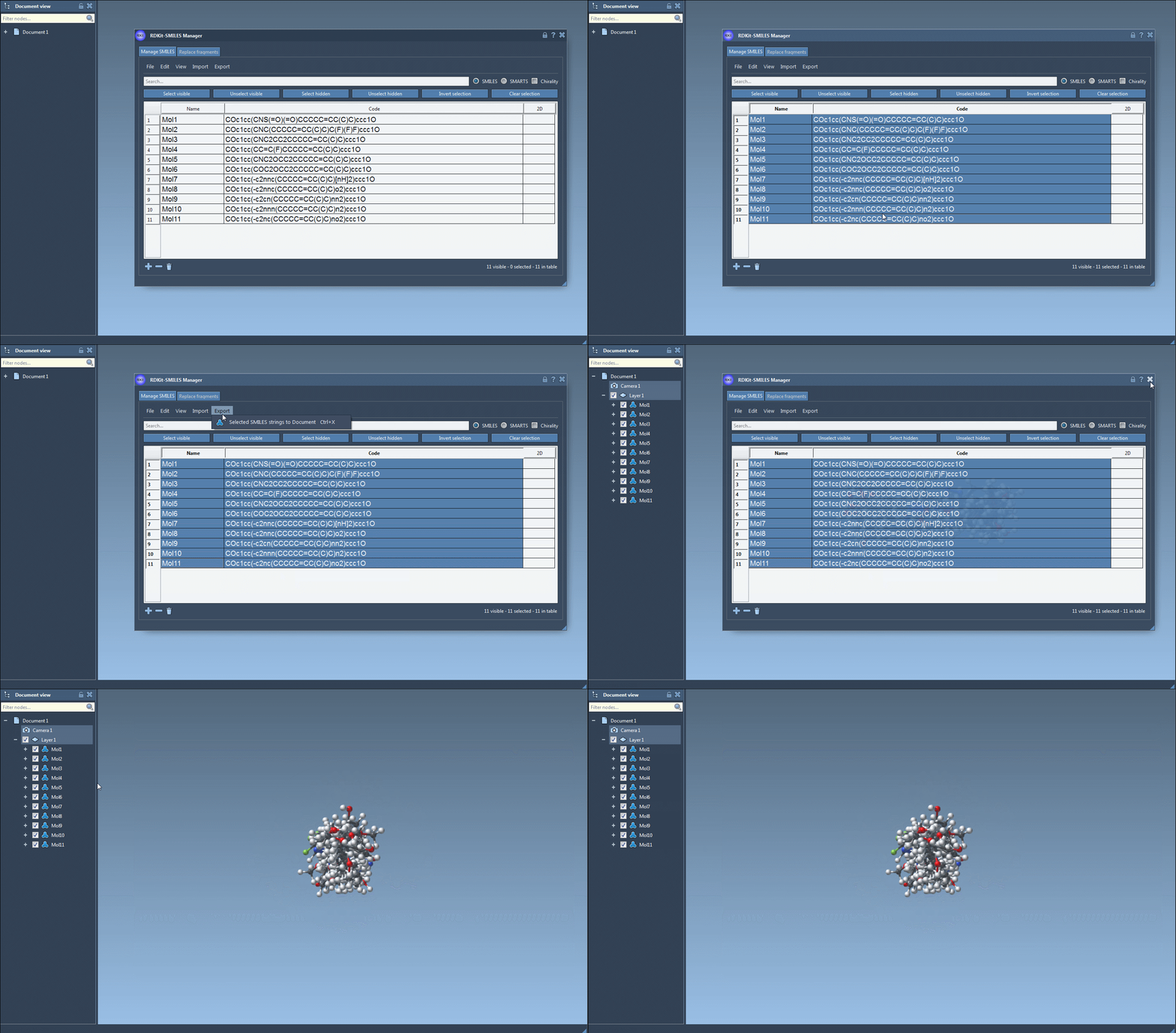
- Import your list of SMILES strings via a
.smior.txtfile directly into the Manage SMILES tab. - Optionally edit or rename any molecules in your list. Each SMILES entry is displayed with a 2D structure for quick verification.
- Select the structures you want to convert in the table.
- From the Export dropdown, click Selected SMILES string to Document. This instantly converts the selected SMILES into 3D models added to your current SAMSON workspace.
This can also be done on individual entries via the right-click menu or by using the 3D generation button in the large depiction view. Molecule names are preserved or assigned automatically based on their SMILES string. The generated 3D geometry is suitable for visualization, alignment, or further refinement.
Validation built-in
If a SMILES string is invalid, the row is highlighted, and a placeholder image is shown instead of a 2D depiction. This helps users quickly spot typos or unsupported formats before 3D conversion. When you correct the string, the preview and generation process updates automatically.
Helpful extras
- Double-click on any 2D image to open a larger view where you can also generate 3D structures.
- Save your 3D models as part of your document or export them for use in other applications.
- Rapidly compare structures side by side using navigation and zoom features built into the view panel.
One tool, fewer steps
Instead of juggling multiple tools for structure generation, region-of-interest selection, image export, and file management, SMILES Manager ties it all together. You can go from a plain SMILES string to a ready-to-use 3D structure in seconds—especially useful when working with custom libraries or unknown datasets.
To explore the full tutorial and additional features like fragment replacement and substructure search, visit the original documentation page here.
SAMSON and all SAMSON Extensions are free for non-commercial use. You can get SAMSON at https://www.samson-connect.net.