



When working with large molecular systems, navigating and managing multiple areas of interest—like ligands, active sites, water molecules, or flexible loops—can quickly become overwhelming. Re-selecting nodes every time you want to zoom in on a specific section or perform operations on it is tedious and error-prone.
If that sounds familiar, Quick Groups in SAMSON might be the time-saving feature you’ve missed.
What are Quick Groups?
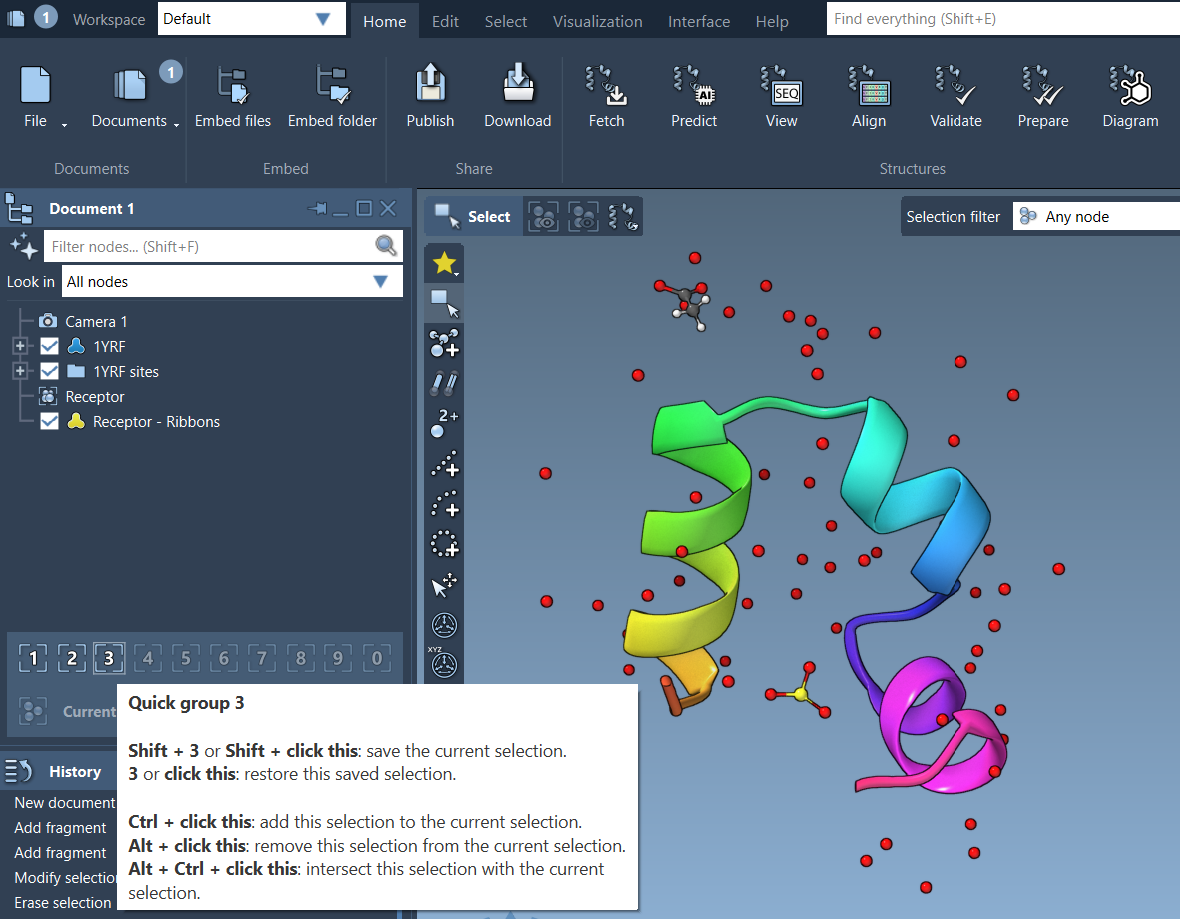
Quick Groups are temporary, unnamed groups of selected nodes (e.g., atoms, residues, molecules) that let you store and recall selections with just a keystroke. Think of them as bookmarks for your molecular system—only instead of keeping a page, they keep selections you’ve defined for easy access.
When are Quick Groups useful?
Quick Groups come in handy in many scenarios, such as:
- Highlighting and returning to the ligand in a large binding simulation
- Switching between chains or functional areas in a protein complex
- Applying different visual models to separate regions of interest
- Teaching or presenting, by quickly toggling between structural features
How to Use Quick Groups
Step 1: Assign a Quick Group
- Select the nodes you’re interested in (e.g., select the ligand in your receptor-ligand system).
- Assign that selection to a Quick Group:
- Keyboard: Press Shift + number key (e.g., Shift + 1).
- Mouse: In the Document view, hover over a Quick Group slot and Shift-click it.
You can store up to 10 Quick Groups (numbered 1–10).
Step 2: Recall a Quick Group
- To reselect a Quick Group’s nodes, just press the corresponding number key (e.g., 1).
- To zoom to it, double-tap that number key (e.g., 1 1).
- Or click on the Quick Group icon in the Document view.
Example Workflow
- Select the ligand, assign it to Quick Group 1 with Shift + 1
- Select the protein chain, assign it to Quick Group 2
- Select crystallographic water molecules, assign to Quick Group 3
- Use 1, 2, and 3 to switch selections while setting up simulations or applying representations
Some Notes
- Quick Groups are temporary—think of them as working selections, not saved annotations.
- You can assign, overwrite, and clear them effortlessly.
- They don’t persist after closing SAMSON, so use permanent Groups for long-term selection storage.
Why Quick Groups Matter
Time is precious, especially when working on molecular models with thousands of atoms. Quick Groups let you focus on your science rather than repetitive selection tasks. They’re not flashy—but once you’ve used them, it’s hard to go back.
Learn more from the original documentation.
SAMSON and all SAMSON Extensions are free for non-commercial use. You can get SAMSON here.