



For molecular modelers, efficiently analyzing and generating variations of molecular structures can often be a time-intensive task. Highlighting specific parts of a molecule to explore substitutions or modifications can dramatically accelerate workflows for tasks such as structure optimization or molecular docking. This is where SAMSON’s SMILES Manager and its ability to utilize SMARTS patterns can simplify things significantly.
Why SMARTS patterns?
SMARTS, or SMiles ARbitrary Target Specification, is a language that allows you to define substructures or patterns in a molecule. In SAMSON’s Positional Analogue Scanning feature of the SMILES Manager, SMARTS patterns make it extremely convenient to locate specific fragments or atoms within a molecule for precise modifications. Whether you’re working on optimizing a ligand, designing analogues, or simply exploring substitutions, this functionality provides a clearer, faster path to achieving your goals. Here is how you can use this feature:
Defining Your Pattern
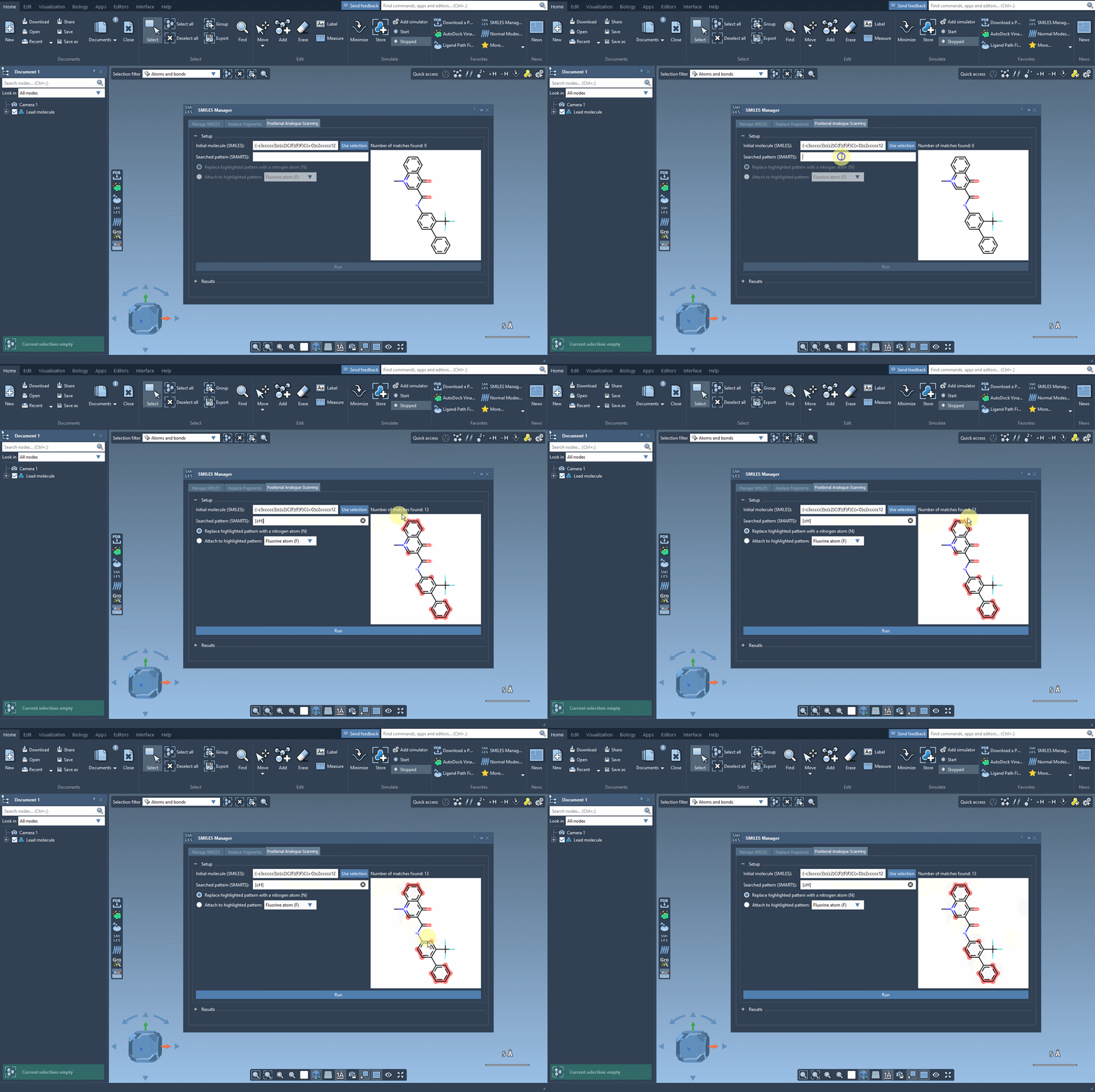
Once you’ve loaded a starting molecule into the SMILES Manager (e.g., by selecting it directly in the SAMSON interface or entering its SMILES code), the next step is to define the part of the molecule you’re interested in targeting. For example, imagine identifying aromatic carbons as a key substitution point. To do so, you would use the SMARTS code:
|
1 |
[cH] |
Simply input this code into the designated field in the interface. As shown below, the SMILES Manager will highlight all the matches found in the molecule. This visualization ensures that your pattern is correctly identified before proceeding, saving time and reducing errors.
What Comes Next?
Once the pattern is recognized in the molecule, you can proceed to either replace it with a specific atom or group or attach new groups to it. For example, replacing an aromatic carbon with nitrogen can help you explore electronic effects and its implications on the molecule’s properties. Similarly, attaching functional groups like fluorine or methyl groups could reveal interesting changes in molecular behavior. The SMILES Manager interface makes such modifications intuitive with simple controls and rapid feedback.
Practical Applications
Finding and acting on patterns with SMARTS is highly beneficial in:
- Generating series of analogues for SAR (Structure-Activity Relationship) studies.
- Exploring potential binding interactions by substituting or enhancing specific fragments.
- Optimizing ligands for docking experiments.
Integrating SMARTS patterns and positional analogue scanning in SAMSON provides you with a powerful and customizable way to make targeted molecular modifications, speeding up exploratory workflows in molecular design.
If you’d like to learn more about how you can use this feature, explore the full documentation for positional analogue scanning in SAMSON here.
Note: SAMSON and all SAMSON Extensions are free for non-commercial use. You can download SAMSON from here.