



For molecular modelers, flexibility and precision in constructing custom polymers are critical. Whether you are designing synthetic chains for material science or tailoring biopolymers for simulation, the ability to register and manipulate base units (monomers) efficiently can significantly speed up your workflow. SAMSON’s Polymer Builder extension offers a powerful solution for managing custom monomers, and today we’ll dive deep into the process of registering new monomers.
Why Is Monomer Registration Important?
When building custom polymers, each monomer serves as a fundamental building block. Defining these blocks with precise properties ensures a fault-tolerant design workflow, allowing you to construct polymers with accurate structural patterns and predictable molecular weights.
In SAMSON, monomer registration allows you to tailor unique fragments to your needs while maintaining flexibility through automation features, such as automatic detection of connection atoms at the start and end of a monomer. Let’s explore how this is done.
Step-by-Step Guide to Registering Monomers
- Select a Monomer Fragment:
Use SAMSON’s selection tools to choose a molecule (monomer unit) from the Document view or Viewport. This will serve as the base template for your new monomer. - Register Monomer:
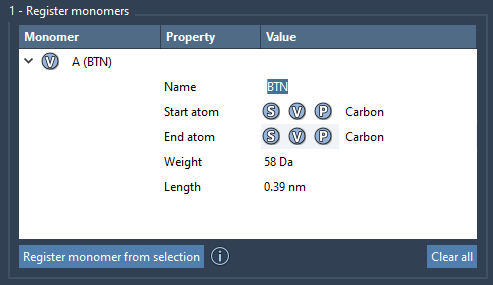
Click on Register monomer from selection. The tool will automatically identify start and end atoms for the new monomer based on the selected structure. These atoms will serve as connection points for polymer generation. - Override Connection Atoms (if needed):
If you want to customize the start or end atoms manually, use the following options:- S: Set atom based on your current selection in the Viewport.
- P: Pick connection atoms from a list of available atoms within the structure.
- V: Visualize the structure or specific atoms for confirmation.
- Monomer Properties:
Each registered monomer is assigned a unique alphabetical identifier (e.g.,A,B,C). You can also view key properties in a table, such as molecular weight and the distance between start and end atoms. - Modify or Delete Monomers:
Want to revise? You can edit registered monomers in the table or remove them using right-click > Delete monomer. To clear all entries, simply click Clear all.
Additional Notes for Advanced Users
If your selected structure contains a single residue or structural group, the monomer name will derive from this. Otherwise, you can assign a custom name to ensure clarity in applications like grouped structural arrangements within polymers.
It’s worth noting that if your monomer’s structure changes (e.g., an atom is added or removed), the system will deregister it to prevent errors in subsequent workflows.
Why Use SAMSON?
Registering custom monomers within SAMSON ensures accurate, reusable building blocks for advanced molecular design. By leveraging its intuitive interface and automation tools, you can eliminate repetitive tasks and focus on innovation. Whether your projects are in material science, pharmaceutical research, or simulation rendering, organizing monomers is a cornerstone for success.
Learn More
To dive deeper into the Polymer Builder’s capabilities and streamline your molecular design workflows, explore the full documentation page at Polymer Builder tutorial.
Note: SAMSON and all SAMSON Extensions are free for non-commercial use. Download SAMSON today at https://www.samson-connect.net.