



A molecular structure can look busy for two very different reasons: the whole system may be drifting or rotating, or parts of the molecule may genuinely be moving relative to one another. If you measure fluctuations before accounting for overall motion, those effects can get mixed together—making it harder to spot the flexible loop, domain, or residue you actually care about.
Root mean square fluctuation (RMSF) helps answer a more local question: how much does each selected feature move over the frames of a path, once overall motion has been removed? In SAMSON’s Path Analyzer, every frame is first aligned using a Fit set. RMSF is then calculated for the features in the Measured set. These two selections have different jobs, and choosing them thoughtfully is central to making the result useful.
Separate alignment from measurement
The Fit set is the part of the structure used to align frames and remove overall translation and rotation. The Measured set is what you want to inspect for fluctuation. They may overlap, but they do not have to: for example, you might use a stable part of a protein for alignment and measure a loop that moves relative to it.
This distinction offers a practical way to troubleshoot a surprising plot. If many features appear to fluctuate together, consider whether the Fit set captures a stable part of the system well. A fit set that includes the very region you are investigating may also influence how the frames are aligned. Try a stable reference region when appropriate, then compare the resulting profiles. The goal is not to make the curve look a certain way; it is to make the alignment match the question you want the analysis to answer.
What the number means
For an atom a, RMSF is the square root of the average squared distance between its aligned position in each frame and its average position across the frames:
RMSF_a = sqrt((1/T) Σ_t ||r̃_a(t) − ⟨r̃_a⟩||²)
Here, T is the number of frames, r̃_a(t) is the aligned position of atom a in frame t, and ⟨r̃_a⟩ is that atom’s average aligned position. In plain language, a larger RMSF means the atom’s positions vary more across the frames being analyzed. RMSF is a measure of positional variation in the selected path—not, by itself, a verdict that a region is unstable or functionally important.
Choose the feature size to match your question
Want to locate individual mobile atoms? Use atom selections as measured features. Want a residue-level view? Select residues or residue-based groups. For a feature containing multiple atoms, Path Analyzer displays the average of the atom-wise RMSF values for that feature. That detail matters: a residue’s displayed value is not a separate calculation of the motion of its center, but an average of its atoms’ RMSF values.
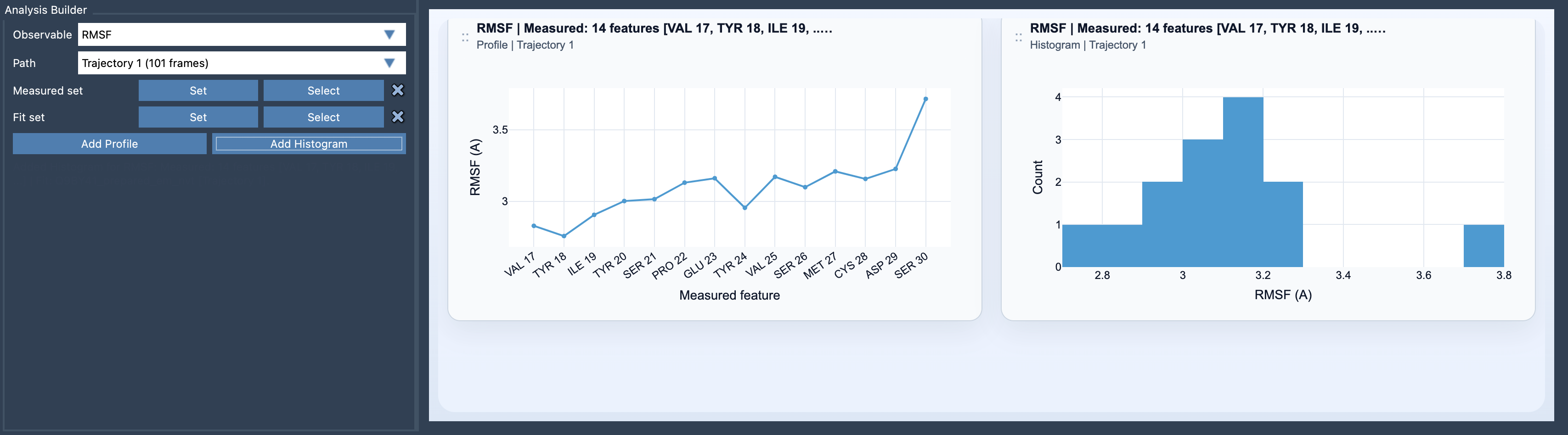
After choosing RMSF as the observable and selecting a path, define both sets and add either a Profile or a Histogram. The profile shows values feature by feature, which is useful for locating where fluctuations are concentrated. The histogram shows their distribution, helping you see whether most measured features have similar amplitudes or whether the values span a wider range. These are two views of the same analysis, so use the one that best supports the question you are asking.
Read peaks as clues, not conclusions
A high point in a profile identifies a feature with greater positional variation in the analyzed frames. It is a good place to investigate, not a complete biological explanation. Check which feature the point represents, how the Fit set was defined, and whether the selected path contains the motion you intended to study. In SAMSON, double-clicking a profile point selects its corresponding feature, making it easier to connect a plot value to the molecular structure.
One useful habit is to state your analysis question before making selections: “Which residues fluctuate relative to this stable region?” or “Which atoms vary most across this path?” Then choose the fit and measured sets accordingly. This makes the plot easier to interpret and helps prevent a common mix-up: treating motion of the entire structure as if it were local flexibility.
Learn more in the RMSF documentation.
Note: SAMSON and all SAMSON Extensions are free for non-commercial use. Get SAMSON.