



Master Atomic Manipulation with SAMSON’s Simple Script Extension
As a molecular modeler, achieving precision in shaping and editing nanoscale structures is a vital part of your work. However, learning how to implement scripts to manipulate atomic properties efficiently can feel daunting. This blog post introduces you to the Simple Script Extension, available in the SAMSON molecular design platform, which simplifies atomic selection and editing at the nanoscale using mathematical expressions and scripting techniques.
Why Simple Script?
The Simple Script Extension is your introduction to scripted atom editing. Do you want to modify atomic coordinates effortlessly? Adjust visibility for specific atoms or create intricate nanoscale shapes from scratch? This extension empowers you to do all of that in just a few lines of code.
For instance, imagine creating a sinusoidal pattern in a graphene sheet or producing a detailed nano-batarang inspired by Batman. These fascinating feats are achievable with minimal scripting effort, letting you transform atom manipulations into an artistic and scientifically valuable experience.
Getting Started with Simple Script
Before diving into action, here’s what you need to do:
- Install the Simple Script Extension from SAMSON-Connect.
- Explore the examples sequentially as they build on one another, helping you to grasp the syntax and features step by step.
Features and Examples
The Simple Script Extension enables you to control various atom attributes, such as positions, visibility, formal charge, and much more. Through scripting, you can perform operations like selecting atoms based on criteria, modifying coordinates, or designing custom patterns. Below, we highlight a few practical examples:
1. Creating a Wavy Surface
Set the z-coordinate of each atom in a periodic sinusoidal pattern:
|
1 |
a.z := sin(a.x * π / 12); |
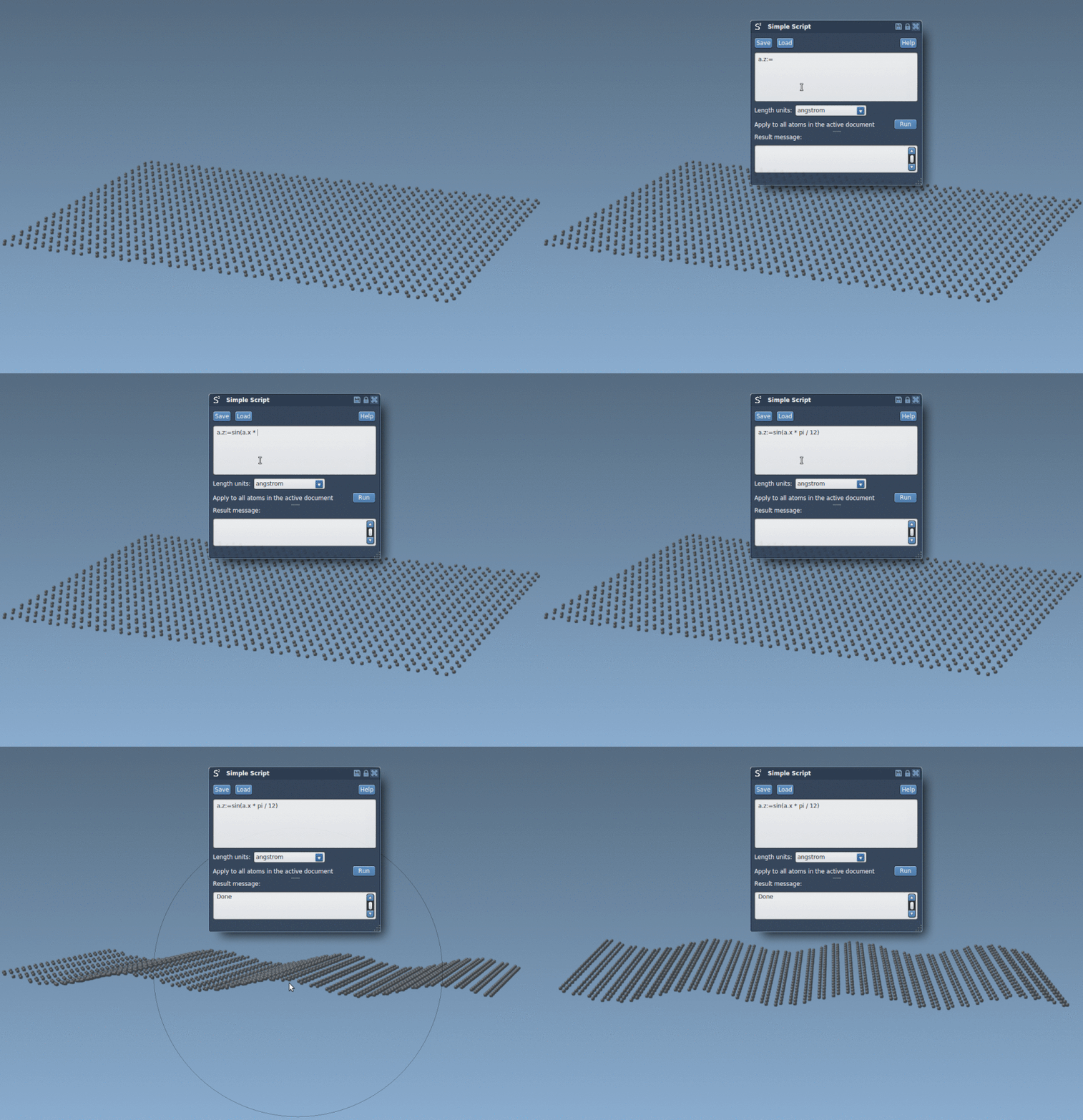
2. Select Specific Atoms
Want to isolate atoms based on spatial criteria? Consider selecting atoms within a certain sector, like this:
|
1 |
if (a.x > 0 and a.y > 0) n.selectionFlag := 1; else n.selectionFlag := 0; |
3. Build Models with Complex Shapes
The extension also empowers you to create nanoscale designs, such as the iconic Batman’s batarang, by scripting its mathematical geometry. This is an excellent way to explore how scripting can be fused with creativity. Check out the result below:

Scripting Flexibility
In addition to basic attribute adjustments, the extension supports loops, conditional statements, switches, and logical operations. For example, manipulate atom properties in nested loops, dynamically adjust flags, or implement geometric transformations like rotations. Here’s how you can rotate atoms about the x-axis by an angle:
|
1 2 3 4 5 6 7 |
var theta := π/4; var y_old := a.y; var z_old := a.z; a.y := y_old * cos(theta) - z_old * sin(theta); a.z := y_old * sin(theta) + z_old * cos(theta); |
The First Step in Your Journey
The Simple Script Extension is designed to make atomic manipulation approachable and intuitive for both beginners and experienced users. It’s more than a tool—it’s a stepping stone toward mastering the scripting techniques you’ll need for advanced molecular modeling.
Ready to dive deeper? Explore the original documentation at this link for more information and advanced examples.
Note: SAMSON and all SAMSON Extensions are free for non-commercial use. You can get SAMSON at SAMSON-Connect.