



For molecular modelers looking to perform precise customizations on atomic structures, SAMSON’s Simple Script Extension offers a powerful and versatile solution. Whether it’s selecting specific atoms based on characteristics, modifying atomic properties, or creating customized nanoscale shapes, this tool allows users to interact with molecular structures using scripts. Here, we’ll dive into how you can maximize your atomic scripting capabilities to save time and enhance your workflows.
The Challenge: Streamlining Atom-Level Customization
Molecular modelers often face repetitive, tedious tasks requiring precise selection and editing of atoms based on complex criteria. For instance, imagine needing to isolate all carbon atoms in a molecule or adjust the z-coordinates of atoms within a specific radius. Manually completing such tasks in vast molecular models can be time-consuming and error-prone. This is where the Simple Script Extension in SAMSON provides an efficient alternative.
Scripting Basics: The Foundations of Simple Script
The Simple Script Extension allows you to define variables and use mathematical expressions to manipulate atomic properties. You can adjust attributes like position (a.x, a.y, a.z), visibility (a.visibilityFlag), selection (n.selectionFlag), charge, and more, all within your active molecular document.
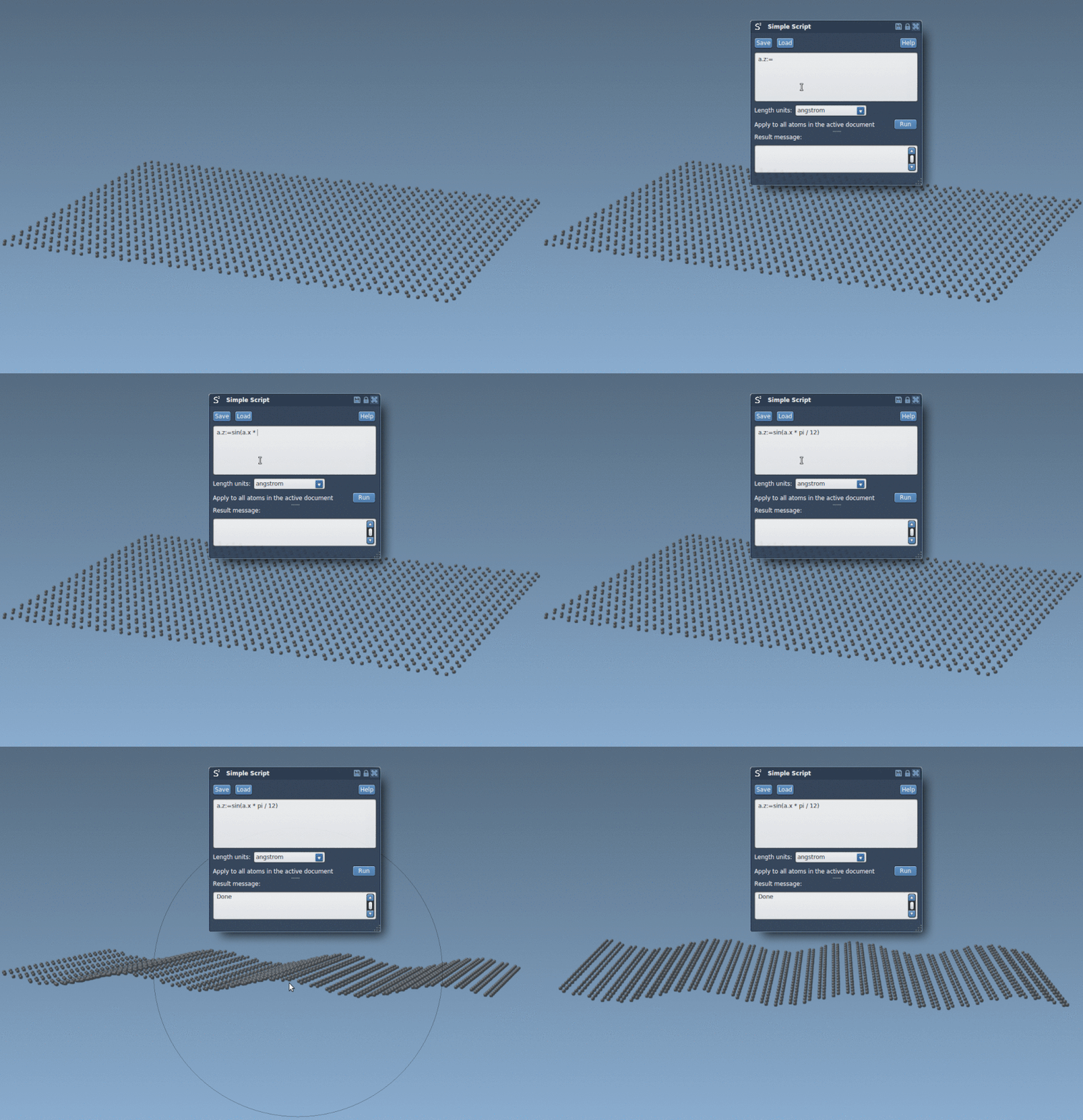
Let’s start with an example. Suppose you want to set the z-coordinate (z) of all atoms to follow a sinusoidal pattern based on their x-coordinate. This can be achieved with a single line of script:
|
1 |
a.z := sin(a.x * π / 12); |
Such scripting power allows you to introduce functional changes to your molecular model quickly and effectively. Below is a visual example of a sinusoidal graphene sheet that was generated using the script above:
Atom Selection Examples
One of the Simple Script Extension’s most useful features is its capability for selection using logical, mathematical, and conditional statements. Check out this example: selecting all atoms whose x and y coordinates are positive:
|
1 2 3 4 |
if (a.x > 0 and a.y > 0) n.selectionFlag := 1; else n.selectionFlag := 0; |
Or, for a more concise approach, it can be written as:
|
1 |
(a.x > 0 and a.y > 0) ? n.sf := 1 : n.sf := 0; |
This logical selection can streamline otherwise tedious processes in seconds. Whether you’re working with hundreds or thousands of atoms, a properly written script saves massive amounts of time and ensures accuracy.
Creating and Applying Custom Atomic Properties
The power of scripting extends beyond basic selection. Consider cases where you need to isolate specific molecular regions or simulate functional environments. Here’s another practical example: selectively showing atoms in a spherical region with a radius of 10 units centered at (0,0,2):
|
1 2 3 4 |
if ((a.x^2 + a.y^2 + (a.z - 2)^2) < 100) a.visibilityFlag := 1; else a.visibilityFlag := 0; |
Such functionalities can lead to incredible customizations in your molecular modeling workflows, making it easier to analyze or simulate structures effectively.
Create Batman Nano-Batarangs
Beyond practical applications, Simple Script also unlocks creative potential. For instance, you can generate intricate, nanoscale representations using scripting logic. A case in point is crafting a Batman-inspired nano-batarang, as illustrated in the tutorial. This showcases how you can leverage geometric and mathematical inputs to shape molecules into complex forms.

Full details and the script for this example can be found in the comprehensive tutorial linked below.
Conclusion
The Simple Script Extension empowers molecular modelers to take control over atom-specific selection and editing with unparalleled precision. Its versatile scripting language, mathematical integrations, and user-friendly logic enable the creation of both routine and complex modifications to molecular structures. Whether you’re building, analyzing, or just experimenting with creative designs, this extension is a must-have tool for anyone working in molecular modeling.
To dive deeper into more examples and learn how to tailor these scripts to your needs, visit the full documentation page.
Note: SAMSON and all SAMSON Extensions are free for non-commercial use. You can download SAMSON at https://www.samson-connect.net.