



For molecular modelers, accurate bond representations are fundamental to meaningful simulations and analyses. The UMA Force Field in the SAMSON platform introduces a versatile solution to this need through its customizable Bond update mode. This feature provides modelers with options to dynamically or manually handle bond graphs during simulations, offering significant flexibility based on your workflow.
Why Bond Updates Matter
Bonds represent the foundation of how molecules are modeled and their properties interpreted. Whether performing structural refinements or analyzing forces, ensuring appropriate bond calculations or representations can directly impact the insights you gain. For instance, an incorrect bond graph might lead to erroneous energy and force outputs, ultimately skewing downstream analyses. Modelers require tools nuanced enough to toggle between interactive bond explorations and precise analytical confirmations.
Understanding UMA’s Bond Update Options
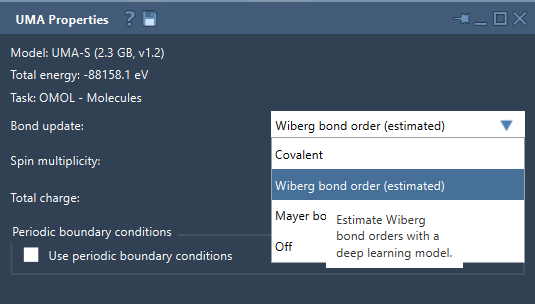
With the Bond update mode, UMA provides the following options for handling bond graphs during the simulation:
- Covalent: This mode recomputes covalent bonds dynamically based on the current molecular structure throughout the simulation. It’s ideal for systems undergoing significant structural transformations.
- Wiberg bond order (estimated): This option uses a deep-learning model to estimate Wiberg bond orders for interactive visualization.
- Mayer bond order (estimated): Like the Wiberg option, this mode estimates Mayer bond orders via machine learning, suited for quick bond order assessments.
- Off: If you prefer working with pre-defined bond graphs without alterations, you can disable dynamic bond updates entirely.
Tips for Leveraging Bond Update Modes Effectively
To maximize the value of this feature:
- Choose modes based on your goals: Use Wiberg or Mayer bond order visualizations when exploring potential interactions or bond strengths. Switch to the Covalent mode if structural transformations are central to your workflow.
- Proceed cautiously with estimated modes: For interactive sessions, estimated bond orders provide quick visual guidance. However, for critical insights, confirm models with your reference methods, as noted in the UMA documentation.
- Disable updates thoughtfully: When working on systems with predefined structures or when computational efficiency is essential, turning off dynamic updates might save valuable time.
Example Workflow for Bond Updates
When using the UMA Force Field:
- Start your simulation by launching the Edit > Simulate > Start workflow within SAMSON.
- Within the UMA Properties window, select the appropriate bond update mode from the dropdown menu (Covalent, Wiberg bond order, Mayer bond order, or Off).
- Interactively refine molecular structures if needed, or switch modes mid-simulation to inspect bonds under different assumptions.
Final Thoughts
The bond update modes available in UMA empower modelers with tools to not just simulate but also explore and refine molecular structures more interactively and flexibly. However, while modes like Wiberg bond order estimation provide rapid insights, it’s critical to remember their exploratory nature—important conclusions should be validated with precise reference methods. This balanced approach ensures both efficiency and reliability in molecular modeling workflows.
To dive deeper into the UMA Force Field’s bond update capabilities and other features, visit the official documentation page.
Note: SAMSON and all SAMSON Extensions are free for non-commercial use. You can get SAMSON at SAMSON Connect.