



Aligning molecules in 3D space can be a complex yet pivotal step in molecular modeling workflows. Whether you’re creating solvent boxes, lipid layers, or specialized nanostructures, consistent molecular orientation can dramatically improve the precision and usability of your simulations. Luckily, with SAMSON’s Molecular Box Builder, defining molecular alignment is both intuitive and flexible. Let’s dive into a practical approach to achieving optimal molecular orientation in SAMSON.
Why molecular orientation matters
Molecular orientation plays a critical role in assembling systems where alignment impacts physical and chemical interactions. For instance, some lipid bilayers or crystal-like systems require a specific orientation for stability. Without alignment, generated structures might lack the consistency needed for reliable simulations, adding to the manual correction workload.
How to set up molecular orientation
The Molecular Box Builder in SAMSON allows you to specify orientations when adding molecules into a 3D box. You can align molecules based on their principal axes to ensure that the arrangement is uniform. Here’s a step-by-step guide:
Step 1: Set the molecule in the app
- Open your molecular system in SAMSON’s Document view or Viewport. This can be an individual molecule, a group of atoms, or an entire residue.
- After selecting the molecule, click the Set button in the Molecular Box Builder app.
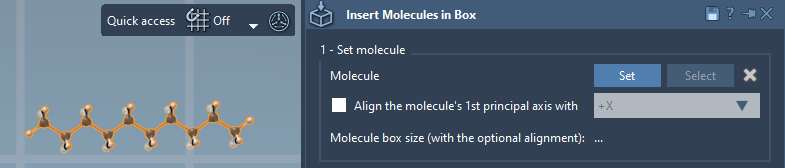
Step 2: Define molecular alignment
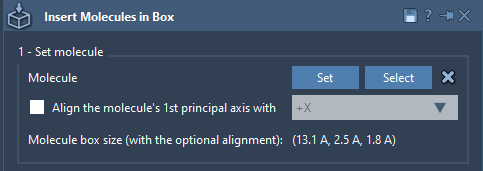
Once the molecule is set, you can choose one of the following alignment options in the app:
- No alignment: Molecules retain their original orientation.
- Align to +X / -X / +Y / -Y / +Z / -Z: The principal axis of the molecule (calculated using its moment of inertia) aligns with the chosen axis.
Pro tip: Use the alignment options to position molecules consistently along a particular direction, especially when building ordered molecular layers like lipid bilayers.
Note
You can always modify the orientation afterwards using SAMSON’s Move editors, making the process incredibly flexible.
What happens behind the scenes?
When aligning a molecular system, SAMSON automatically calculates its bounding box based on the alignment you’ve set. This ensures that the molecular arrangement adheres to the defined spatial constraints within the box, minimizing unintended overlaps or collisions.
Practical use cases
Here are ways molecular orientation can enhance your modeling:
- Building lipid layers: Avoid inconsistencies in the lipid tail orientation by aligning molecules along the Z-axis (+Z or -Z).
- Simulating crystals: For small molecules, aligning their axes consistently may resemble crystalline arrangements.
- Orderly solvent boxes: Even alignments can simplify close-proximity interaction analysis.
Conclusion
With the Molecular Box Builder in SAMSON, controlling molecular orientation is simpler than ever, saving you time while leveling up the quality of your molecular assemblies. To learn even more about creating molecular boxes and working with the various alignment options, check out the full documentation at https://documentation.samson-connect.net/tutorials/molecular-box-builder/molecular-box-builder/.
Note: SAMSON and all SAMSON Extensions are free for non-commercial use. Download SAMSON today at https://www.samson-connect.net.