



For molecular modelers, a common challenge lies in arranging molecules in a precise manner within simulation environments. Whether you’re building a solvent box, generating lipid layers, or creating complex molecular assemblies, ensuring consistent and suitable molecular orientation can be critical for accurate modeling. The Molecular Box Builder in SAMSON offers a straightforward yet powerful way to define molecular orientation during box generation. Here’s how you can make it work for you.
Why is molecular orientation important?
When populating a 3D box with molecules, their orientation often determines how well they fit together, whether they mirror real-world configurations, and whether further simulations behave as expected. Misaligned molecules can lead to unexpected clashes, inaccuracies, or even structural instability.
The Molecular Box Builder allows you to define how molecules should be oriented when added to the box, offering a blend of flexibility and precision.
Setting the molecule and defining orientation
Here’s the step-by-step guide to ensuring your molecules align correctly:
- Select the molecule or molecular system: In the Document view or Viewport, choose the molecule or group of molecules you want to populate your box with. This can be anything from full molecular systems to individual atoms, residues, or structural groups.
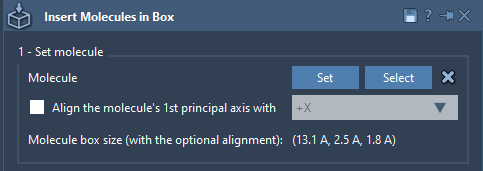
- Set orientation options: Open the Molecular Box Builder and, after selecting your molecule, choose one of the following options for alignment:
- No alignment: Molecules retain their original orientation.
- Align to +X / -X / +Y / -Y / +Z / -Z: Align the first principal axis of the molecule (determined by the eigenvector of its moment of inertia) with a specified axis direction.
As SAMSON performs these alignments, it calculates the bounding box dimensions based on the chosen alignment. This ensures the system can efficiently manage molecule placement without overlap or unexpected clashes.
Additional tips for orientation
Tip
You can move and rotate the system in SAMSON using the Move editors. This can be helpful if you need finer control prior to generating the full system.
Practical example: Aligning lipid molecules
Let’s imagine you’re preparing a lipid layer around a protein structure. To correctly define how each lipid integrates into the membrane, you’d want to ensure they align along a particular axis, such as +Z. By using the Molecular Box Builder’s alignment options, you can quickly set up a configuration where all lipids face appropriate directions consistently within the simulation environment.

Conclusion
Defining molecular alignment with SAMSON’s Molecular Box Builder is both simple and powerful, enabling precise molecule placement for various research needs. Whether you’re creating solvent boxes, lipid bilayers, or membrane environments, this feature ensures your modeling is scientifically accurate and optimized for simulation.
Explore the full documentation on properly setting molecular orientation and more here: https://documentation.samson-connect.net/tutorials/molecular-box-builder/molecular-box-builder/.
Note: SAMSON and all SAMSON Extensions are free for non-commercial use. Download SAMSON here.