



When modeling molecular systems, properly orienting molecules is a crucial step when assembling membranes, solvent environments, or any molecular structure. Misaligned molecules can lead to inaccurate simulations or cause unnecessary frustration during construction. Thankfully, with the Molecular Box Builder in SAMSON, defining molecular orientation has never been simpler.
In this post, we’ll explore a straightforward yet powerful feature: specifying molecular orientation during box population. Whether you’re setting up lipid bilayers or filling 3D boxes with molecules, understanding molecule alignment can save time and ensure accurate system building.
The Challenge of Alignment
When populating boxes with repeated molecules, their orientation often matters. For example, molecules like lipids in membranes need to be aligned along a specific axis to mimic real biological systems. Without proper alignment tools, this can be tedious, requiring manual adjustments for each individual molecule.
Orientation Options in Molecular Box Builder
The Molecular Box Builder provides intuitive orientation control, allowing you to define the alignment of molecules when filling a box. Here’s how it works:
- No alignment – Uses the molecule’s original orientation. Perfect for scenarios where orientation isn’t critical.
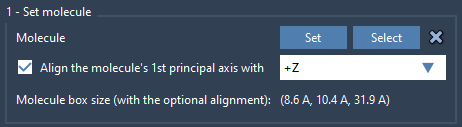
- Axis alignment – Aligns the molecule’s first principal axis (its moment of inertia’s eigenvector) with a specific direction:
+X,-X,+Y,-Y,+Z, or-Z. This ensures structural consistency across the system.
These options allow both precision and flexibility without introducing unnecessary complexity.
How to Define Orientation
- Select the molecule you wish to replicate in the Document view or Viewport.
- Open the Molecular Box Builder app (Home > Apps > Assembly).
- Click Set in the app to load the selected molecule.
- Choose the desired orientation under the alignment options: No alignment or align to axes (
+X/-X...).
Why It Matters
Consider lipid bilayers surrounding proteins: lipids must be correctly oriented to form functional layers. Using +Z or -Z alignment ensures that lipid tails point outward or inward as required. Without such alignment, assembling functional biological models can take countless hours debugging molecule orientation errors.
Additional Tips
Even after defining orientation, SAMSON provides tools to refine the positioning:
- Use Move editors to rotate and adjust molecules in the Viewport.
- Preview the bounding box to confirm correct alignment.
SAMSON automatically calculates the bounding box of molecules based on the selected orientation, ensuring that they fit perfectly inside specified dimensions.
Conclusion
Defining molecular orientation might seem like a small step, but it’s a cornerstone of proper molecular modeling. The intuitive alignment options in SAMSON’s Molecular Box Builder streamline this process, empowering researchers to build accurate, reusable systems quickly.
Ready to optimize your molecular assemblies? Learn more in the official documentation: Defining Orientation.
SAMSON and all SAMSON Extensions are free for non-commercial use. Download SAMSON at SAMSON Connect.