



If you’ve ever worked on molecular modeling, you know that precisely organizing molecules in a system can be a daunting task. SAMSON’s Molecular Box Builder comes to the rescue with tools to not only populate your 3D boxes with molecules but also align these molecules in the desired orientation. This blog post focuses on the often-underappreciated yet crucial step of defining molecule orientation and how you can leverage it effectively.
The Problem: Misaligned Structures
When setting up complex molecular systems—be it lipid bilayers, solvent boxes, or custom assemblies—randomly oriented molecules can lead to unnecessary clashes, simulation issues, or structures that don’t align with your research goals. For example, aligning lipid molecules along specific axes can significantly improve your membrane-building process.
Defining Orientation the Right Way
With Molecular Box Builder, you have the option to specify how your molecules should be oriented during placement, giving you much-needed control. Here’s how it works:
- No alignment: Molecules are added in their original orientation—a good option if orientation doesn’t impact your setup.
- Align to +X / -X / +Y / -Y / +Z / -Z: Align the molecule’s principal axis (based on its first eigenvector of the moment of inertia) with your chosen direction. This can be particularly useful for anisotropic molecules or when building systems like lipid layers.
Note
You can manually move and rotate the system later in SAMSON, using the Move editors, if further adjustments are needed.
Visualizing the Orientation Process
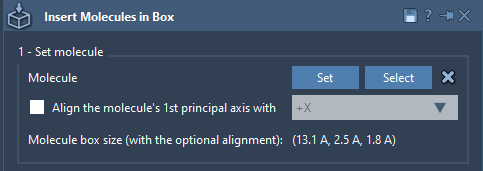
SAMSON automatically calculates the bounding box of the molecule based on the alignment, so you can clearly see its spatial arrangement. Here’s an example of how the system determines molecule size:
Practical Tips
- Use Select in the app to highlight the structure you want to align.
- If necessary, utilize the Shift + E shortcut to search for “Molecular Box Builder” in SAMSON quickly.
- Don’t forget that molecule orientation impacts how objects fit together in a box, so experiment with different axes to achieve the best results.
Making Your Life Easier
By properly defining molecule orientation, you can avoid common pitfalls in molecular designs and save time during simulations. No more worrying about structures being out of alignment or having to reposition objects manually after box generation. This feature is particularly valuable for anyone working on membrane setups or solvent environments, adding precision and speed to your workflow.
To explore this feature in more detail, check out the full documentation at this link.
SAMSON and all SAMSON Extensions are free for non-commercial use. Download SAMSON today at samson-connect.net and start exploring molecular modeling like never before!