



For molecular modelers diving into umbrella sampling workflows, deriving the Potential of Mean Force (PMF) profile is often a pivotal step that can reveal critical insights into reaction mechanisms, binding affinities, and more. However, this phase can pose challenges, especially if you’re dealing with matching subprojects for your system or handling large amounts of data. Fortunately, the GROMACS Wizard in the SAMSON platform simplifies the process with its Weighted Histogram Analysis Method (WHAM).
Why PMF Analysis Matters
The PMF profile quantifies the free energy landscape along a reaction coordinate. It’s invaluable if you’re investigating systems where molecular interactions, conformational changes, or pathway energetics need to be understood quantitatively. However, without a streamlined process, generating PMF profiles can quickly turn into a cumbersome task, especially when verifying reaction-coordinate coverage or handling inconsistent input data.
Simplifying PMF Computation with GROMACS Wizard
With GROMACS Wizard’s WHAM Analysis tab, you can compute the PMF from your umbrella sampling data with minimal effort. Here’s a step-by-step guide:
- Prepare your project folder: Ensure the project folder from your umbrella sampling workflow contains numbered subfolders corresponding to individual reaction-coordinate segments.
- Load project details: Either manually choose the project path or take advantage of the auto-fill functionality. This feature pulls data directly from your prior umbrella sampling simulation, saving time and reducing errors.
- Select the reaction coordinate: GROMACS Wizard automatically loads relevant information such as reaction-coordinate data, time range, and temperature. From the available list, select the coordinate you want to analyze.
- Fine-tune optional settings: Adjust parameters such as custom bounds, time ranges, or even the energy units according to your specific needs.
- Run the analysis: Click Compute, and the WHAM algorithm will handle the rest. Depending on your input data, computation may take seconds to minutes.
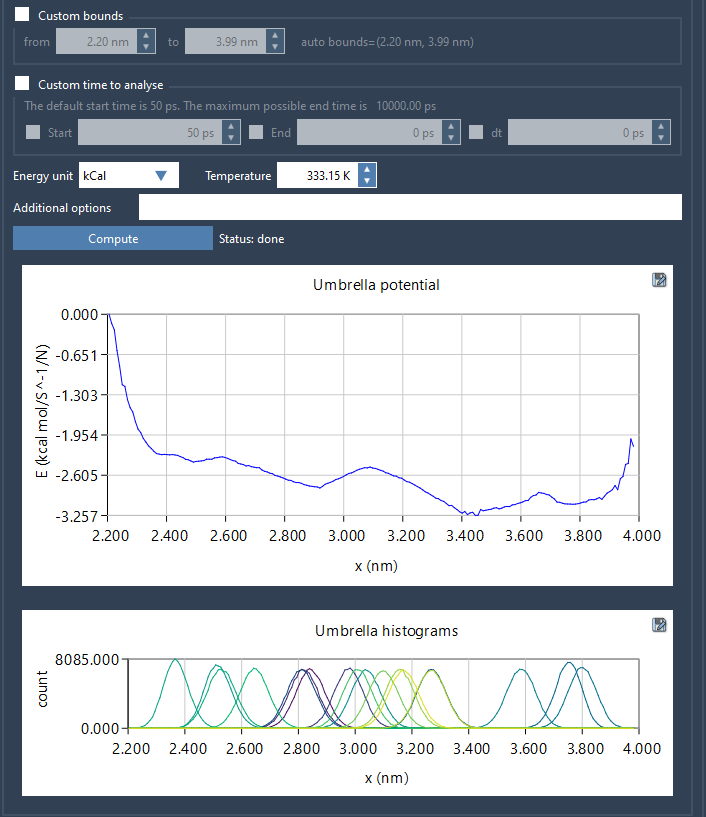
Once completed, GROMACS Wizard generates two essential plots:
- A PMF profile chart that provides the free-energy landscape
- A histogram showing the coverage of the reaction-coordinate space
Making Sense of the Results
The histogram is a particularly useful diagnostic tool. By inspecting it, you can identify poorly sampled regions where additional simulations may be required. This reduces the risk of bias or inaccuracies in your PMF profile.
All generated data—including plots, histograms, and profiles—are saved into the wham_results subfolder of your project directory. What’s more, results for previously analyzed reaction coordinates are stored, meaning you won’t need to recompute from scratch when switching between coordinates for the same setup.
Addressing Incomplete Sampling
An insufficiently sampled reaction-coordinate space can limit the accuracy of PMF analysis. If the histogram reveals such gaps, head back to the Umbrella Sampling stage and either add more simulations or extend the windows in regions with sparse data coverage.
Learn More
To dive deeper into the process or to access helpful visuals, visit the full documentation page at PMF Analysis with GROMACS Wizard.
SAMSON and all SAMSON Extensions are free for non-commercial use. You can get SAMSON at SAMSON Connect.