



For molecular modelers, visualizing and designing molecular interactions can often feel like navigating through a maze of complexity. Imagine if you could seamlessly bridge 3D molecular views with intuitive 2D interaction diagrams. Meet the Interaction Designer in SAMSON, a tool designed to revolutionize the way we visualize protein-ligand interactions and design molecules directly in 2D.
Why 2D Diagrams Matter
Protein-ligand interactions play a crucial role in drug discovery and molecular design. While 3D visualization is integral, 2D diagrams provide clarity when identifying interactions, binding pockets, residue accessibility, and structural group environments. The Interaction Designer cleverly synchronizes 2D and 3D representations, ensuring that any action in one immediately impacts the other.
Creating Interaction Diagrams with Ease
The Interaction Designer allows for automatic generation of 2D diagrams based on your selections or the entire molecular document. Here’s how it works:
- Navigate to Home > Diagram to generate the 2D interaction diagram.
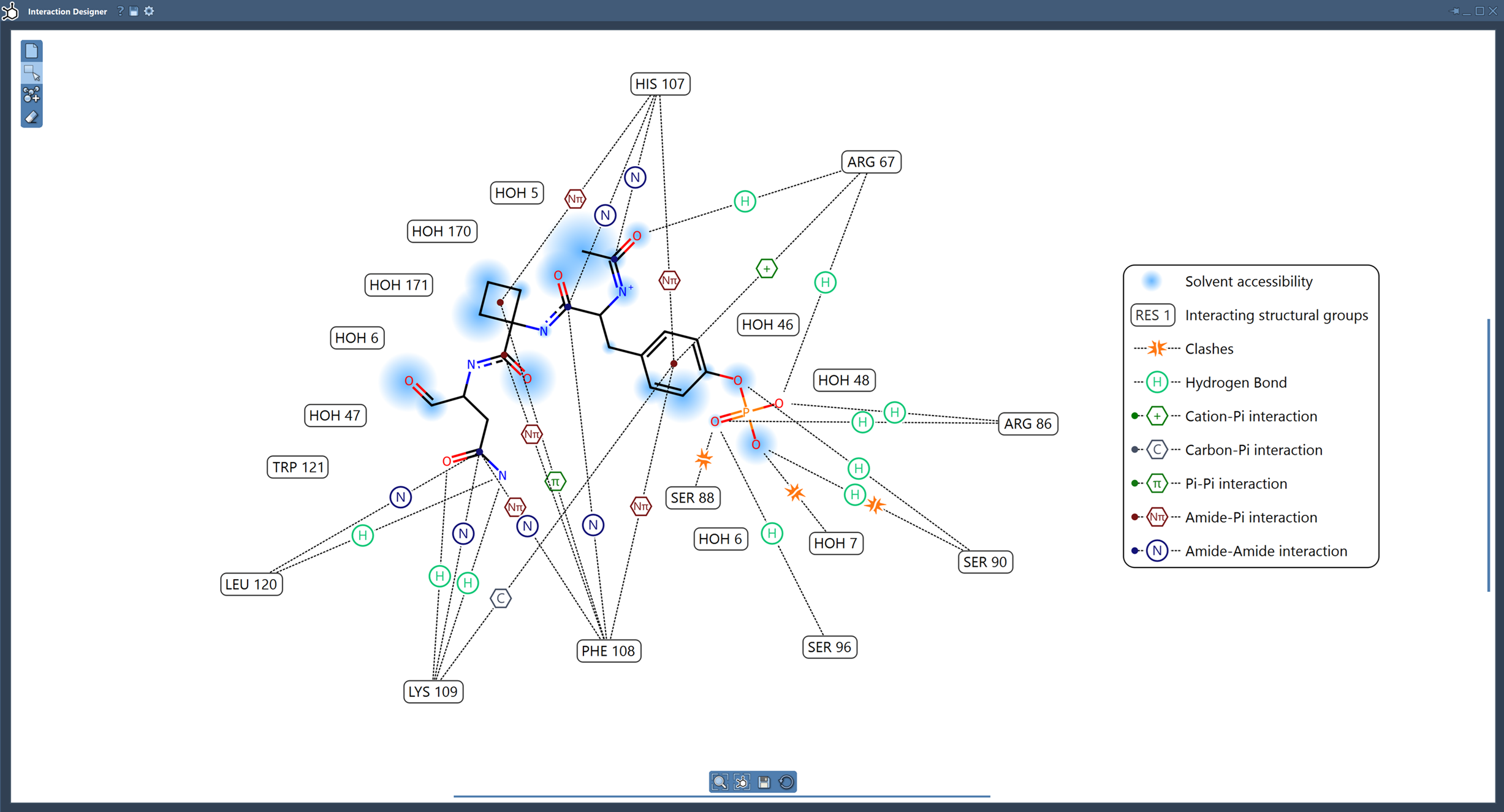
- The diagram highlights key elements like binding pockets, solvent accessibility of ligands, and interacting residues.
Not only are these diagrams highly detailed, but they are also interactive and customizable. You can select an atom or residue by clicking it and zoom into its details by double-clicking, syncing the 2D and 3D views for enriched molecular exploration.
Customization at Your Fingertips
Sometimes, an automatically generated diagram doesn’t align perfectly with your presentation or analysis requirements. That’s where customization features shine:
- Move interaction labels and symbols: Rearrange elements of the diagram with ease to manage the layout and visual clarity.
- Hide or show interactions: Click on the interaction names in the legend to toggle visibility.
- Change interaction colors: Double-click on an interaction name or icon in the legend to adjust the color, perfect for highlighting specific interactions.
Here’s an example of moving labels and customizing the colors:
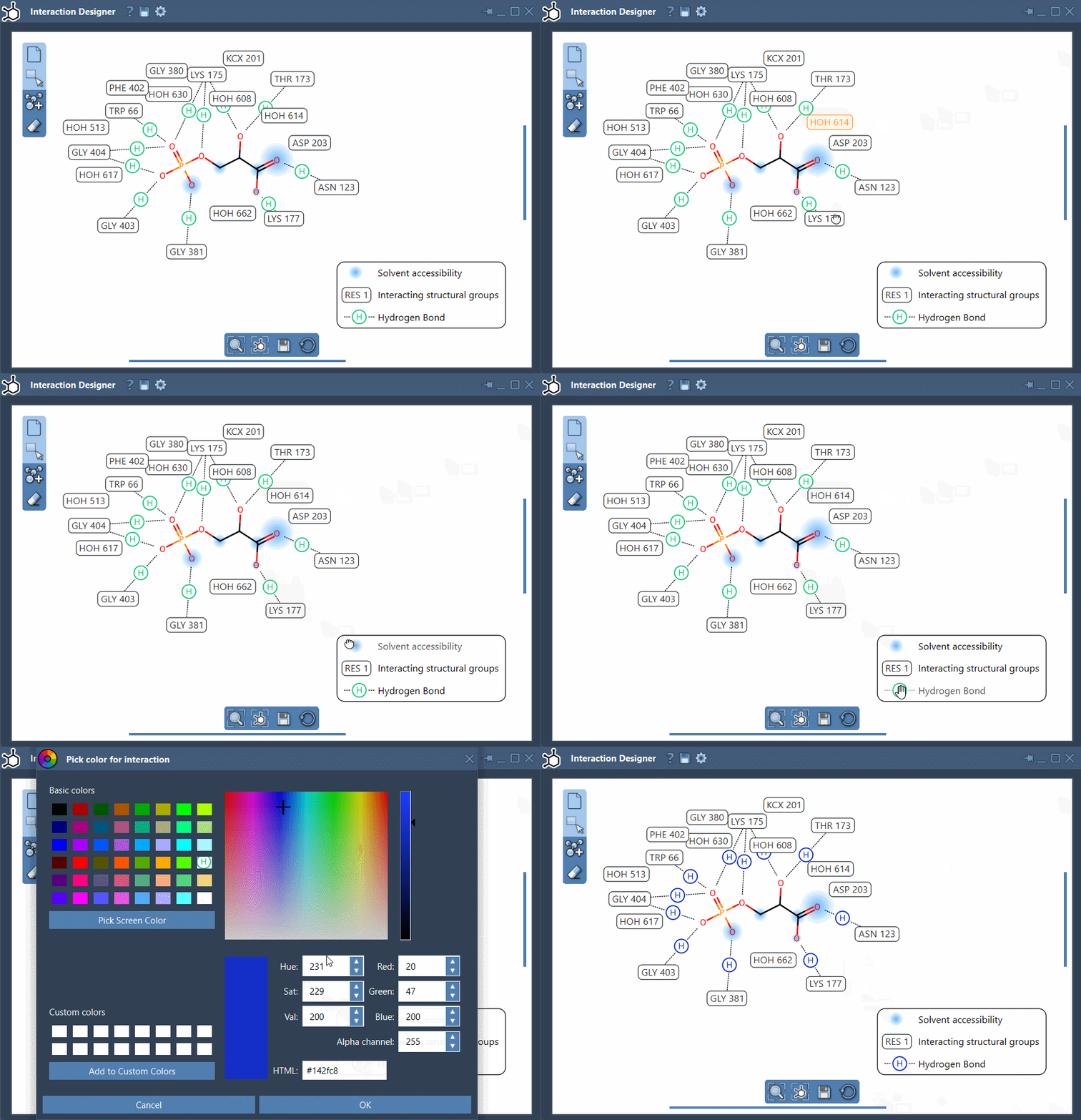
You can undo color changes at any time via the settings in the Interaction Designer window.
Features That Make Interaction Diagrams Stand Out
The Interaction Designer does more than just visualization. It offers:
- Detailed binding pocket representation for protein-ligand studies.
- Insights into solvent accessibility of ligand atoms, helping modelers understand the chemical environment better.
- A wide range of supported interaction types, from hydrogen bonds to van der Waals interactions, annotated for clarity (see validation details).
Aligning 2D and 3D Views
The bottom menu in the Interaction Designer isn’t just functional—it’s empowering. You can align and update perspectives between 2D and 3D views at the click of a button for precise molecular insight. Use Ctrl (Cmd on Mac) and your mouse wheel to zoom in/out or drag to translate diagrams.
Generate Insights, Share Seamlessly
Once you’ve created your perfect interaction diagram, exporting it is simple. Save it in formats like png, jpg, or svg, ensuring compatibility for presentations, publications, or team collaborations. The export button, located in the bottom panel, handles it all effortlessly.
Ready to Dive In?
Whether you’re exploring molecular interactions or creating new 2D sketches for drug design, the Interaction Designer elevates the modeling experience. It’s visual, intuitive, and most importantly, synchronized with 3D views, making molecular design more accessible than ever.
Learn more about what the Interaction Designer can do for you by heading over to the full documentation page.
SAMSON and all SAMSON Extensions are free for non-commercial use. Get started today by downloading SAMSON from here.