



Have you ever struggled to sift through large datasets of molecular structures to find specific patterns? For molecular modelers, this can be a time-consuming task, especially when dealing with complex requirements, like locating fragments containing precise functional groups. The SMILES Manager in SAMSON, powered by RDKit, offers an elegant and improved solution in its latest version: a customizable substructure search tool.
The substructure search functionality allows you to drill down into your molecular datasets using tailored combinations of structural patterns. For instance, you can easily identify molecules containing specific atoms separated in space, a feature essential for tasks like lead optimization or structure-property exploration.
How does substructure search work?
The substructure search feature is straightforward yet powerful. Here’s an example to explain how you can use it effectively:
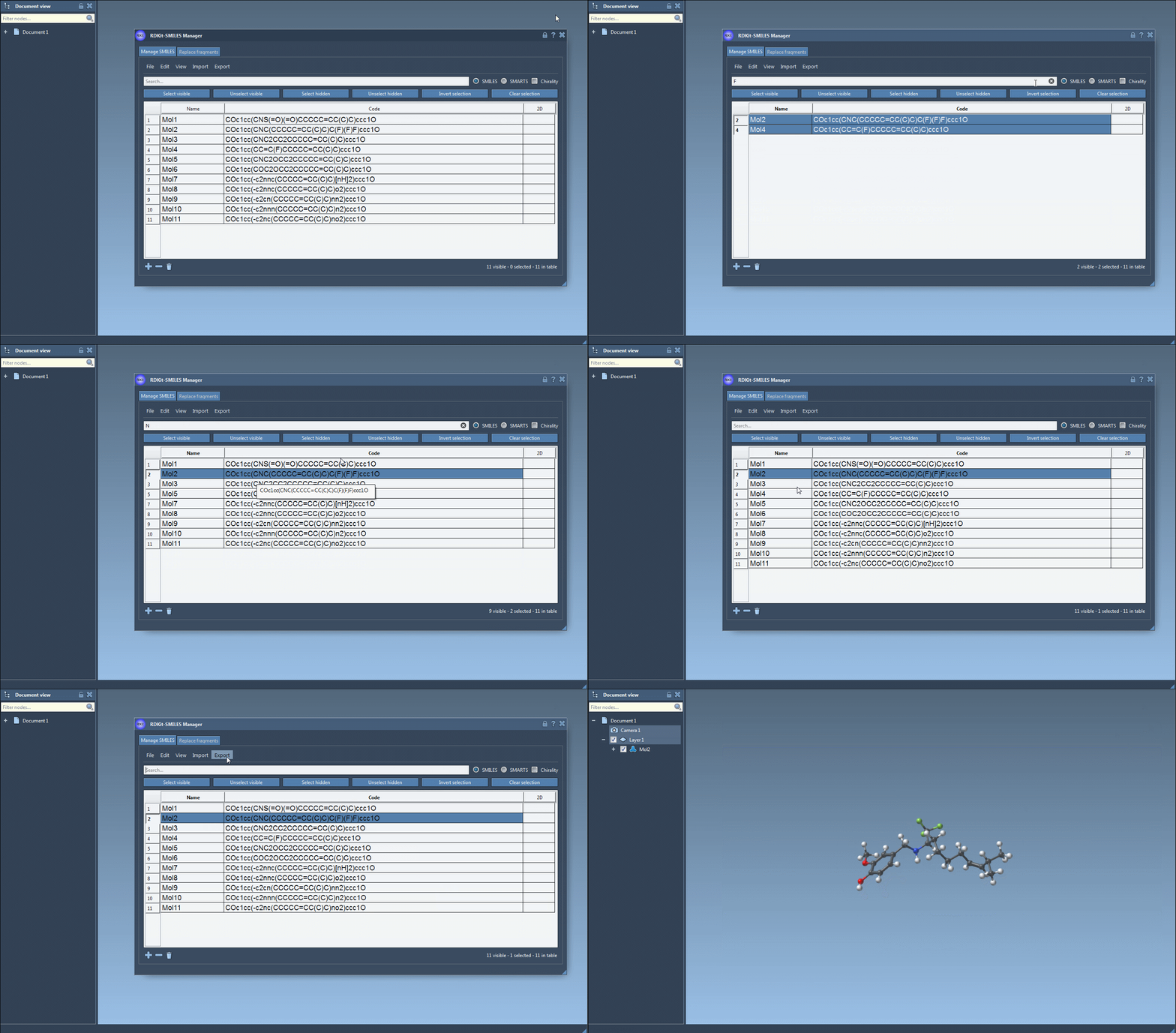
- Start by importing your SMILES dataset into the SMILES Manager. You can use
.smior.txtfiles for this purpose. The molecules and their 2D depictions will appear in a table. - In the search bar, enter the atom or substructure you are looking for. For example, you can search for molecules containing fluorine by simply entering
F. Press ‘Select visible‘ to highlight all molecules matching the criteria. - If needed, refine your selection further. Clear the search bar, ensure your initial selection is retained, and input another criterion. For instance, you might next enter
Nto find nitrogen-containing molecules within the already-selected fluorine-rich subset. - Use the ‘Unselect hidden‘ option to unselect molecules that do not match all criteria, leaving a refined selection of molecules satisfying both conditions—in our case, molecules containing both fluorine and nitrogen.
This process, as shown below, is visually intuitive and ensures no molecule is overlooked:
Why is this feature essential for molecular modeling?
Molecular modeling often involves searching for specific moieties or functional groups in larger molecules. Whether you’re designing drugs or creating materials, identifying key substructures is crucial in selecting promising candidates for further analysis. The SMILES Manager not only makes this task easier but also ensures accuracy by presenting results in a clean, interactive table with high-quality 2D depictions for quick validation.
Moreover, since the search can handle complex selection workflows, it greatly reduces the time required to analyze large collections of molecule data. You can apply advanced techniques, such as enabling chirality for stereochemistry-sensitive searches, empowering you to tackle even the most intricate datasets.
Next steps
After completing the substructure search, selected molecules can easily be exported for further exploration. Generate 3D structures, create analogue libraries, or prepare these structures for docking studies—all within SAMSON.
The substructure search feature enhances the efficiency, flexibility, and precision of your molecular modeling workflows. To learn more about this feature and the entire SMILES Manager in SAMSON, visit the official documentation page.
Note: SAMSON and all SAMSON Extensions are free for non-commercial use. Download SAMSON at www.samson-connect.net.