



When working on complex molecular systems — such as proteins with multiple ligands, solvated complexes, or multimeric structures — it’s common to revisit specific components repeatedly. Selecting a ligand, then moving to a receptor, and later examining water molecules or charge centers often involves repetitive navigation and mouse clicks. Wouldn’t it help if you could bookmark parts of your structure and jump between them instantly?
Quick Groups in SAMSON solve this problem by letting you rapidly store and recall multiple selections with just one keypress. Designed for faster visual inspection, comparison, or workflow navigation, Quick Groups are a convenient tool to streamline your molecular modeling process.
What Are Quick Groups?
Quick Groups are temporary, unnamed selection groups that appear at the bottom of the Document view in SAMSON. Think of them as quick bookmarks for your selections. You can create up to 10 of them, and assign them to different structural elements such as ligands, domains, active sites, or solvents.
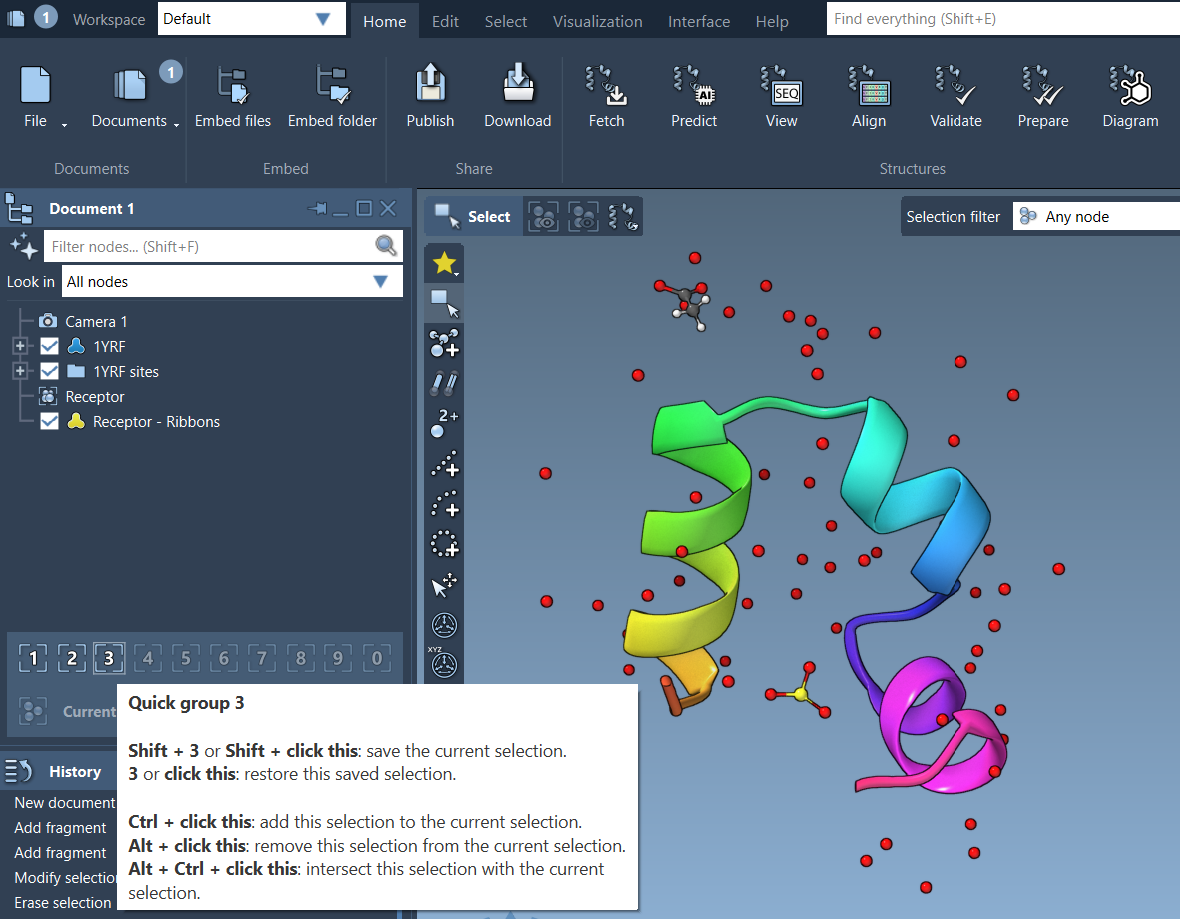
Assigning Selections to Quick Groups
To create a Quick Group, first select the nodes (atoms, residues, or molecules) you’re interested in. Then, assign the selection using one of these methods:
- Mouse method: Hover over an empty Quick Group slot in the Document view and press Shift + click.
- Keyboard method: Press Shift + a number key (1–10) to assign to that Quick Group, e.g., Shift + 2.
Switching Between Groups
Once your selections are saved, switching between them is instant:
- Press 1, 2, etc., to select the assigned Quick Group.
- Double-tap the number to automatically zoom in on the group.
- You can also click directly on the icons in the Document view.
This makes Quick Groups particularly handy for tutorials, simulations, or presentations where time and clarity are essential.
Example Use Case
Suppose you’re analyzing a binding pocket:
- Select the ligand and assign it to Quick Group 1.
- Select the receptor site and assign to Quick Group 2.
- Select the water molecules and assign to Quick Group 3.
Now, with just one keypress, you can switch between these groups. You can apply visual styles, quantify distances, or simulate dynamics selectively — all without manually reselecting components.
Quick, Flexible, and Temporary
Quick Groups don’t require naming and are easily overridden, making them perfect for temporary experiments and interactive sessions. You can clear or redefine them anytime, helping you adapt to evolving workflows without managing permanent groups or filters.
To learn more about selection techniques in SAMSON, including how to create permanent groups or advanced filters using the Node Specification Language, visit the official documentation page.
SAMSON and all SAMSON Extensions are free for non-commercial use. You can download SAMSON at https://www.samson-connect.net.