



Molecular modelers often face the challenge of adapting force fields to account for specific needs in their simulations. The Universal Force Field (UFF) in SAMSON offers an intriguing opportunity for advanced users to tailor typization settings—optimizing atom and bond representations to refine the accuracy of molecular systems. This blog post will guide you through how to customize UFF typization in SAMSON for improved simulations.
Why Customize UFF Typization?
Force field typization involves understanding and defining atomic types and bonding behaviors within a molecular model. While UFF provides automatic structural perception to assign bonds, bond orders, and atom types, certain cases may require manual adjustments:
- Handling non-standard molecular structures
- Correcting incorrect atom or bond typing
- Exploring alternative molecular configurations
Customizing typization requires caution but can significantly improve your results.
How to Customize Typization in UFF
Here are key tools you can use to refine UFF typization in SAMSON:
Adjust Atom Coordination and Valence
- Coordination: The number of neighbors an atom can have.
- Valence: The weighted number of neighbors based on bond order.
You can modify these parameters directly to refine the automatic perception of atoms:
- Select an atom, choose the new coordination or valence from the dropdown menu, and click Set.
- Limits apply: customized coordination or valence values cannot exceed default maximum values.
Force Bond Orders
To refine chemical interactions, you can assign or freeze bond orders:
- Assign bond order: Select the bonds to modify, input a bond order value between 0.1 and 3.9, and click Set.
- Freeze bond order: Prevent changes in future perceptions by selecting bonds and clicking Freeze.
Non-integer bond orders are supported, enabling advanced levels of customization.
Adjust Atom Typization
Atomic types determine how atoms behave in simulations. You can:
- Assign custom types: Select atoms, pick the desired UFF type, and click Set.
- Freeze types: Lock the current typing to prevent changes and stabilize the model when updates occur.
Reset and Recompute: A Start-Over Option
Made too many changes or need to test another pathway? Use:
- Reset all: Undo customizations for bonds, coordination, or atom types by clicking the respective Reset all buttons.
- Reset perception: Recompute atom perception using the current settings and atom positions.
Tips for Success
Here are a few pointers to make the most of UFF customization:
- Experiment conservatively: Customizing typization is a powerful tool but can easily introduce errors if used improperly.
- Validate configurations: After custom modifications, carefully review outcomes to ensure the molecule remains realistic.
Below is an example of running UFF with custom parameters in SAMSON:
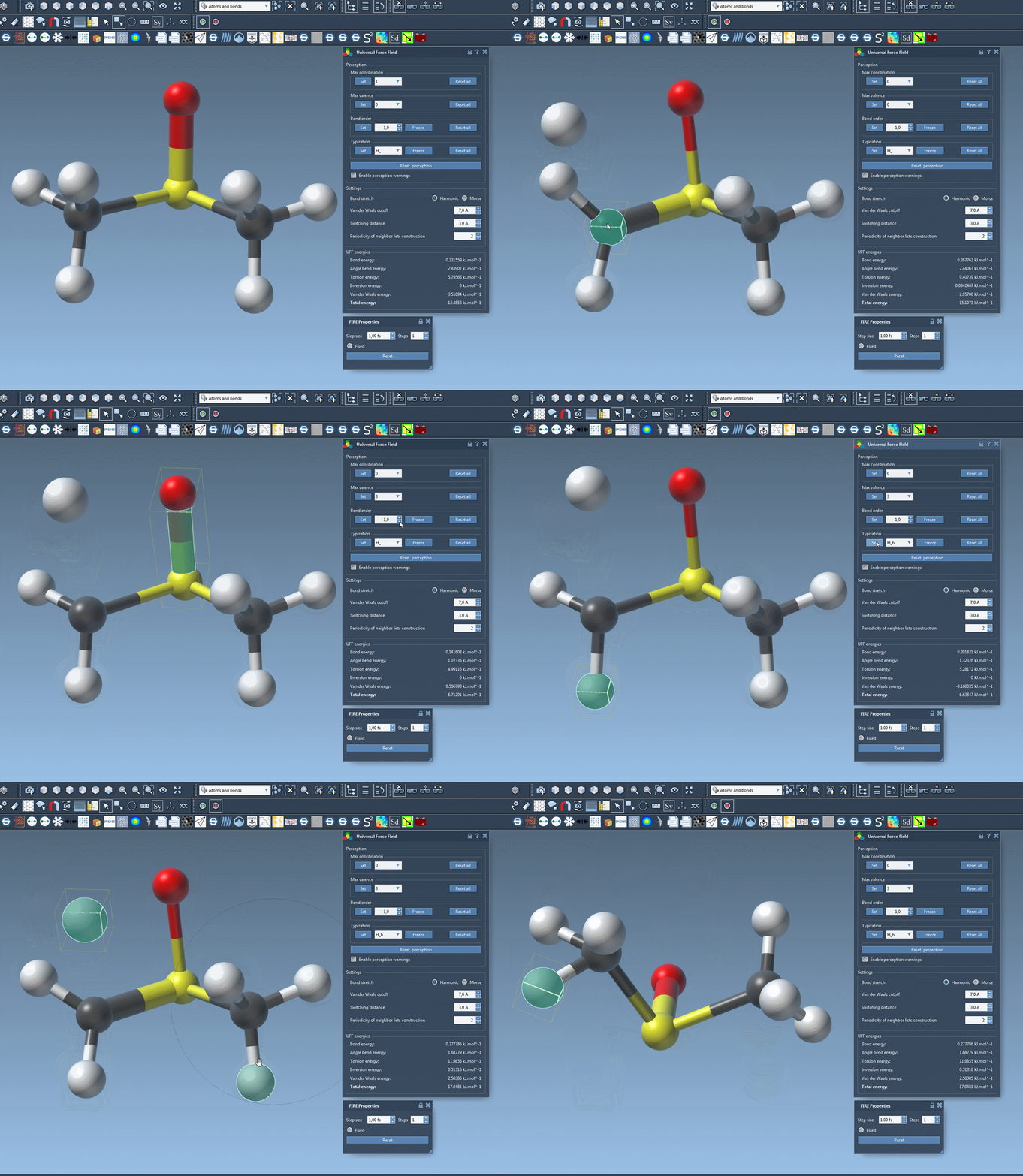
Next Steps
For more insights into utilizing UFF in SAMSON, consider exploring interactive molecular modeling with UFF.
Learn more about the UFF module in the original SAMSON documentation.
Note: SAMSON and all SAMSON Extensions are free for non-commercial use. Download SAMSON at https://www.samson-connect.net.