



For molecular modelers, refining protein structures often feels like navigating a maze. Ensuring residues adopt energetically favorable conformations is crucial for reliable simulation and accurate modeling results. Fortunately, the Interactive Ramachandran Plot Extension in SAMSON provides a streamlined solution to this challenge. This blog post dives into how this tool can enhance your modeling workflows while minimizing frustration.
What is the Ramachandran Plot?
A Ramachandran plot is a graphical tool in protein chemistry that maps the allowed and disallowed φ (phi) and ψ (psi) dihedral angle combinations for residues in a protein. Yellow regions indicate energetically favorable conformations, while white regions show unfavorable ones. This standard method helps researchers refine structures and identify strained residues before simulations.
Quick Setup in SAMSON
Setting up the Interactive Ramachandran Plot is easy:
- Log into SAMSON Connect.
- Add the Interactive Ramachandran Plot Extension from its page.
- Restart SAMSON to enable the Extension.
Now you’re ready to visualize proteins and start refining with ease.
Visualize and Explore Residues
First, load a structure of your choice. For instance:
- Go to Home > Fetch, search the Protein Data Bank (PDB) for
1YRF, and click Load.
Then, open the Ramachandran Plot app via Home > Apps > Biology > Ramachandran plot. Click Update to compute the plot. Here’s an example:

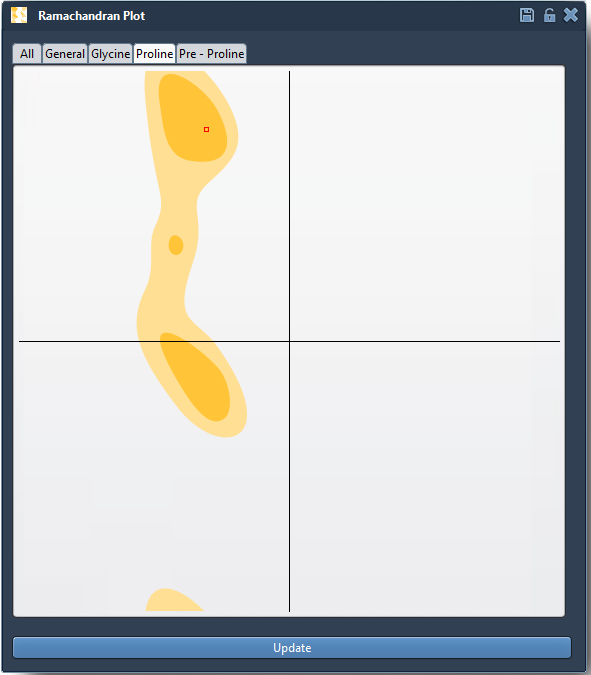
Residues in yellow zones correspond to favorable conformations, while those in white zones may need refinement. Tabs let you filter residues into categories, including glycine, proline, general residues, and more. For example, selecting Proline highlights its specific conformations:
Interactive Editing Made Simple
The real strength of the Extension lies in interactive editing. You can refine backbone conformations in two ways:
1. Dragging Points
- Click and drag any point on the plot to adjust φ and ψ angles.
- Watch the corresponding 3D structure update in real-time.
- If you need to revert changes, simply use Ctrl/Cmd + Z.
2. Using the Twister Editor
- Activate the Twister editor tool from the left-hand menu in SAMSON.
- Twist the protein directly in 3D space and see live updates on the Ramachandran plot.
This intuitive approach ensures that strained residues can be precisely adjusted according to energetic constraints.

Why This Matters
Whether you’re preparing a homology model, analyzing binding sites, or just validating a structure, the Interactive Ramachandran Plot has practical applications:
- Identify and address strained residues before molecular dynamics simulations.
- Refine models by eliminating outliers.
- Understand the flexibility of active or binding sites in proteins.
By combining a comprehensive plot with interactive editing, this tool enables efficient workflows, reducing guesswork in structure optimization.
To learn more, visit the full documentation at this link.
SAMSON and all SAMSON Extensions are free for non-commercial use. Get SAMSON at https://www.samson-connect.net.