



Designing synthetic polymers and molecular scaffolds often involves repetitive molecular units that don’t exist in standard libraries. In such cases, molecular modelers are faced with an important question: How can I register a new, custom monomer and reuse it efficiently across multiple designs?
The Polymer Builder extension in SAMSON offers a built-in way to define, label, and reuse your own monomers. Whether you are simulating material properties or constructing chains for drug delivery vehicles, this process simplifies the creation of repeatable molecular units.
Step-by-Step: Registering Your First Custom Monomer
After launching the Polymer Builder in SAMSON (Home > Apps > Assembly > Polymer Builder), you can begin registering monomers from fragments you select:
- Select a molecule (monomer unit) in the Viewport or Document view.
- Click Register monomer from selection.
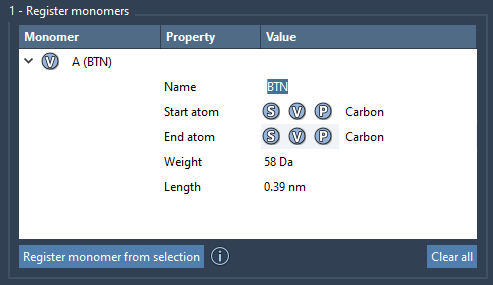
SAMSON detects the start and end atoms, which define how the monomer connects to others. You can override them using these shortcuts:
- S: Set atom from current selection.
- P: Pick atom from the structure’s atom list.
- V: Highlight atoms in the Viewer.
Each new monomer is automatically labeled with a letter (A, B, C, etc.). These identifiers are used later to generate polymers and sequences. You can view all registered monomers in a table that shows helpful properties such as molecular weights and the distances between connection atoms.
Editing and Managing Monomers
You can modify any monomer directly in the table, including expanding its structural group assignment. Hover over a monomer to:
- Check its structural details
- View molecular weight and connect distances
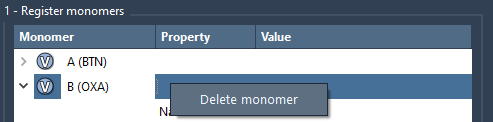
- Delete it via right-click > Delete monomer
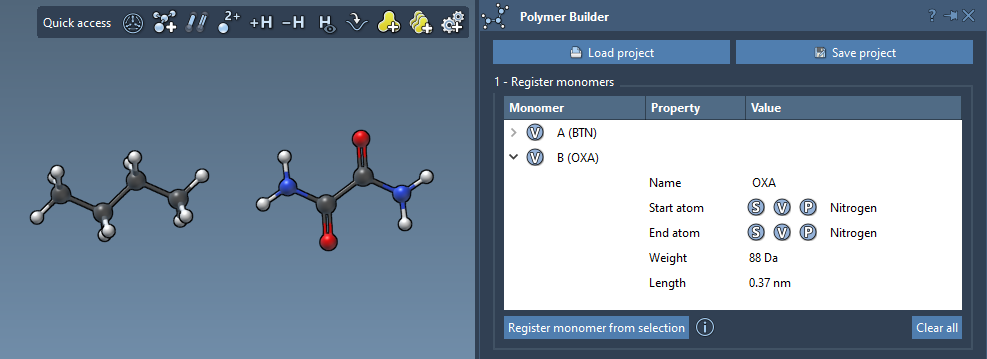
Need a fresh start? Simply click Clear all to remove all monomers at once.
A Few Notes to Keep in Mind
- If a monomer has only one residue, its name is inferred from it. Otherwise, you can define its name manually.
- If you modify the structure of a previously registered monomer, it will be automatically deregistered for consistency.
Why This Matters
Without the ability to register custom monomers, designing tailored polymers would require repetitive manual editing. By creating and naming structural fragments once, you can integrate them seamlessly into sequences, adjust bond types, and build complex systems like block copolymers much faster and with fewer errors.
Once you’re done registering monomers, check out how to go further by registering sequences or generating polymers from your custom inputs.
To learn more, visit the full documentation page: Polymer Builder documentation.
SAMSON and all SAMSON Extensions are free for non-commercial use. To get started, download SAMSON at www.samson-connect.net.