



Performing umbrella sampling simulations is a common task in molecular modeling when estimating the Potential of Mean Force (PMF) along a reaction coordinate. But what often frustrates modelers is how cumbersome post-processing can become. Collecting the simulation outputs, ensuring consistency across multiple windows, and preparing inputs for WHAM — it all takes time and error-prone effort.
Fortunately, if you’re using the GROMACS Wizard in SAMSON, there’s a streamlined way to carry out PMF analysis through WHAM — and it requires minimal setup. Whether you’re new to molecular dynamics or have been doing these analyses for years, this tool can help you focus more on insights and less on logistics.
What the GROMACS Wizard Can Do for You
The WHAM Analysis tab in the GROMACS Wizard walks you through the PMF calculation process. You simply:
- Choose your project folder — or use the auto-fill button to import the path from your previous umbrella sampling step automatically.
- Select a reaction coordinate from the list.
- Adjust parameters like bounds, time, and energy units if needed.
- Click Compute.
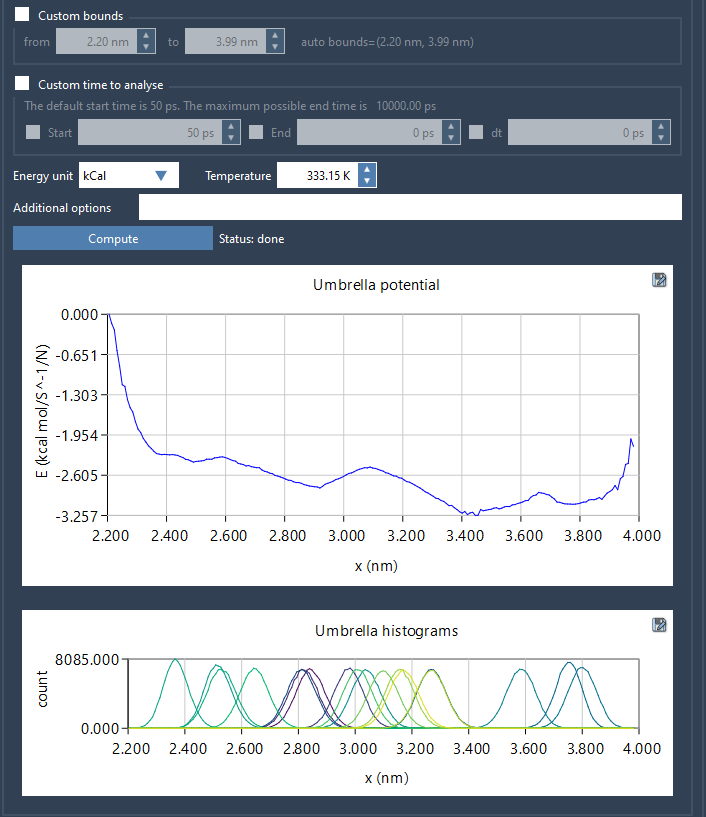
That’s it. Behind the scenes, the Wizard reads numbered folders from your umbrella sampling project — each corresponding to simulation windows — and sets everything up for WHAM. The interface visualizes results with two key plots:
- The PMF profile: showing the free energy landscape along your coordinate.
- The histogram: letting you quickly check whether sampling is sufficient or requires refinement.
Why This Matters
While GROMACS and WHAM are powerful tools on their own, setting them up across multi-window umbrella sampling simulations typically requires writing scripts or using third-party tools to automate input generation. This is especially tiresome for large systems or repeat analyses: changing parameters like time ranges or reaction coordinate bounds can mean duplicating effort or redoing work when checking sensitivity.
The Wizard minimizes these steps by caching previously computed results per reaction coordinate and automatically updating plots when you switch between settings. Each output is saved in a wham_results subfolder, making retrieval and comparison straightforward.
Project Folder Structure
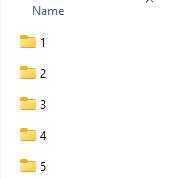
For the tool to work correctly, ensure your umbrella sampling outputs are stored in a project folder containing numbered subfolders (like 000, 001, etc.), each corresponding to a simulation along the same reaction coordinate. If you ran this through SAMSON’s batch mode, the structure is generated automatically.
A Workflow That Adjusts to You
If you’re revisiting results weeks later or tweaking parameters to test the robustness of the PMF profile, the reuse of cached analyses can be an unexpected time-saver. This setup minimizes repetitive processing and reduces disk clutter from redundant output files.
The GROMACS Wizard doesn’t replace GROMACS or WHAM — it enhances them by untangling the repetitive steps and embedding them into a more user-friendly interface that interacts smoothly with your project data.
To learn more, visit the official documentation page for this feature: https://documentation.samson-connect.net/tutorials/gromacs-wizard/pmf-analysis/.
SAMSON and all SAMSON Extensions are free for non-commercial use. You can get SAMSON at https://www.samson-connect.net.