



Molecular modeling often involves selecting specific atoms, residues, or other nodes based on spatial relationships. For instance, you might need to identify atoms within a certain distance from a ligand or residues surrounding an active site. These proximity-based queries can be complex, but the Node Specification Language (NSL) in SAMSON offers a straightforward approach to solving this challenge.
Understanding Proximity Operators
NSL’s proximity operators allow you to define spatial criteria for selecting nodes. These include finding nodes within or beyond a specific distance of others, and filtering results accordingly.
Two primary operators are available for spatial selection:
within {distance} of: Selects nodes located within a specified distance from a reference.beyond {distance} of: Selects nodes located outside a specified distance from a reference.
For example, to select all carbons within 5 angstroms of a residue named “GLN 2”, you can use:
|
1 |
C within 5A of "GLN 2" |
Similarly, to identify atoms beyond 5 angstroms from a molecule named “2AZ8-IA”, the command is:
|
1 |
node.type atom beyond 5A of "2AZ8-IA" |
Practical Applications
Let’s explore some scenarios where proximity operations are indispensable:
- Active Site Analysis: This can help you quickly find residues surrounding an enzyme’s active site or a ligand-binding pocket for mutational studies or molecular docking.
- Protein-Ligand Interactions: You can identify residues or atoms interacting with a ligand, aiding in structure-based drug discovery.
- Cluster Identification: Proximity operators help in identifying spatial clusters of atoms or residues for further analysis.
Using Proximity Operators Effectively
While proximity operators are powerful, they require careful application to ensure intended results. For instance, using within without specifying node types can select unrelated nodes. Consider the following example:
|
1 |
* within 5A of "GLN 2" |
This command will select the entire document node if any atoms are within 5 angstroms of “GLN 2”. To avoid unintended results, define the type of nodes explicitly:
|
1 |
node.type atom within 5A of "GLN 2" |
To exclude atoms belonging to the reference set (such as “GLN 2”), refine your query further:
|
1 |
n.t atom within 5A of "GLN 2" out of "GLN 2" |
Visual Example
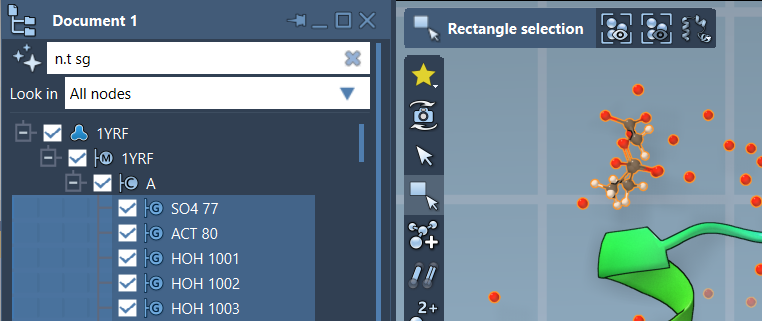
Here’s an example of selecting structural groups in SAMSON using a proximity operator. The image below demonstrates nodes selected with a query involving spatial constraints:
Topological Proximity
Beyond simple distances, NSL also supports topological proximity operators, which allow selection based on the number of bonds separating nodes. Use the withinBond operator for such tasks. For example:
|
1 |
atom.symbol C withinBond 3 of atom.symbol S |
This matches all carbon atoms within three bonds of any sulfur atom. Topological proximity queries are valuable for navigating molecular frameworks and studying relationships beyond geometric distance.
Conclusion
The flexibility of NSL’s proximity operators in SAMSON minimizes time spent on complex selection tasks, enabling you to focus on your scientific goals. To explore more about proximity operators and their applications, visit the official SAMSON documentation.
SAMSON and all SAMSON Extensions are free for non-commercial use. Get SAMSON from SAMSON Connect.