



Setting up accurate molecular simulations can be daunting, particularly when it comes to selecting and applying the right force field. The Universal Force Field (UFF) provides a versatile solution by offering a full periodic table force field for molecular mechanics and dynamics calculations. In this post, we’ll dig into how easy it is to set up the UFF interaction model in SAMSON, ensuring smoother workflows for your molecular modeling projects.
Why the Setup Matters
Force fields are pivotal for simulating molecular systems, providing the equations and parameters that determine how atoms interact. Setting up a force field like UFF can streamline your experiments and offer reliable insights. However, challenges like determining bond orders, atom types, and covalent bonds can often complicate tasks. SAMSON helps by providing an automatic molecular perception scheme, so you can focus more on results than details.
Step-by-Step Guide to Setting Up UFF in SAMSON
Here’s how to quickly configure UFF and get started:
- Open the molecular system you want to simulate.
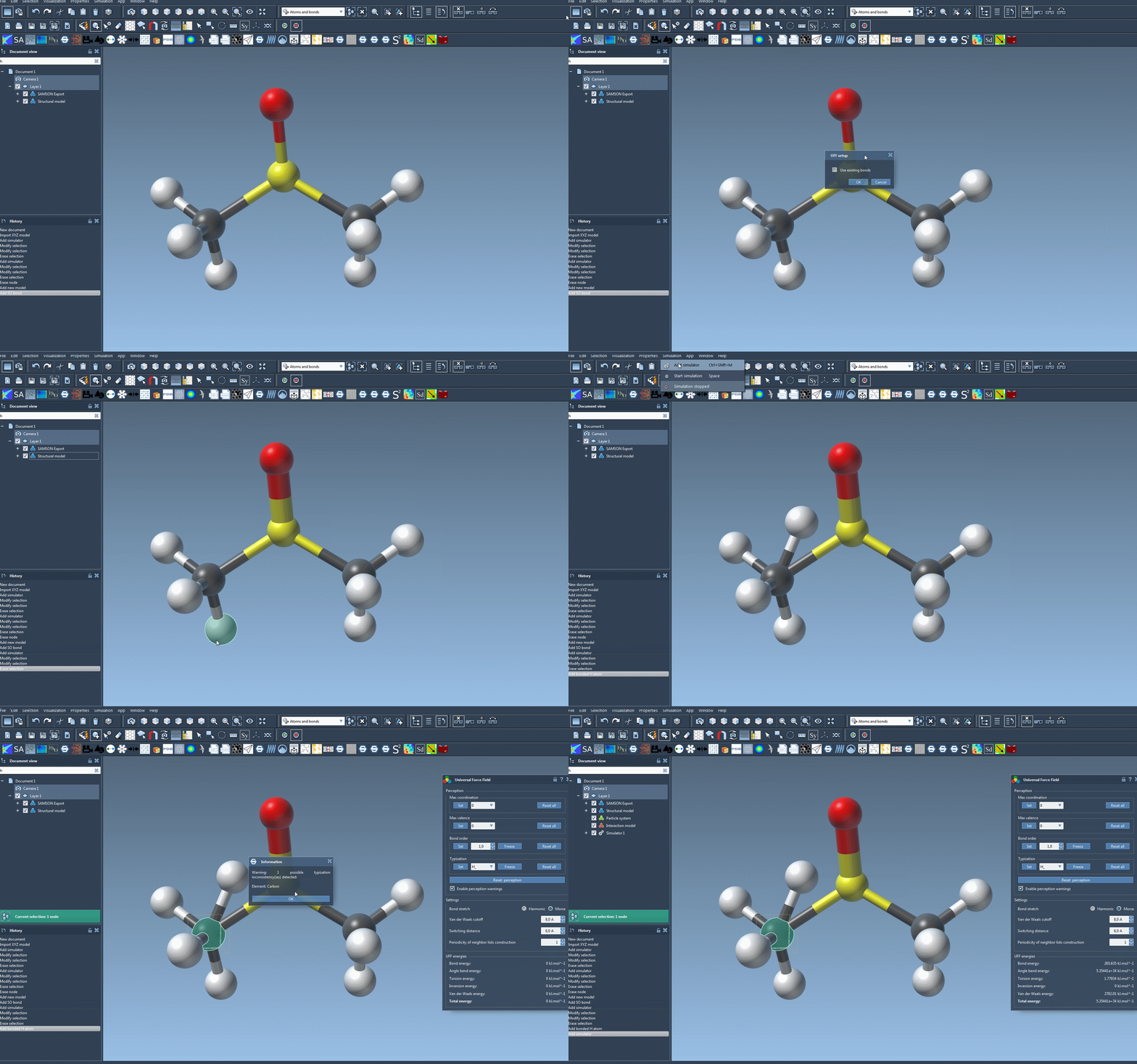
- Add a simulator by navigating to
Edit > Simulate > Add simulator, or use the shortcutCtrl+Shift+M(Windows/Linux) orCmd+Shift+M(Mac). - Select Universal Force Field from the list of available interaction models.
- Choose an appropriate state updater for your simulation, such as FIRE.
- Click the OK button.
At this point, the UFF setup window appears, allowing you to customize key options:
- Use existing bonds: If selected, SAMSON will use the preconfigured bonds in your structure. Otherwise, it will automatically compute bonds from atom types and positions.
- Click OK again, and SAMSON will initialize the system, computing covalent bonds (if needed), bond orders, and atom types.
If any inconsistencies are detected during this process, SAMSON will generate a warning message to help you address potential problems. Once setup completes, a parameter window enables further customization before running simulations.
Key Benefits of UFF in SAMSON
One of the highlights of UFF in SAMSON is its flexibility. Beyond the basic setup, users can:
- Select harmonic or Morse bond stretch interactions depending on their modeling needs.
- Set van der Waals cutoff distances and switching distances, ensuring precise yet efficient calculations.
- Control the periodicity of neighbor list construction for optimized compute performance.
What’s more, the UFF module allows interactive simulations, so you can move atoms in real time and see how the system adapts dynamically. This makes UFF an excellent choice for experimenters who want both precision and interactivity in their modeling workflows.
Conclusion
By making UFF a breeze to set up, SAMSON simplifies molecular design for everyone from novice researchers to seasoned professionals. If you’re eager to learn more about tweaking UFF parameters, running dynamic simulations, or handling custom typizations, you can dive deeper into the tutorial at this link.
Note: SAMSON and all SAMSON Extensions are free for non-commercial use. You can download SAMSON at samson-connect.net.