



Crystals are a foundational part of materials science and molecular modeling, offering key insights into structural, electronic, and optical properties. However, creating and customizing crystal models can be a daunting task for molecular modelers, especially when precision and customization are necessary. SAMSON’s Crystal Creator Extension reduces this complexity, providing advanced tools for cutting and manipulating crystals directly from Crystallographic Information Files (CIF).
Why Crystal Cutting is Important
Crystal cutting allows researchers to examine different planes of a crystal structure and study unique configurations and properties. For example, cutting a diamond crystal along the [111] direction reveals its compact hexagonal arrangement. Such approaches are invaluable for applications ranging from visualizing defects to tailoring crystal surfaces for specific experiments.
How to Cut Crystals in SAMSON
The Crystal Creator Extension in SAMSON makes this process efficient with intuitive tools. Here’s a simple guide to get started:
- Load a Crystal Structure: Open the crystal’s CIF file in SAMSON using the Crystal Creator App. A window will let you configure the initial import settings, such as the number of unit cells and symmetry preferences.
- Access the Property Model: After importing, the crystal and its property model will appear in the data graph. Right-click on the property model and select properties to access the detailed toolset.
- Use Cutting Tools: The first tab of the property window contains a toolbox for cutting your crystal. Here’s how to use it:
- Specify the Miller indices to define the cutting direction. For example,
[111]for a diamond crystal. - Set the cutting distance from position 0.
- Apply the cut and visualize the results instantly.
- Specify the Miller indices to define the cutting direction. For example,
Validate and Explore Your Crystal
Crystal Creator doesn’t just stop at cutting. The second tab in the property window includes tools to validate the generated crystal. Use the check atoms ratio tool to verify whether the atom site ratios of defects or substitutions are consistent with the CIF file. This ensures your model maintains scientific accuracy while incorporating real-world imperfections.
Example: Cutting a Diamond Crystal
Let’s take an example of cutting a diamond crystal. Load a diamond CIF file into SAMSON and head to the property model. Cut the crystal along the [111] direction using the Miller indices tool. Observe how the resulting hexagonal pattern showcases diamond’s distinct structural arrangement.
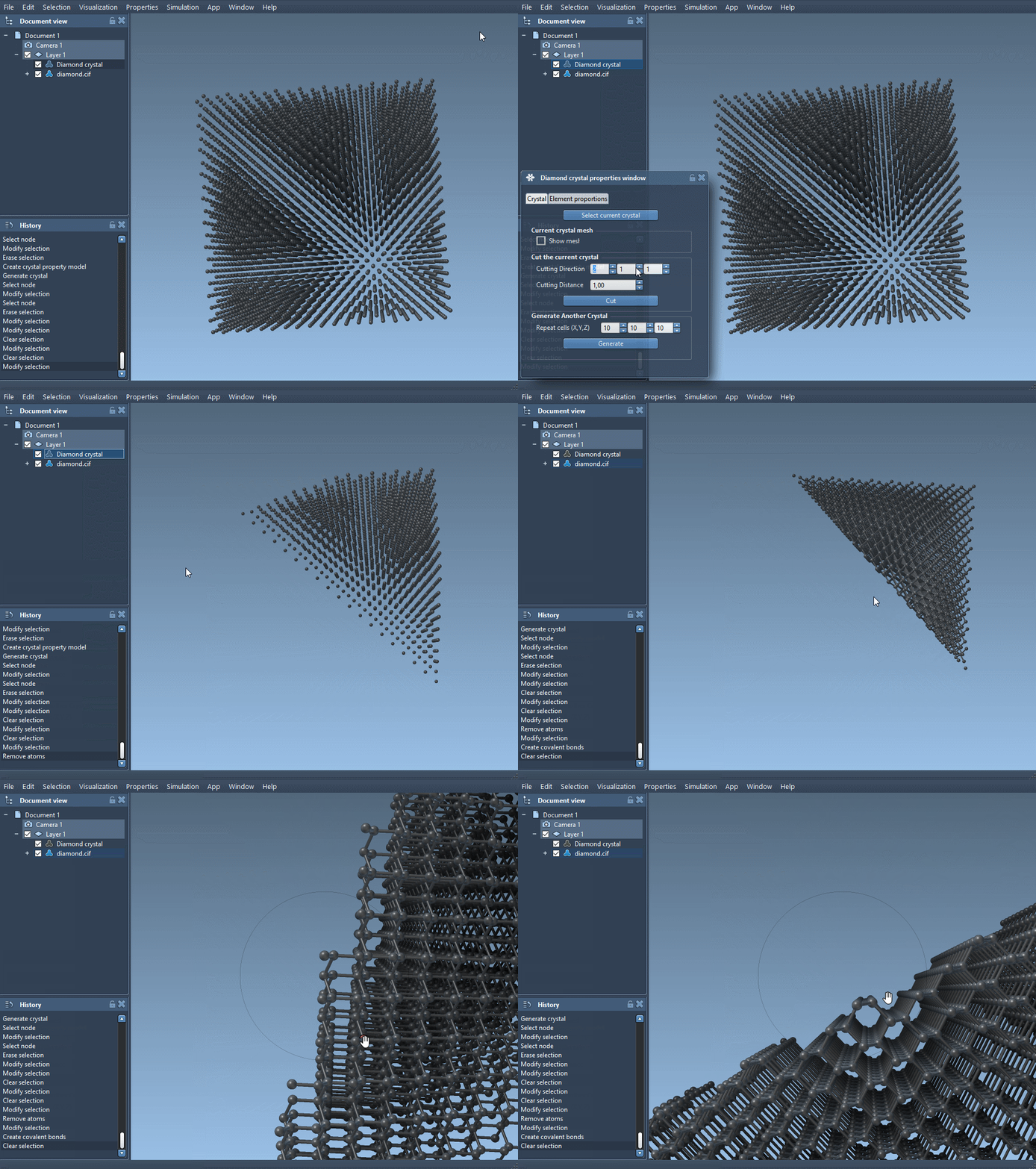
This straightforward process allows for efficient exploration and customization, whether you are studying defects, simulating real-world conditions, or preparing a custom lattice for advanced simulations.
Discover More Tools
Crystal Creator isn’t limited to cutting. You can also use it to import CIF files, build custom crystals, and adjust unit cell parameters. Interested in diving deeper? Check out the official documentation page that provides step-by-step guidance for a wide range of crystal modeling workflows: https://documentation.samson-connect.net/tutorials/crystal-creator/generating-crystal-models/.
Note: SAMSON and all SAMSON Extensions are free for non-commercial use. You can download SAMSON at https://www.samson-connect.net.