



Building complex polymer structures can be a challenging endeavor for molecular modelers. Whether you are designing synthetic polymers, drug-polymer conjugates, or biopolymers, the process often involves intricate workflows, manual adjustments, and lots of trial and error. However, the Polymer Builder extension in SAMSON offers a solution that streamlines this process, especially through its ability to register and manage monomer sequences. Let’s explore how this feature can save you time and effort while giving you full control over your designs.
Why Define Monomer Sequences?
When constructing polymers, repeating sequence patterns are a common requirement. For instance, some polymers might contain sections that follow predictable patterns like ABBA or A=B. Manually creating each segment of these sequences can be repetitive, error-prone, and inefficient. The Polymer Builder makes it simple to register and manage these repeating sequences, ensuring accuracy while giving you flexibility in design.
The sequence registration functionality allows you to:
- Define complex repeating patterns using monomer IDs like
A,B, etc. - Select custom bond types (single, double, or triple) between monomers in the sequence.
- Automatically validate the sequence for structural correctness.
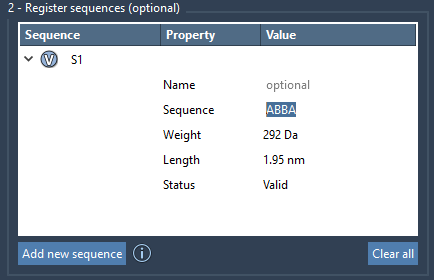
Step-by-Step: Registering Monomer Sequences
Here’s how you can define monomer sequences in Polymer Builder:
- Click “Add new sequence.” This adds a new sequence entry in the Polymer Builder table.
- Enter the desired repeating pattern using registered monomer IDs. For example, you could define the sequence
ABBAor use bonds to create something likeA=B. - Use special symbols in your sequence to adjust bond types:
=for double bonds (e.g.,A=B).#for triple bonds (e.g.,A#B).
- Validate the sequence: If the sequence is correct, its “Status” will show “Valid.” Otherwise, you’ll see an error message, allowing you to fix any issues.
Each sequence receives a unique identifier like S1, S2, etc., making it easy to reuse them in larger polymer construction workflows. Additionally, properties such as predicted molecular weight and length for the sequence are automatically calculated and displayed, helping you refine your design effectively.
Advanced Flexibility with Bond Types
One of the standout features of the sequence registration tool is the ability to define specific bond types between monomers. By leveraging single, double, and triple bonds, you can model polymers with precise structural and functional properties. For example:
A=Bindicates a double bond between monomer A and monomer B.A#Brepresents a triple bond between monomers A and B.
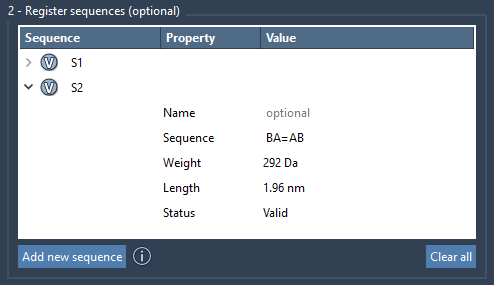
Simplify Your Workflow
By utilizing sequences, you can significantly streamline your polymer generation process. Once a sequence is registered, you can directly incorporate it into larger chains or structures. For instance, a sequence like 2*S1 + AB=BA can include two repetitions of sequence S1, followed by a segment where AB is connected to BA with a double bond. This approach minimizes repetitive manual tasks and gives you precise control over the polymer design.
Ready to try it yourself? Check out the full documentation on Polymer Builder to access other powerful features like structure validation, prediction tools, and advanced options for handling hydrogens or steric clashes. Start revolutionizing your molecular modeling workflow by visiting Polymer Builder’s official documentation page.
Note: SAMSON and all SAMSON Extensions are free for non-commercial use. You can download SAMSON at https://www.samson-connect.net.