



When working on molecular dynamics simulations, preparing a protein-ligand system can often seem daunting—especially when your ligand isn’t readily available in the required force field. This step, known as ligand parametrization, is crucial to ensure accurate simulations and avoid errors later in your workflow. Let’s break it down into an actionable, beginner-friendly guide using SAMSON and its GROMACS Wizard.
1. Why Ligand Parametrization is Important
Ligand parametrization involves generating topology files that describe your ligand’s interactions with other molecules in the system. This step is essential if your ligand isn’t available as a standard residue in your chosen simulation’s force field. Without correct parametrization, the simulation will fail or produce inaccurate results.
2. Automating Ligand Parametrization
The good news is that you don’t have to do this manually. There are several reliable tools and servers that can generate topology files for different force fields. Here are a few recommended ones:
- Antechamber for the AMBER force field
- ATB for the GROMOS96 54A7 force field
- CGenFF for the CHARMM force field
- LigParGen for the OPLS-AA force field
Using these tools, you can upload your ligand file, select the desired force field, and download the .itp file and updated structure as needed.
3. Preparing the Ligand Before Submission
To streamline parametrization, ensure your ligand has all hydrogens added and is ready for input:
- Add hydrogens: Use SAMSON’s
Edit > Add hydrogensfeature to add hydrogens based on the Chemical Component Dictionary (CCD). Non-standard ligands can also have hydrogens added based on valencies if their aromatic rings and charges are correctly specified. - Extract the ligand: If your ligand is part of a protein-ligand complex, extract it before submission. In SAMSON, select the ligand in Document view, navigate to
Home > File > Save selection as..., and save it in a compatible file format. - Convert file formats: If the parametrization tool does not accept your format, you can use SAMSON for file conversion: load the file into SAMSON and save it in the required format.
4. Handling Larger Ligands
Some servers have limitations on ligand size. If your ligand exceeds the allowable size, you can subdivide it into smaller chunks or sub-residues. Process each chunk separately, ensuring connectivity between them. Check your chosen tool or server’s documentation for detailed guidance on handling such cases.
5. Finalizing the Setup
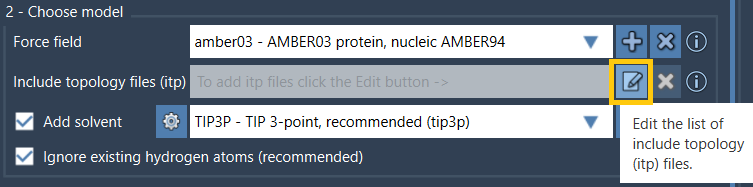
Once parametrized, download the topology file (.itp) and any updated ligand structures from your server. This .itp file will serve as the piece of data that allows tools like GROMACS Wizard to simulate your ligand’s interactions within the protein-ligand complex.
For additional steps, like incorporating the protein-ligand complex into the system or combining files, refer to the broader GROMACS Wizard documentation.
Why Choose SAMSON?
SAMSON not only simplifies these steps with intuitive features but also integrates seamlessly with GROMACS Wizard, making it easier to prepare, parametrize, and simulate systems without external dependencies. SAMSON is perfect for researchers aiming for a smooth, streamlined workflow.
To learn more and dive deeper into the procedures, visit the detailed documentation at this link.
SAMSON and all SAMSON Extensions are free for non-commercial use. Download SAMSON at https://www.samson-connect.net.