



For molecular modelers and researchers, designing custom polymers often feels like assembling a puzzle with missing or mismatched pieces. Whether you're working on synthetic chains, biopolymers, or novel molecular scaffolds, creating tailor-made structures is a meticulous process. Luckily, SAMSON's Polymer Builder offers a streamlined solution: the ability to register and use custom monomers in your polymer designs.
Why Custom Monomers Matter
Imagine having complete control over the building blocks of your polymer, from their start and end connections down to their spatial arrangement. The Register New Monomers feature in Polymer Builder lets you achieve exactly that. This is particularly valuable for:
- Creating polymers with complex architectures like branched chains or conjugated systems.
- Ensuring atom-level precision for predictive simulations or property modeling.
- Customizing and adapting fragments for specific research needs.
How to Register and Use Custom Monomers
Registering custom monomers in SAMSON is intuitive. Here’s how:
- Select a molecule (your intended monomer unit) from the Document view or Viewport.
- Click Register monomer from selection. SAMSON automatically detects suitable start and end atoms at opposite ends of the fragment.
- If the automatic detection isn’t ideal, you can override the selections with intuitive options:
- S: Set an atom by selecting it in the document or viewport.
- P: Pick an atom from a list.
- V: Highlight specific structures or atoms for better visualization.
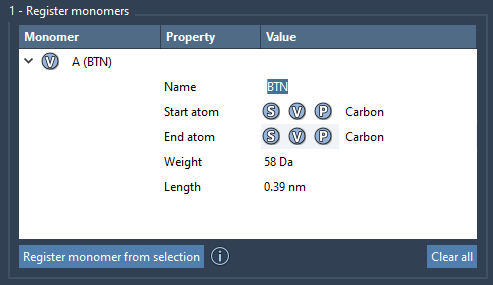
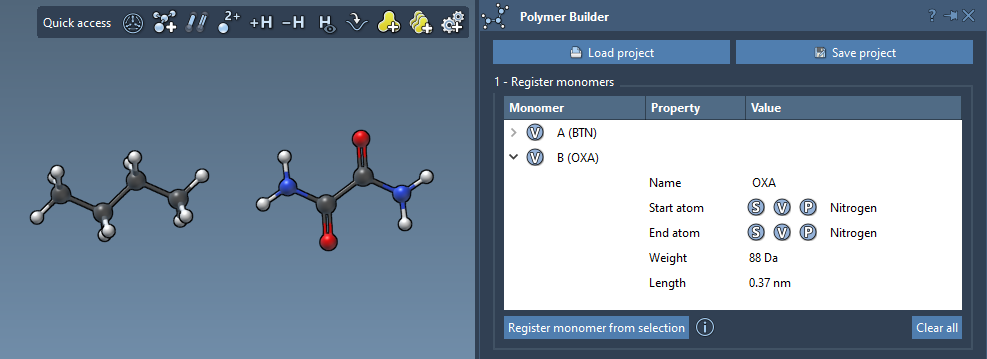
Once registered, each monomer is assigned a unique letter (A, B, and so on). You can also rename these monomers to better reflect their structural group or intended use.
Refining Your Monomer Table
To ensure precision, SAMSON provides detailed information for each registered monomer:
- Molecular weight: Measured in Daltons.
- Start-End Atom Distance: Useful for visualizing polymer chains and estimating final polymer dimensions.
You can easily modify, expand, or remove monomers from your registry:
- To edit a monomer, make changes directly in the monomer table.
- To delete a monomer, right-click on it and select Delete monomer.
- For a full reset, click Clear all to empty your monomer table.
Keep Your Designs Flexible
If you modify an already registered monomer’s structure (e.g., by adding or removing atoms), SAMSON ensures consistency by automatically deregistering the monomer. This eliminates potential discrepancies during polymer generation and guarantees that your data remains accurate.
When using SAMSON, you’re not only saving time but also minimizing errors that might arise in complex or large-scale polymer creation workflows.
Getting Started with Polymer Builder
Whether you’re venturing into synthetic polymers, biopolymers, or drug-polymer conjugates, SAMSON’s Polymer Builder ensures a seamless experience. Explore all the powerful options in SAMSON to take your molecular designs to the next level. To learn more about how to register custom monomers and other features, visit the Polymer Builder documentation page.
Note: SAMSON and all SAMSON Extensions are free for non-commercial use. Download SAMSON today at www.samson-connect.net.