



Designing complex polymers is often a complicated and time-consuming task for molecular modelers. Whether working on synthetic polymers, biomaterials, or molecular scaffolds, creating accurate models is essential for property prediction and simulations. SAMSON’s Polymer Builder provides a streamlined way to create polymers from customizable sequences of monomers, enabling users to overcome a significant challenge in molecular modeling. This blog post explains how you can register and use monomer sequences to design custom polymers with ease.
The Benefit of Monomer Sequences
Imagine having a repeating pattern in a polymer—manually placing every component in the chain would be tedious and susceptible to errors. SAMSON’s Polymer Builder introduces the concept of monomer sequences, allowing you to define and reuse repeating patterns. This not only saves time but also ensures consistency.
Here’s how it works: After registering basic monomer units, you can group them into sequences. These sequences can then be used to create larger polymer structures, with control over bond types and repeating patterns.
How to Register Monomer Sequences
Follow these steps to register monomer sequences:
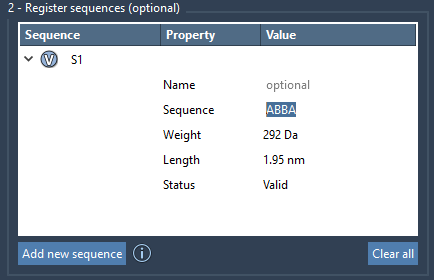
- Click on Add new sequence in the Polymer Builder interface.
- Input the sequence using the IDs of registered monomers (e.g.,
ABBA). - Specify bond types between monomers, with
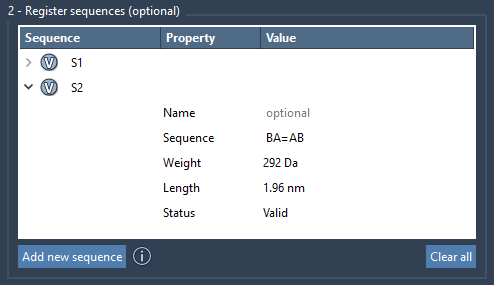
=denoting double bonds and#denoting triple bonds. For example,A=Bforms a double bond between monomers A and B.
Each sequence is given a unique identifier (e.g., S1, S2), and the Polymer Builder validates the sequence in real-time. Errors appear in the Status field, helping users to identify and resolve issues.
Customizing and Managing Sequences
Once registered, sequences can be customized directly within the Polymer Builder interface. Changes in sequence names or patterns are reflected immediately, and molecular properties such as weight and length are automatically updated.
You can also manage sequences effectively:
- Highlight monomers in sequences using the V button.
- Remove sequences as needed by right-clicking and selecting Delete sequence.
- Clear all sequences in one click if starting over.
Bringing it All Together: Generating Polymers
Combining monomers and sequences allows you to generate fully customizable polymers. Use expressions to specify the desired structure. For example:
S1 + 2*S2 + 3*AB + AB=BA + A#B
Here, S1 and S2 are sequences, 2*S2 represents two repeats of sequence S2, and AB=BA specifies a double bond between two monomer pairs. With this approach, you have complete control over polymer design, from simple chains to complex architectures.
The result? A well-structured polymer model that’s ready for additional steps like simulation or property prediction.
Get Started
Regenerating polymers with reusable sequence templates makes molecular design more efficient and adaptable. To explore the full capabilities of the Polymer Builder, visit the detailed documentation page at this link.
Note: SAMSON and all SAMSON Extensions are free for non-commercial use. You can download SAMSON at https://www.samson-connect.net.