



Potential of Mean Force (PMF) analysis, often seen as a pivotal task in molecular simulations, has long been the cornerstone for understanding reaction processes and free energy changes along reaction coordinates. Yet, for many molecular modelers, turning umbrella sampling data into a clear and usable PMF profile can be challenging. The GROMACS Wizard in SAMSON offers an elegant way out by streamlining the PMF computation workflow through the Weighted Histogram Analysis Method (WHAM).
Why Streamline Your PMF Workflow?
PMF analysis often involves wrangling data from windowed simulations, ensuring proper file organization, and making sense of sometimes dense histogram results. These steps can be both error-prone and time-consuming. GROMACS Wizard simplifies it all—from identifying reaction coordinates to generating insightful plots. If you’re feeling intimidated by managing complex input directories or performing manual WHAM analyses, this tool can save the day with its intuitive interface and automation features.
How Does It Work?
Step 1: After running an umbrella sampling simulation, confirm that your input folder is organized into numbered subfolders representing each sampling window. The organization is critical to ensure no inconsistencies creep in.
Step 2: In the GROMACS Wizard interface, navigate to the WHAM Analysis tab. You can select the project path manually or take advantage of the auto-fill functionality ( ) if your umbrella sampling data came from a recent workflow.
Step 3: GROMACS Wizard will automatically load crucial parameters such as reaction-coordinate information, the time range, and temperature from your project folder. Choose the correct reaction coordinate from the list to proceed further.
Step 4: Before computation, explore customizable settings such as assigning custom bounds, altering the time range, or switching energy units. These fine-tuning capabilities help ensure output relevance to your study’s specific requirements.
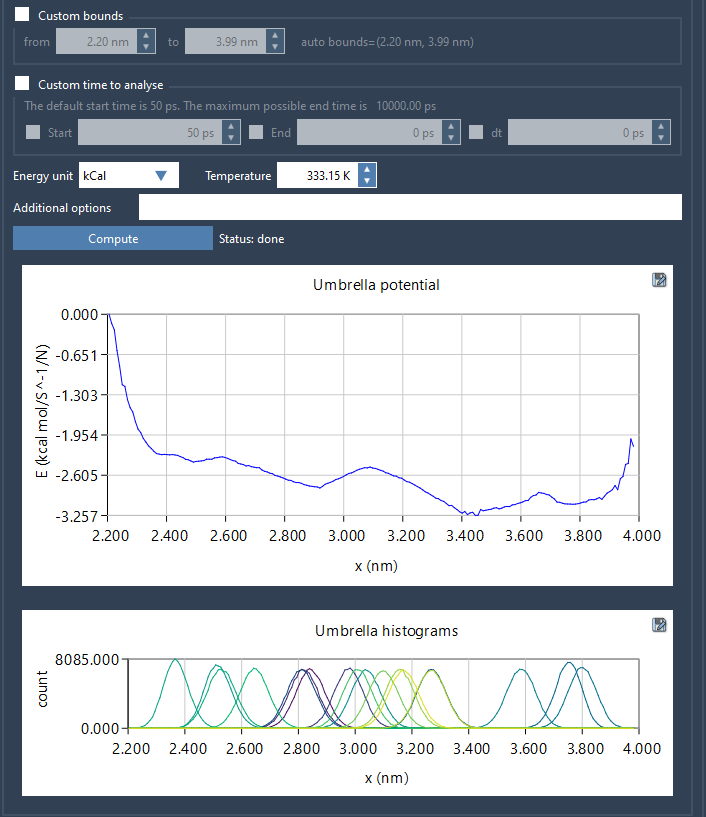
Step 5: Click Compute. The wizard not only performs the WHAM analysis but also generates two fundamental outputs:
- A PMF profile to indicate free energy surfaces.
- A histogram displaying how well the reaction-coordinate space is sampled, helping identify any regions requiring further sampling fidelity.
Interpreting the Results
The generated plots provide actionable insights. The PMF profile allows you to evaluate free energy variation, while the histogram ensures the robustness of your sampling. Regions with insufficient sampling, as revealed by sparsely populated histogram portions, may necessitate additional umbrella sampling simulations for better accuracy. Results—including profiles, histograms, and plots—are stored in the wham_results folder of your project for easy retrieval and secondary analysis.
Tackle Sampling Insufficiencies Proactively
The histogram’s role goes beyond mere validation. By pinpointing undersampled regions, it effectively informs decisions about extending simulations within targeted windows. This feature closes the loop in iterative workflows, helping you navigate directly to gaps in your PMF study.
Start Streamlining Your PMF Analysis Today
With the GROMACS Wizard, PMF analysis becomes a streamlined, user-friendly process. From folder organization to generating robust data visualizations, this tool eliminates common bottlenecks while maintaining analytical precision. To learn more, check out the full documentation at this link.
Note: SAMSON and all SAMSON Extensions are free for non-commercial use. Get started today by downloading SAMSON from https://www.samson-connect.net.