



Molecular modeling often requires preparing input files for advanced analyses or simulation workflows, such as reaction coordinate studies or free energy calculations. Extracting atom trajectories along specific paths can be a tedious and error-prone process if done manually. Luckily, the Export Along Paths extension in SAMSON provides a simple and efficient way to handle this process, saving time and ensuring accuracy.
Why Export Atom Trajectories?
Exporting atomic coordinates along predefined paths is especially useful when studying dynamic molecular processes. For example, you might want to:
- Prepare reaction coordinate files for free energy profiling.
- Export ligand exit or entry trajectories for enhanced sampling.
- Visualize intermediate molecular states.
- Focus only on specific atoms, such as a ligand, binding site, or protein backbone.
Fortunately, SAMSON offers an intuitive solution for accomplishing these tasks efficiently.
Step-by-Step Guide to Exporting Atom Trajectories
The Export Along Paths extension allows users to extract coordinates for all atoms or a subset of atoms, providing flexibility based on the study’s requirements. Here’s how to get started:
1. Open the Export Along Paths App
First, launch the Export Along Paths app in SAMSON by navigating to: Home > Apps > All > Export Along Paths. Alternatively, use the shortcut Shift+E to access the Find everything… search bar and locate the app there.
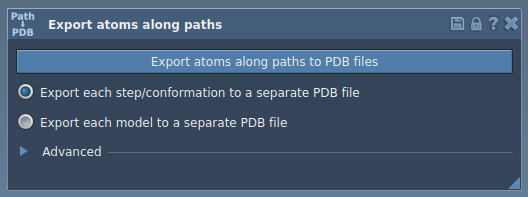
2. Choose Export Options
You can choose between two primary export modes:
- Export All Atoms: Select one or more paths from the Document view, then choose whether to export all trajectory frames in a single PDB file or save each frame as a separate PDB file. When exporting, SAMSON will prompt you to select the destination folder and file prefix. Optionally, the Advanced section lets you adjust the frame export interval.
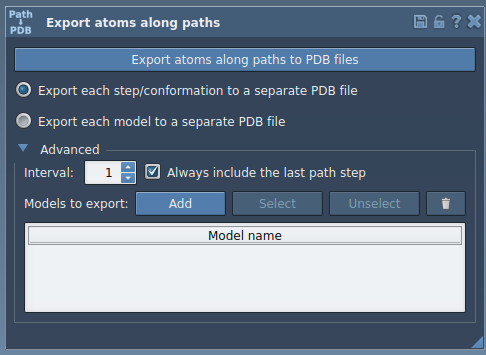
- Export a Subset of Atoms: Expand the Advanced panel, select a subset of atoms in the Document view (e.g., a specific ligand or functional group), and define these atoms as a model to export. You can rename your model, add multiple models, or reset the selection if needed. Afterward, select the desired path(s) and export format before finalizing the export.
Real-World Examples
The Export Along Paths extension is particularly handy for studies that require understanding molecular trajectories. For instance:
- Extracting ligand unbinding pathways generated from other SAMSON tools such as the Ligand Path Finder.
- Preparing atomic coordinates of intermediates for simulations or free energy calculations using techniques like Umbrella Sampling.
- Visualizing only relevant regions (e.g., binding pocket and ligand) to evaluate specific atom-level changes along a transition path.
Conclusion
By using the Export Along Paths extension, molecular modelers can streamline their workflows, minimize errors, and focus on analyzing results rather than setting up tedious input files. To learn more about leveraging SAMSON for exporting atom trajectories, visit the full documentation page.
SAMSON and all SAMSON Extensions are free for non-commercial use. Get SAMSON at SAMSON Connect.