



Analyzing molecular pathways is a fundamental task in molecular modeling, whether you’re studying ligand unbinding events, protein transitions, or reaction coordinates for free energy profiling. But extracting atomic coordinates along these paths can often feel tedious and convoluted. Here’s how SAMSON’s Export Along Paths extension can simplify this process and enhance your workflow.
The Export Along Paths extension in SAMSON provides a user-friendly solution to export atomic trajectories—empowering researchers to easily prepare data for simulations, visualizations, or computational studies.
Why This Matters
Imagine you’ve computed a ligand unbinding path or optimized a protein transition path using advanced methods (like the parallel nudged elastic band method). Sharing your findings or diving deeper into free energy calculations requires accurate export of atomic coordinates. Without an efficient tool, this task could quickly become a bottleneck in your modeling efforts.
Streamlining Path-Based Exports
SAMSON’s Export Along Paths extension not only saves time but also offers precision through its intuitive interface. Whether you need to export all atoms or just a select model, here’s how the tool works step-by-step:
Exporting All Atoms
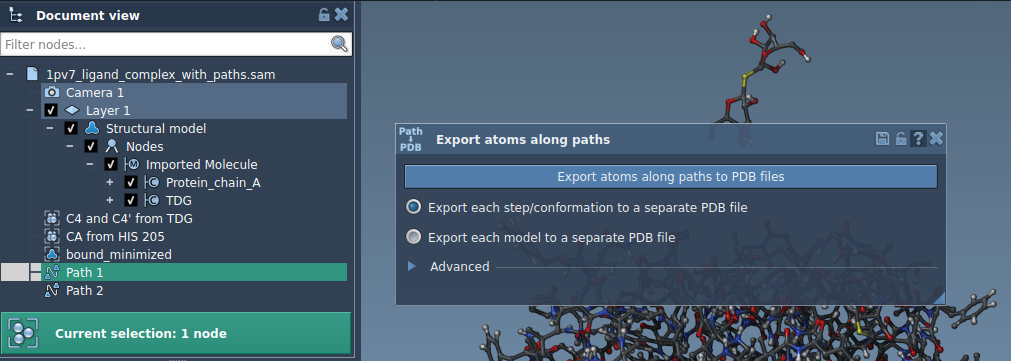
- In the Document view, select one or more paths you’ve computed.
- Choose an export mode that suits your needs:
- Export all frames into a single PDB file.
- Export each frame separately in multiple PDB files.
- Click Export atoms along paths to PDB files, then set your destination folder and file naming scheme.
Optional features like interval-based frame export (under the “Advanced” settings) allow for even greater customization when working with large pathway data sets.
Exporting a Subset of Atoms
Sometimes, exporting only relevant atoms—like a ligand or a binding site—can reduce file complexity and aid focused analysis. The Export Along Paths extension makes this easy:
- Open the Advanced panel in the app.
- Select a specific subset in the Document view, for example, a ligand molecule.
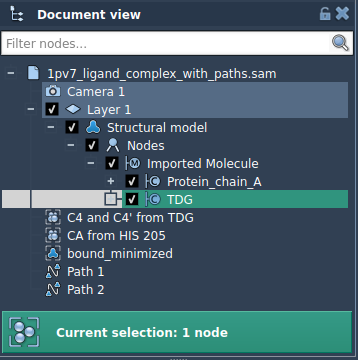
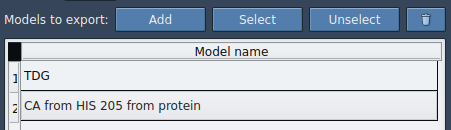
- Click Add to confirm your selection, creating a named model that appears in the export list.
Customize as needed:
- Rename models.
- Add or reset subsets for export.
- Highlight atoms or specific trajectories for clarity.
Once ready, choose the desired output format (single or multiple PDB files), select the path(s), and export your subset of atomic data.
Applications in Molecular Modeling
The ability to export atomic coordinates along paths unlocks significant opportunities, such as:
- Generating reaction coordinate files for free energy profiling.
- Tracking ligand exit and entry movements for enhanced sampling methods.
- Isolating backbone or binding site atoms for focused pathway visualization.
Ready to Learn More?
By combining the Export Along Paths extension with other powerful tools in SAMSON—like Ligand Path Finder or Protein Path Finder—you can achieve a more dynamic approach to molecular modeling. To dive deeper, check out the detailed documentation.
SAMSON and all SAMSON Extensions are free for non-commercial use. Start exploring today by downloading SAMSON at https://www.samson-connect.net.