



Molecular modelers often face a critical challenge: preparing stable and realistic molecular geometries for simulations or molecular design workflows. Whether you’re cleaning up a structure before running simulations or optimizing geometries during interactive modeling, time and accuracy matter. This is where the FIRE Minimizer (Fast Inertial Relaxation Engine) in SAMSON excels. Let’s explore how you can use the FIRE Minimizer to speed up geometry optimization while maintaining high precision.
Why Choose FIRE for Geometry Optimization?
Traditional geometry optimization approaches, like the steepest descent method, can be slow when dealing with large-scale molecular motions or challenging topologies. The FIRE Minimizer offers significant advantages:
- Speed: FIRE is faster than steepest descent, especially for collective atomic motions where convergence may otherwise get bogged down.
- Compatibility: FIRE works seamlessly with any SAMSON interaction model, making it versatile for various molecular systems.
- Efficiency: It is ideal for pre-simulation cleanup and structural relaxation, ensuring accurate and stable starting points for advanced workflows.
Getting Started with FIRE
Implementing the FIRE Minimizer in your molecular modeling workflow is straightforward. Here’s how you can get started:
1. Loading Your Molecular System
You can load molecules into SAMSON using supported formats such as PDB, MOL2, and others. This flexibility ensures that you can use FIRE on a wide range of molecular systems.
Tip
If you’re new to SAMSON or working with molecular files, check out the Loading Molecules Guide for detailed instructions.
2. Adding a Simulator
Once your molecular system is loaded, the next step is to incorporate the simulator:
- Navigate to Edit > Add Simulator in SAMSON.
- Select the interaction model that fits your needs.
- In the State Updaters list, choose FIRE.
Tip
Want to learn more about simulators? Explore the Simulators Overview for additional details.
Customizing the FIRE Minimizer Settings
To maximize the effectiveness of FIRE, you can tweak its settings to suit your needs:
| Setting | Description |
|---|---|
| Step size | Specifies the initial integration step for the minimization process. You can adjust this to fine-tune the algorithm’s behavior. |
| Steps | Determines the number of FIRE steps that occur between updates in the visual interface. |
| Fixed | Allows you to force the step size to remain constant if certain constraints are required. |
Key Benefits: FIRE vs. Steepest Descent
The benefits of FIRE become especially clear when compared to the steepest descent algorithm. FIRE converges more efficiently, particularly when potential energy changes are minor, but molecular geometry still undergoes significant structural transitions (e.g., large-scale motions). Check out the visual comparison below to see the difference:

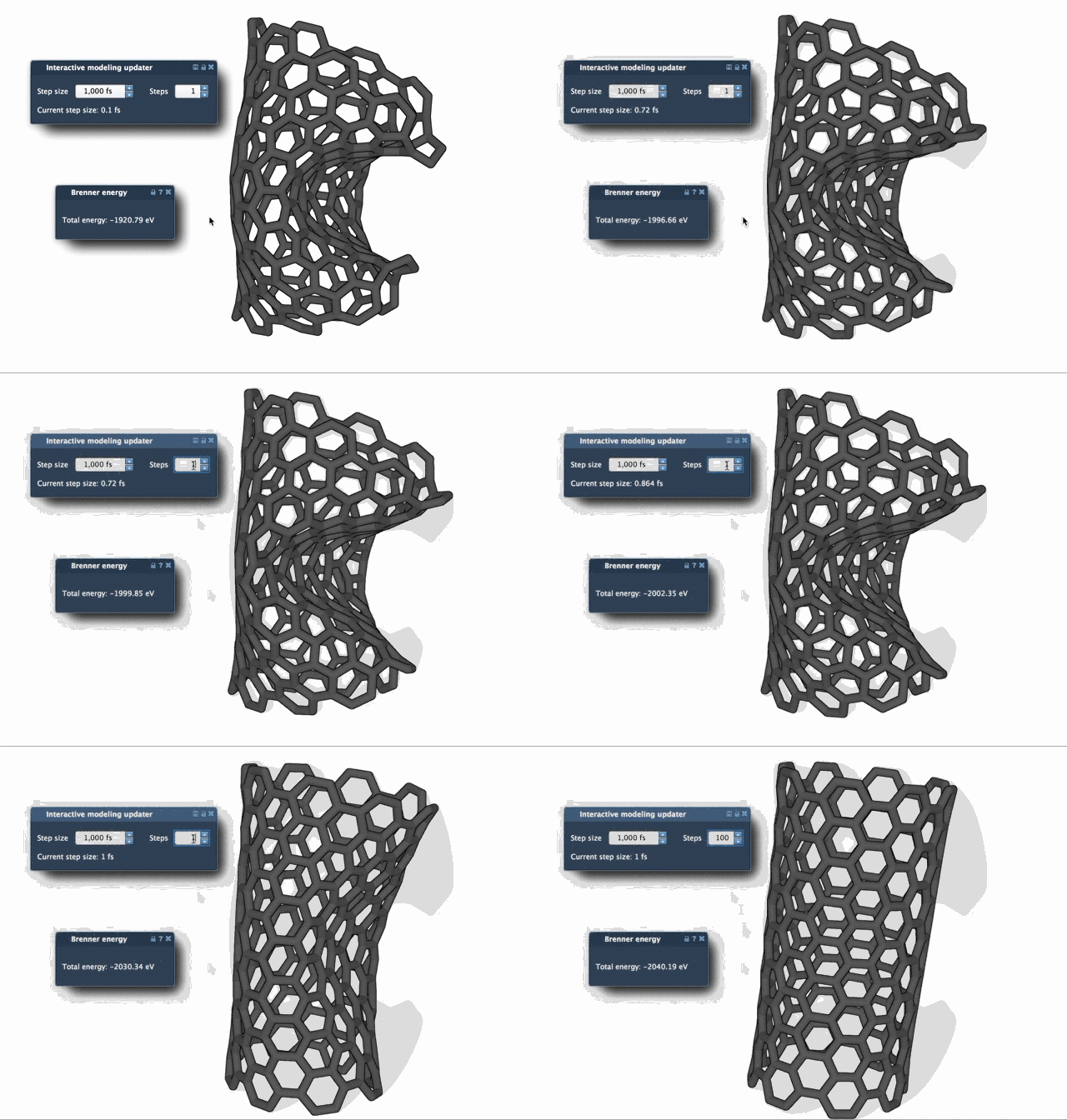
These examples highlight how much faster FIRE achieves stable and relaxed geometries compared to steepest descent.
Ready to Streamline Your Workflow?
The FIRE Minimizer integrates seamlessly into SAMSON workflows, making it an indispensable tool for anyone aiming to optimize molecular geometries. By leveraging this tool, you can save time, enhance accuracy, and tackle more complex simulations with ease.
For more comprehensive instructions and tips, visit the full documentation page on Fast geometry optimization with the FIRE Minimizer.
Note: SAMSON and all SAMSON Extensions are free for non-commercial use. Get SAMSON now to start exploring these powerful tools.