



Modeling molecular systems often involves calculating the Potential of Mean Force (PMF) along a reaction coordinate. This can be essential for understanding binding affinities, reaction mechanisms, and free energy landscapes. However, performing a PMF analysis—especially assembling and processing multiple simulation windows—can be tedious, prone to error, and difficult to reproduce.
The GROMACS Wizard in SAMSON offers a more approachable solution using the Weighted Histogram Analysis Method (WHAM). If you’ve already performed an Umbrella Sampling simulation using the GROMACS Wizard, you’re just a few clicks away from producing publication-ready PMF data.
Load your simulation data effortlessly
To get started, simply switch to the WHAM Analysis tab within the GROMACS Wizard. If your current project folder is a follow-up from Umbrella Sampling or batch umbrella simulations, you can use the auto-fill button to automatically populate the file paths.

Ensure your project contains numbered subfolders—each representing separate windows of simulation along the reaction coordinate. This folder structure signals the wizard to read in the relevant data automatically.
Configure analysis in a few steps
Once the folders are loaded, the wizard recognizes information such as reaction coordinates, timeframes, and temperature. You can:
- Select a reaction coordinate
- Customize reaction coordinate bounds
- Adjust time intervals
- Choose units for energy output
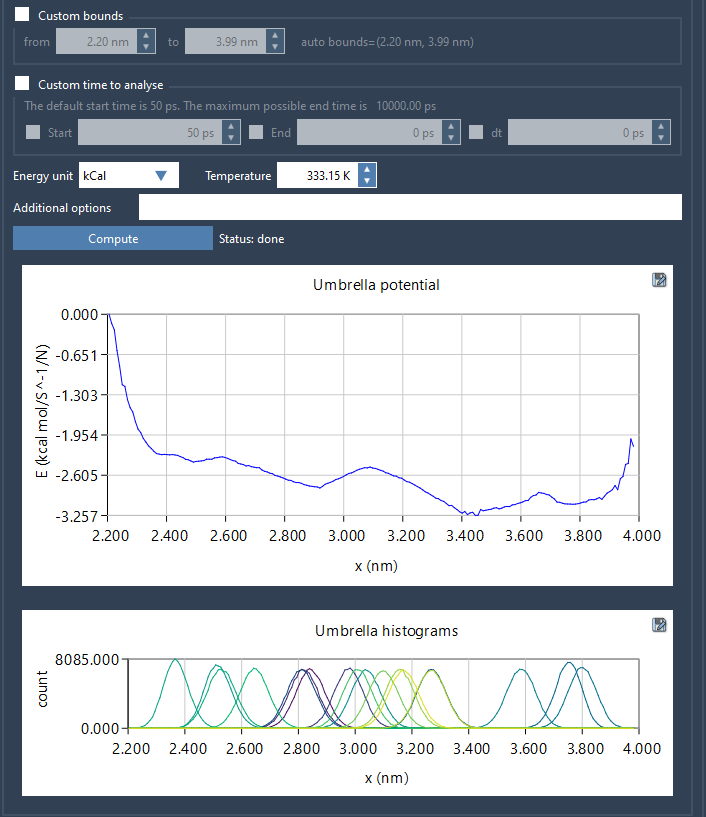
Click Compute and let the wizard process the data. Depending on the size of your trajectories, the computation time may vary from several seconds to a few minutes.
Assess your reaction coordinate coverage
The wizard produces two key visualizations:
- PMF plot: Displays the free energy profile across the reaction coordinate
- Histogram plot: Indicates sampling density, helping you identify regions where additional windows or sampling may be needed
This is particularly useful for diagnosing poor overlap between windows or identifying areas of insufficient sampling—common issues that are hard to detect when processing data manually.
All results are automatically saved into a wham_results folder within your project. If you switch to a different reaction coordinate later, previously computed data is reloaded instantly, saving precious time during iterative refinements.
Minimize errors, maximize reproducibility
By automating file path handling, data parsing, and WHAM execution, the GROMACS Wizard helps reduce setup mistakes and improves reproducibility. This can be particularly useful for teams aiming to standardize workflows or for students who are new to free energy calculations.
To learn more or to follow the tutorial step by step, visit the original documentation page: https://documentation.samson-connect.net/tutorials/gromacs-wizard/pmf-analysis/.
SAMSON and all SAMSON Extensions are free for non-commercial use. You can download SAMSON at https://www.samson-connect.net.