



Designing custom polymers can be a daunting task for molecular modelers, especially when dealing with complex sequences and bond types. The good news is that SAMSON’s Polymer Builder is here to make this process both intuitive and efficient. Whether working on synthetic chains, biopolymers, or advanced molecular scaffolds, the Polymer Builder provides a streamlined approach to building even the most intricate polymer structures directly within SAMSON.
How Does Polymer Builder Help?
The Polymer Builder extension is an invaluable tool for creating polymers by combining monomers and sequences. It offers flexibility in structure and functionality while automating key aspects of the design process. Here’s why it matters:
- It enables you to craft linear or branched polymers from real chemical fragments.
- It allows you to control bond types—single, double, or triple—which is critical for structural and functional diversity.
- The tool automatically detects connection atoms and prevents clashes, ensuring smooth assembly.
One particularly powerful feature is the ability to define custom sequences with repeating patterns. This functionality is perfect for polymers that require tailored arrangements of monomeric units.
Creating a Polymer: A Step-by-Step Look
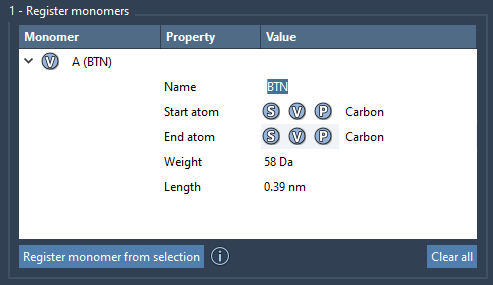
To get started with Polymer Builder, you begin by registering individual monomers. This involves selecting a molecule in the SAMSON workspace and assigning it a monomer ID. Monomers are automatically provided with unique identifiers (e.g., A, B, C), and you can adjust their start and end atoms manually for greater control if needed.
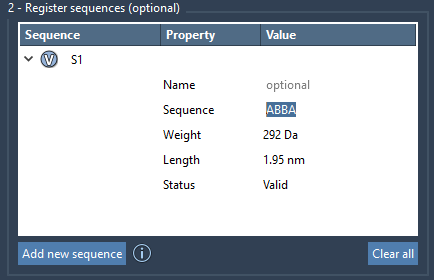
Next, you can combine these monomers into a sequence. Simply click “Add new sequence” and specify the arrangement using the monomer IDs. For example, entering ABBA will result in a repeating pattern with monomers in that order. Define double or triple bonds as needed using = or #, adding further customization options.
Once your monomers and sequences are ready, you can input an expression to generate the full polymer. For instance, the sequence S1 + 2*S2 + A=B creates a polymer with unique combinations of specified sequences and bond types. The tool immediately calculates an estimated molecular weight and length, giving you quick feedback on your design.

Advanced Options for Precision
The Polymer Builder doesn’t just stop at generating polymers. It includes advanced settings to refine your design:
- Hydrogen adjustments: Automatically adds or removes hydrogens based on the valency of the connection atoms.
- Steric clash prevention: The tool minimizes overlaps between atoms during the polymer construction process, creating a realistic structure.
From Creation to Simulation
Once your polymer is ready, SAMSON provides built-in tools for further optimization or analysis. For example, you can minimize the structure using SAMSON’s Universal Force Field, ensuring it is relaxed and ready for simulation. Additionally, polymers created through this process can be exported into other toolchains like GROMACS or OpenMM for advanced simulations and property predictions.
Conclusion
The Polymer Builder in SAMSON takes the complexity out of designing custom polymers, offering powerful tools and automation for modelers to bring their ideas to life. From custom monomers to sophisticated sequences, the possibilities are vast. Learn more about Polymer Builder and its features by visiting the official documentation.
Note: SAMSON and all SAMSON Extensions are free for non-commercial use. You can get SAMSON at SAMSON Connect.