



For molecular modelers, navigating complex molecular structures often means dealing with intricate selections that need constant revisiting. Whether it’s jumping between ligands, receptors, and water molecules, or toggling between different structural elements, it can be time-consuming and disrupt your workflow. Fortunately, SAMSON introduces an efficient feature to resolve this challenge—Quick Groups.
What are Quick Groups?
Quick Groups in SAMSON are temporary, numbered groups designed to let you rapidly save and recall selections in your molecular design projects. This feature is perfect for instances where you need to retrieve specific structural elements, analyze subsets of a system, or even compare different areas of your model.
The key benefits of Quick Groups include:
- Quickly switching between different regions of interest.
- Applying visual models or transformations to specific parts.
- Streamlining your modeling, simulation setup, or teaching workflows.
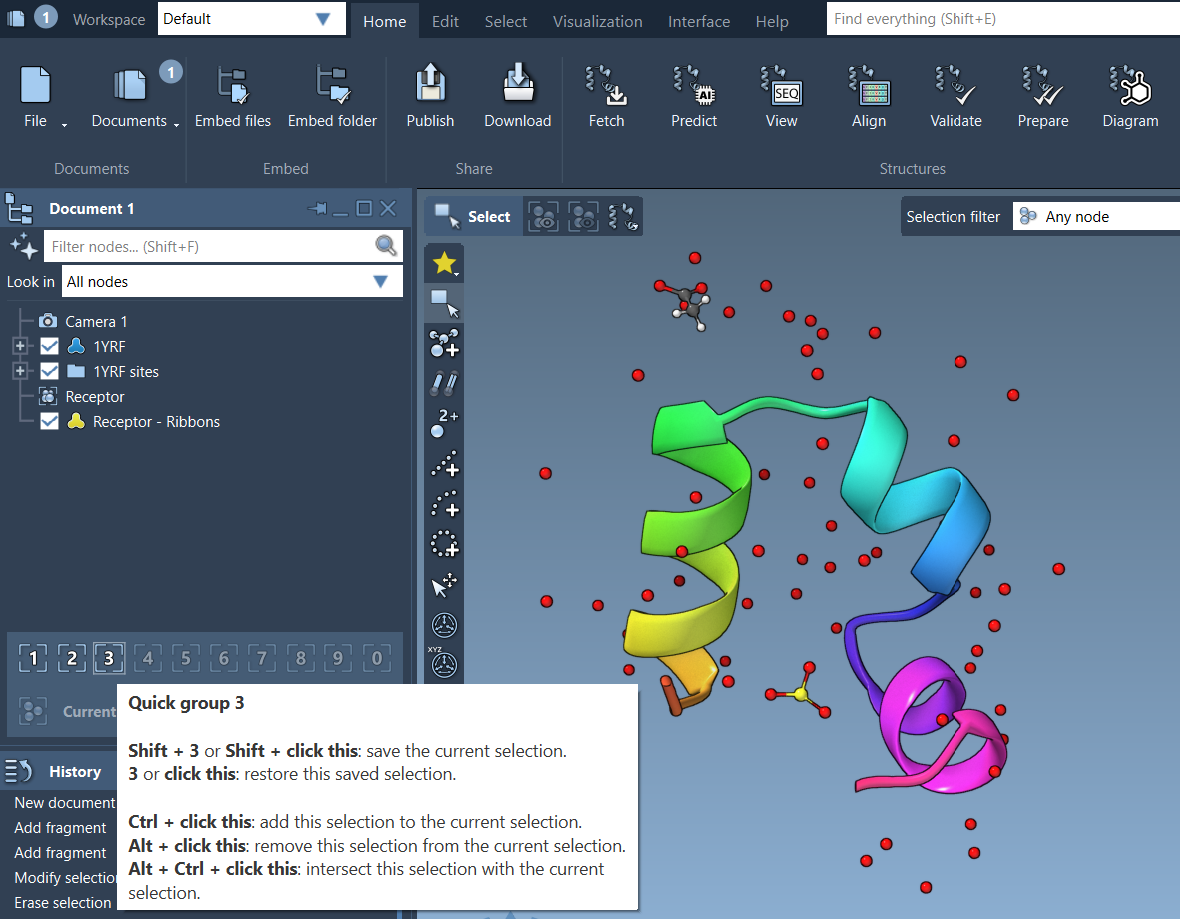
How to Assign Quick Groups
Assigning selections to a Quick Group is simple and intuitive:
- Make a selection (e.g., atoms, residues, or molecules).
- Choose your preferred assignment method:
- Mouse method: Hover over a Quick Group slot in the Document view, then press Shift + click.
- Keyboard method: Press Shift + the corresponding number key. For example, press Shift + 2 to assign a selection to Quick Group 2.
You can create up to 10 Quick Groups (numbered 1-10) and redefine or clear them anytime.
Switching Between Quick Groups
Navigating through your assigned Quick Groups is equally seamless:
- Press the number key associated with the Quick Group. For example, pressing 1 will switch the selection to Quick Group 1.
- Click directly on the Quick Group icons in the Document view.
- To zoom to a group’s selection, double-press the number key (e.g., 11).
This functionality allows molecular designers to rapidly jump between different parts of their system, much like control groups in real-time strategy games.
Example Workflow with Quick Groups
Let’s take a typical modeling scenario:
- Select the ligand in your structure and assign it to Quick Group 1.
- Select the receptor and assign it to Quick Group 2.
- Select water molecules and assign them to Quick Group 3.
- Toggle between these groups using the number keys for efficient analysis and modification.
Temporary yet Powerful
Quick Groups are designed to be flexible and adaptable. They are temporary, unnamed groups that appear in the lower section of the Document view. If you need to iterate rapidly or switch between selections frequently, Quick Groups are an indispensable tool for boosting productivity without sacrificing clarity.
To see Quick Groups in action, check out this video tutorial from the SAMSON 2025 webinar:
For a deeper dive into selection tools and workflows, explore the original documentation page here: https://documentation.samson-connect.net/users/latest/selecting/.
Note: SAMSON and all SAMSON Extensions are free for non-commercial use. Get SAMSON at https://www.samson-connect.net.